On This Page
Creating a Token
Tokens can be created directly by a validator or through your back office system. The
workflow diagram shows the token creation process.
When the customer taps their card, the validator generates a unique transaction
identifier that is used to create these tokens:
- Transient token
- Tokenized EMV tag data and track2 data. The transient token is used as the transaction ID to create the instrument identifier and payment instrument tokens. It is also used as the payment token for the final authorization and sale transactions. The token can be deleted after a successful transit payment for the travel period.Visa Acceptance Solutionsstores the transient token for seven days.
- Example:The transient token is created using the UUID2 or UUID4 format, as shown in REST Example: Creating a Token. This request creates three entries in theTMStoken vault.
- The first entry creates a token of the track2 equivalents and EMV tag data. This token is used as the transaction ID. The data is stored against the ID value created using the UUID.
- The second entry creates a token of the payment card number. This token is stored as an instrument identifier token that can be collected later.
- The third entry creates a token of the card hash value. This token is stored against the payment instrument ID.
- Instrument identifier
- Tokenized card number. Used for follow-on payment transactions such as merchant-initiated debt recovery or stand-alone credits.
- Payment instrument
- Stores the card hash value used to identify the payment card on the deny list.
Figure:
Creating a Token Workflow
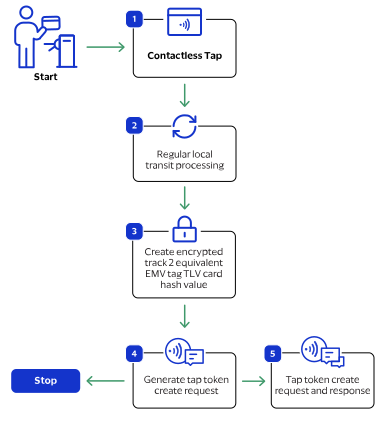
The token creation process begins when the cardholder taps a payment card at the fare
collection terminal.
- The cardholder taps their contactless card.
- Regular local transit processing occurs. See Mass Transit Models and Workflows.
- The validator encrypts the card data and creates the card hash value.
- Your system uses the card hash value to create the tokens.
- You receive the tokens in the response message.
Endpoint
Test:
POST
https://apitest.visaacceptance.com
/tms/v2/tapsProduction:
POST
https://api.visaacceptance.com
/tms/v2/tapsRequired Fields for Creating a Token
- id
- Transient token identifier assigned by the contactless terminal.
- paymentInformation.card.hash
- paymentInformation.fluidData.descriptor
- paymentInformation.fluidData.encoding
- paymentInformation.fluidData.value
- pointOfSaleInformation.deviceId
- processingInformation.industryDataType
- Set the value totransit.
REST Example: Creating a Token
Request
{
    "id": "a76392f4-cde4-97aa-1111-0252ac14c005",
    "paymentInformation": {
        "card": {
            "hash": "7400A4154369E584BA36CA19B50AAA3F9AE9764B3E87B2B93CF8FBC11112"
        },
        "fluidData": {
            "descriptor": "4649443D454D562E5041594D454E542E415049",
            "encoding": "Hex",
            "value": "DFEE120A8888885140001840000357189141DC75F996D2E930B9ADABE735CBE80ECF17A263E94964F07A0000000031010500b4379626572736F757263655F2D02456E5F3401015F360102820220008407A0000000031010950500000000009A032101199C01009F02060000000004009F03060000000000009F030200019F1006A1B2C3D4E5F69F1A0208409F21031301255F2A0208409F26080123456789ABCDEF9F2701409F33030000009F360200019F3501259F3704123456789F390100"
        }
    },
    "pointOfSaleInformation": {
        "deviceId": "FF123457"
    },
    "processingInformation": {
        "industryDataType": "transit"
    }
}
Response 202
No body response