On This Page
Unified Click to Pay Developer Guide
Unified Click to Pay
Developer GuideThis section describes how to use this guide and where to find further
information.
- Audience and Purpose
- This document is written for merchants and ISVs who want to enableUnified Click to Payso that they can accept payments on their e-commerce page.
- Conventions
- This statement is used in this document:IMPORTANTAnImportantstatement contains information essential to successfully completing a task or learning a concept.
- Customer Support
- For support information about any service, visit the Support Center:
Pilot Release
This document describes the pilot release of the
Unified Click to Pay
Developer
Guide.Recent Revisions to This Document
26.09.01
Added client versions 0.8, 0.9, and 0.10 to the client version history, with detailed
change descriptions for each release. See Client Version Changes.
Updated the client version summary to include client versions 0.8, 0.9, and 0.10. See
Client Version History.
26.07.01
Updated client version from 0.6 to 0.7. See Client Version History.
Added a new section describing changes between client versions. See Client Version Changes.
Added information about the sessions API. See API Specifications.
Added new Customer workflows. See Unified Click to Pay Customer Workflows.
26.05.01
Added information about testing your
Click to Pay
configuration.
See Test Your Click to Pay Configuration.Added information about boarding merchants for
Unified Click to Pay
. See Merchant Boarding for Portfolio Users.26.04.01
Added information about client and server keys. See these topics:
Added information about the required keys for
checkout()
. See
checkout() and checkout() API Specifications.26.04.01
Added
version
to the capture context example. See Capture Context.Updated the
uctp
object to vsdk
in all examples.
See these topics:Added information about client and server keys. See these topics:
26.02.01
Initial release.
Introduction to Unified Click to Pay
Unified Click to Pay
Unified Click to Pay
, powered by Unified Checkout
, provides a
flexible integration that enables merchants to customize their checkout experience for
accepting Click to Pay
payments from Visa, Mastercard, and American
Express. The Unified Click to Pay
SDK has no UI and the UI must be configured by
the integrator. This enables merchants and partners to fully control the UI and
branding. Unified Click to Pay
offers advanced security and compliance and is PCI
4.0 compliant. Unified Click to Pay
consists of a server-side API and a client-side JavaScript
SDK. The server-side component authenticates your identity as the merchant and instructs
the system to act within your payment environment. The response contains a JWT that can
be used for the initialization of the client-side SDK and sets up the backend
configuration required to run the SDK.The client-side JavaScript SDK can be used to integrate with
Click to Pay
payments from Visa, Mastercard, and American Express
cards.IMPORTANT
Each request that you send to
Visa Acceptance Solutions
requires
header information. For information about constructing the headers for your request, see
the Getting Started with REST Developer
Guide.Prerequisites
Before you call the capture context and load the SDK, you must complete these tasks:
Enabling Click to Pay in the Business Center
Click to Pay
in the Business Center
To begin your integration, you must first enable
Click to Pay
.
Click to Pay
is a digital payment solution that allows customers
to pay with their preferred card network and issuer without entering their card details
on every website. Customers can use Visa, Mastercard, and American Express cards to
streamline their purchase experience. Click to Pay
provides a fast,
secure, and consistent checkout experience across devices and browsers.Follow these
steps to enable in
Click to Pay
on Unified Checkout
:- Log in to theBusiness Center:Production URL:If you are unable to access this page, contact your sales representative.
- In theBusiness Center, go to the left navigation panel and choosePayment Configuration>Unified Checkout. TheUnified Checkoutcustomer experience page appears:
Figure:
Unified CheckoutCustomer Experience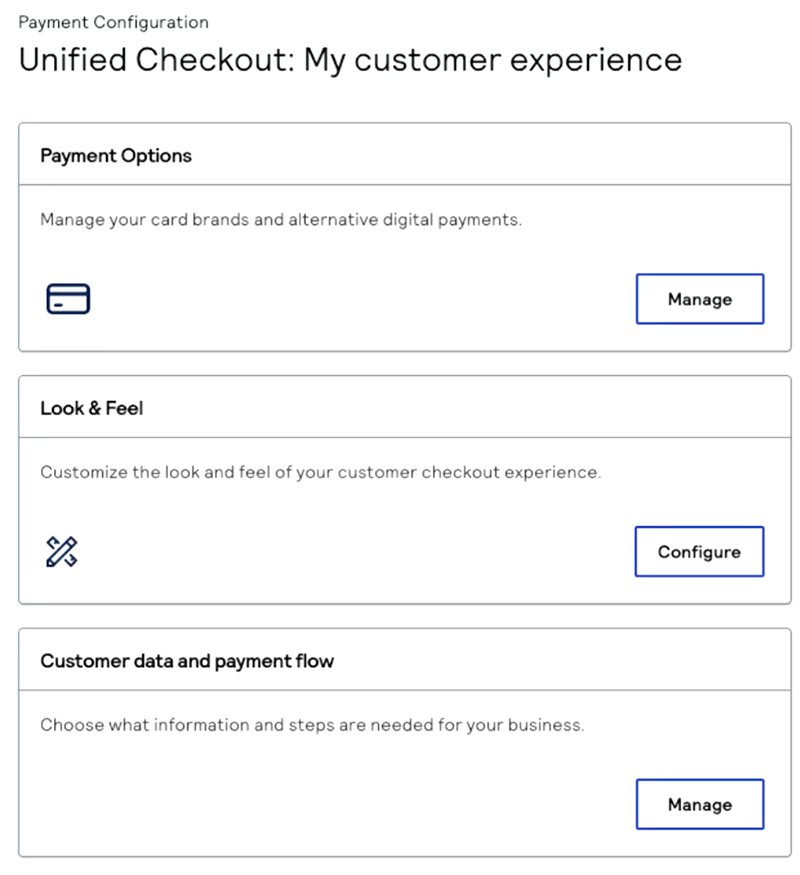
- In the Payment Options section, clickManage. The Payment Options page appears.
- ClickManagenext toClick to Pay. TheClick to Payconfiguration page appears.
- Enter your business name and website URL.
- ClickSubmit.IMPORTANTClick to Payuses network tokenization for transactions. These network tokens are stored in the vault of the token requestor ID (TRID) for the card scheme.
Upload Your Encryption Key
After you enable
Click to Pay
, you must upload your public
encryption keys so that you can retrieve payment information from the Unified Click to Pay
checkout()
SDK method. This method retrieves all of the payment
data that is captured during the transaction. The payment data is encrypted to
ensure that the payment information is secure. You must generate an encryption key
pair to retrieve the encrypted payment information and upload the public encryption
key to the Visa Acceptance Platform
. IMPORTANT
You must upload your encryption key before you can generate
the capture context from the
sessions
API.Follow these steps to upload your encryption key to the
Visa Acceptance Platform
:- Log in to theBusiness Center:Production URL:If you are unable to access this page, contact your sales representative.
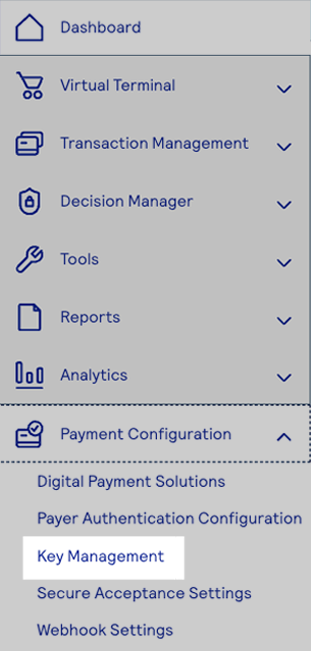
- In theBusiness Center, from the navigation panel choosePayment Configuration > Key Management.
- Click+ Generate key.
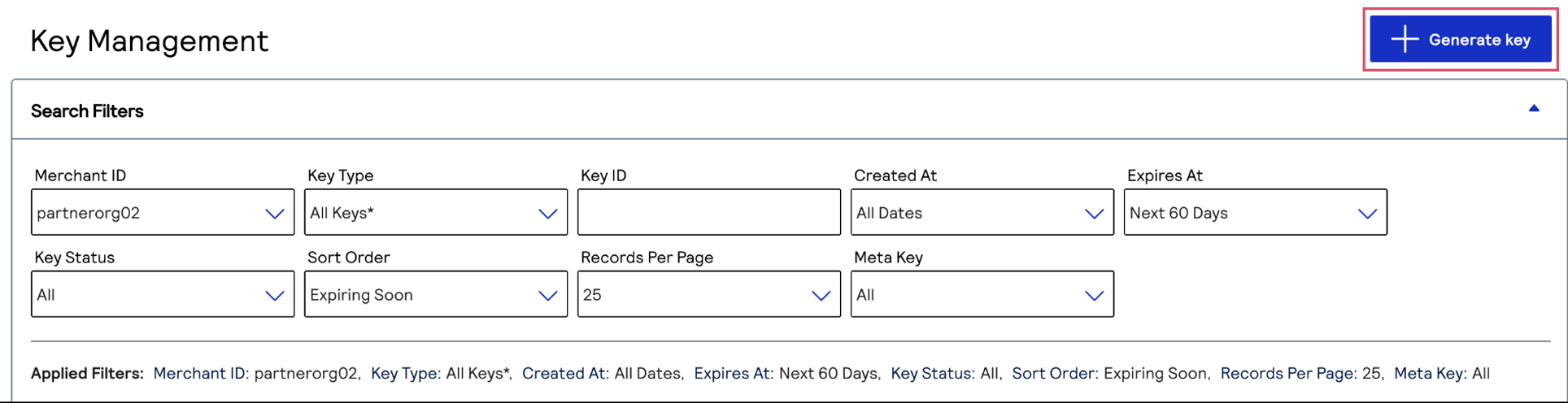
- Under Alternate Key Types, chooseToken Management MLEand clickGenerate key.

- Enter your public key in Base64 format and clickCreate key.
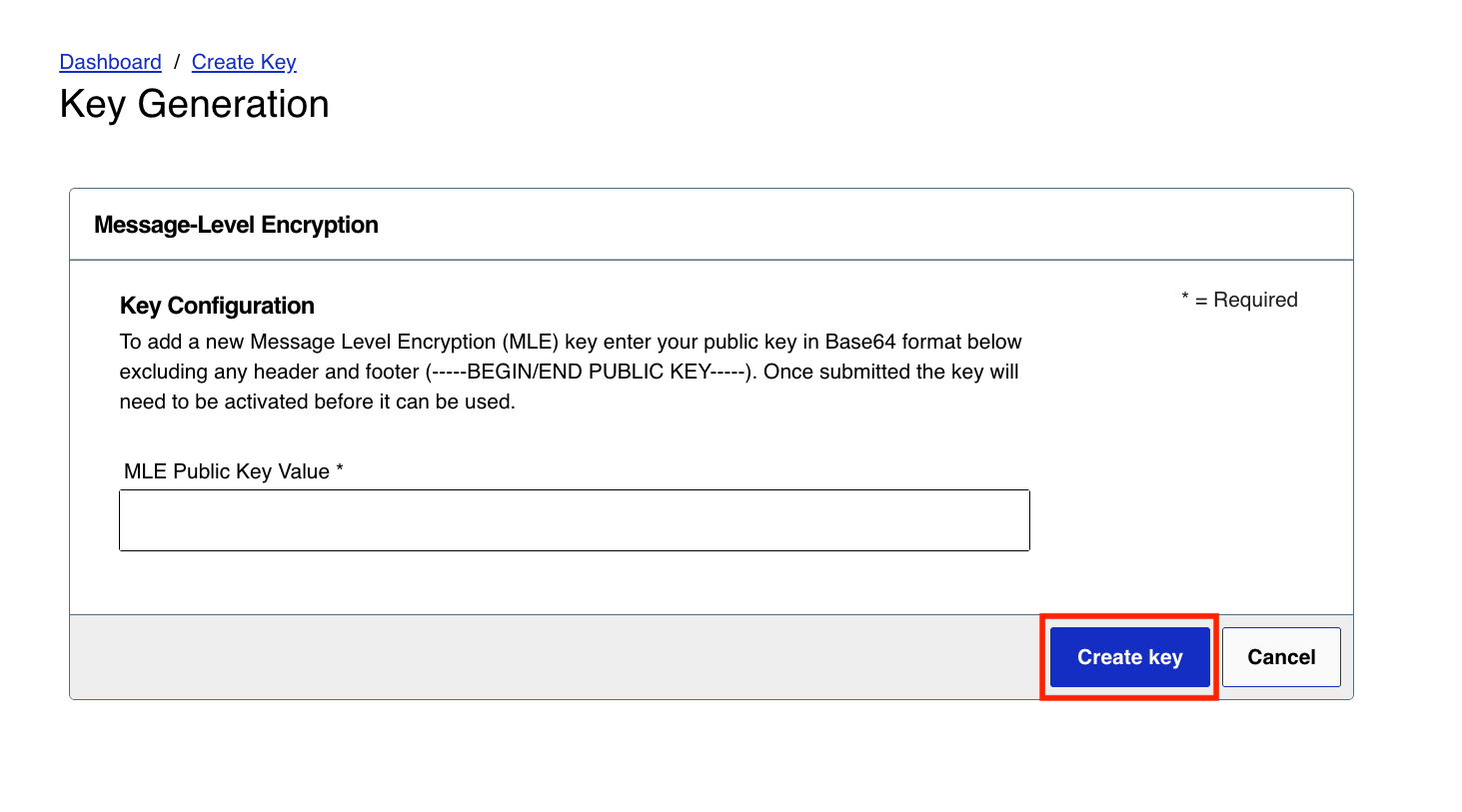
Set Up Customer Authentication for Unified Click to Pay
Unified Click to Pay
After you enable
Click to Pay
and upload your encryption key, you must
set up customer authentication for Unified Click to Pay
. Follow these steps
to use the Business Center
to enable customer authentication through
Unified Click to Pay
. Authentication methods differ in each region and
are dependent on the issuer, the cardholder device, and the Click to Pay
configuration. These authentication methods are
available: - 3-D Secure
- FIDO
- Card verification value (CVV)
- One-time password (OTP)
IMPORTANT
After you complete these steps, Visa determines which
authentication method to use. When Visa determines that they will authenticate,
they authenticate each
Click to Pay
transaction through the
appropriate method. This may be a frictionless authentication or the customer
may need to provide more information when required by the issuer. This is
available only through Visa.- Log in to theBusiness Center:Production URL:If you are unable to access this page, contact your sales representative.
- In theBusiness Center, from the navigation panel choosePayment Configuration>Unified Checkout.You must haveClick to Payenabled as a digital payment method to use this method of authentication. ClickManageto view the digital payment methods that you have enabled.
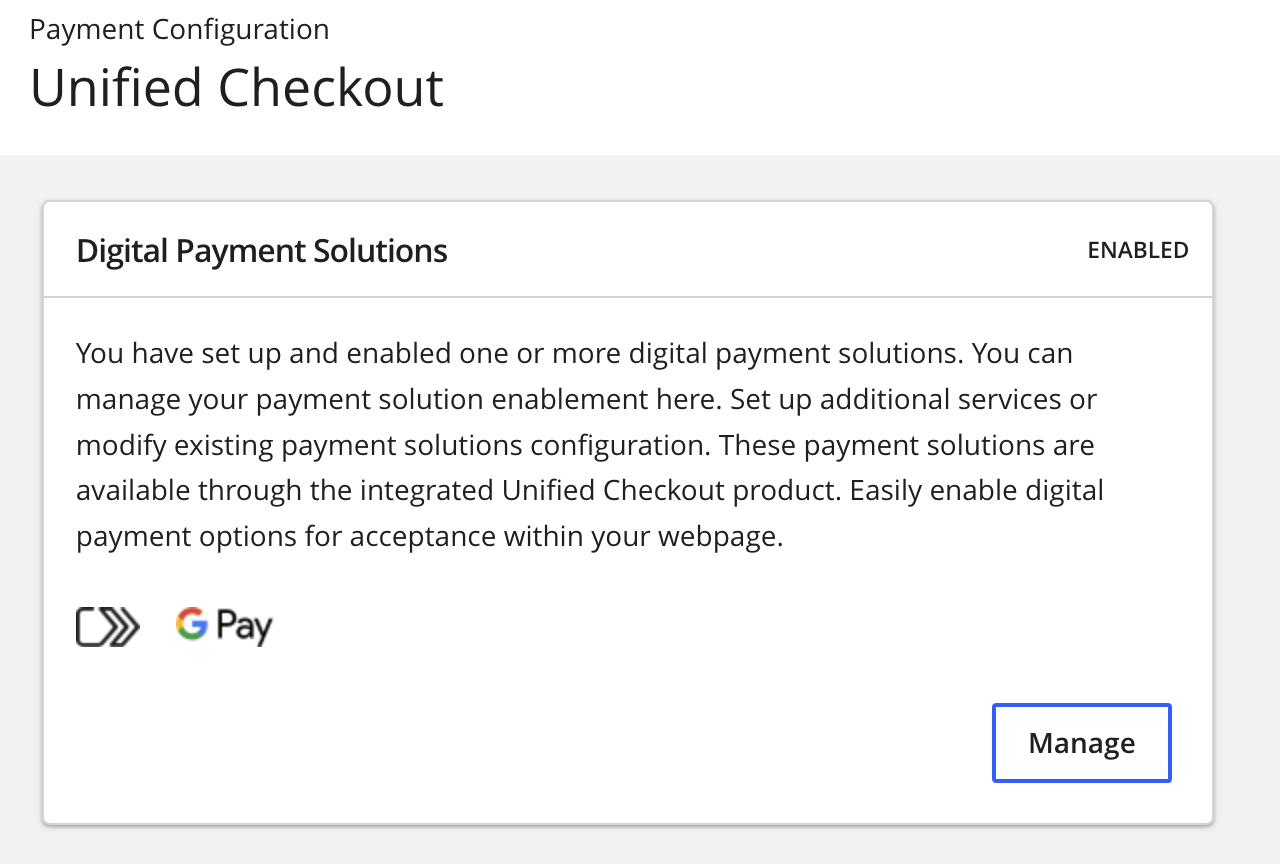 IfClick to Payis not enabled, clickOnnext toClick to Pay.
- Enter the account details and clickUpdate.
- ClickSet upunder Value Added Solutions. The Value Added Solutions page appears.

- ClickSet upto set up3-D Secure. The 3DS page appears.
- Enter the required information in the Merchant Details section. You must enter the information that is provided to you byyour acquirer or processor.

Step Result
This completes the authentication setup for the entered acquirer merchant ID and BIN. If you do not know what these values are, you must contactyour acquirer. Completing this information enablesVisa Acceptance Solutionsto send Visa the information that is required for authentication.IMPORTANTCharges for3-D Securemay apply. You must speak withyour acquirerfor more information about the charges associated with3-D Secure.
Unified Click to Pay Customer Workflows
Unified Click to Pay
Customer WorkflowsThis section describes the flows within
Unified Click to Pay
. Unified Click to Pay
provides customers with a simple payment experience across
multiple payment networks. You can customize the user experience.The customer flow for calling the capture context and loading the SDK differs based on
the type of customer in
Click to Pay
:- The customer is a recognizedClick to Paycustomer.
- The customer is not recognized byUnified Click to Paybut is aClick to Paycustomer.
- The customer is a new user enrolling inClick to Pay.
Additionally,
Unified Click to Pay
offers the following Supplementary Flows:- Adding a new card inClick to Pay.
- Switching id or logging out ofClick to Pay.
- Re-trigger sending an OTP.
Recognized Click to Pay Customer
This section provides an overview of the
Click to Pay
recognized
experience. This interaction occurs when a customer's device is recognized by Unified Click to Pay
using the remember me flow.A customer's device is recognized under these conditions:
- When the customer has usedClick to Payon their device through anyClick to Paychannel.
- If the customer chose to have their device remembered during a previous transaction.
Recognized customer devices use the following payment flow.
Figure:
Journey
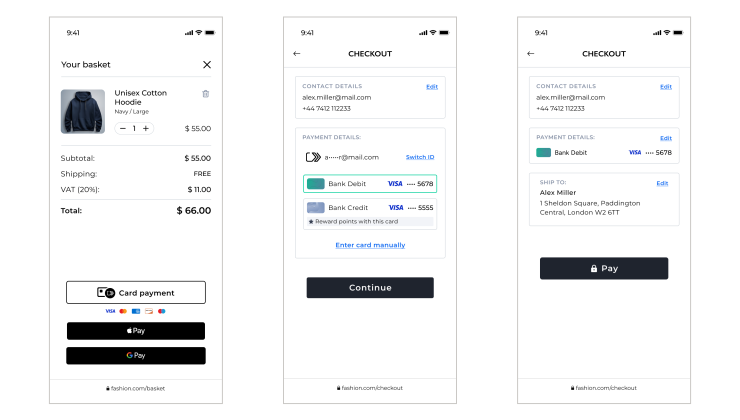
- The customer checks theremember mesetting on the card-selection screen.
- Integrators send additional details on compliance settings in the checkout payload.
- On success, theUnified Click to PaySDK saves customer details on the consumer device.
- On the next visit to anyClick to Payinteraction, when passing the same customer details to get cards, the card lists are returned.
Find more details on code changes in the Use Case Dictionary.
Figure:
Recognized
Click to Pay
Customer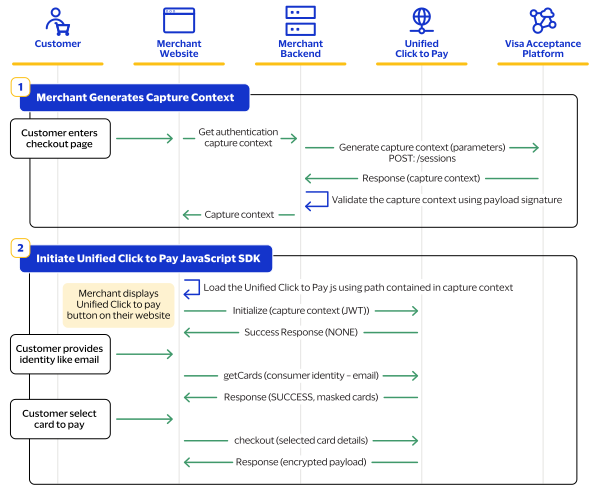
- Set up your server side by generating the capture context. For information about how to set up your server side, see Server-Side Set Up.
- Set up your client side by initiating theUnified Click to PayJavaScript SDK. For a recognized customer, you will load these functions from the SDK:
- initialize(capture context JWT)
- getCards(consumer identity - email)
- checkout(card details)
Unrecognized Click to Pay Customer
This section provides an overview of the
Unified Click to Pay
unrecognized
experience. This interaction occurs when a customer's device is not recognized by the
Unified Click to Pay
SDK. This condition occurs when the customer has a
Click to Pay
account but has not used it on their device
previously.Unrecognized customer devices use the following payment flow.
Figure:
Journey
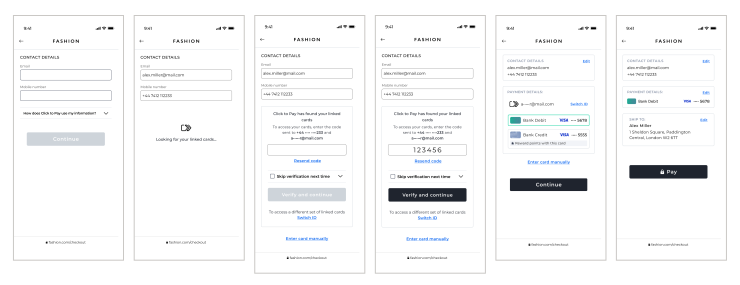
- The customer visits the merchant checkout and is prompted to enter their email or phone number.
- The customer enters the requested details.
- As the customer proceeds, they are prompted to enter an OTP.
- The customer enters the OTP sent to their email or phone to retrieve theirClick to Payaccount.
- The customer selects a card from the displayed list.
- The customer completes the transaction.
Find more details on code changes in the Use Case Dictionary.
Figure:
Unrecognized
Click to Pay
Customer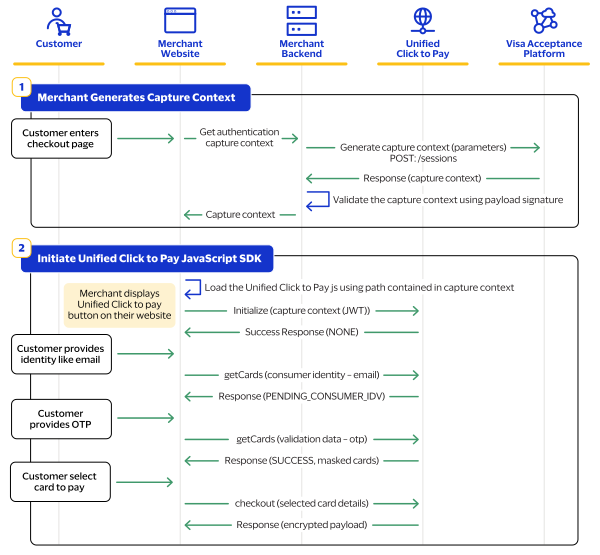
- Set up your server side by generating the capture context. For information about how to set up your server side, see Server-Side Set Up.
- Set up your client side by initiating theUnified Click to PayJavaScript SDK. For an unrecognized customer, you will load these functions from the SDK:
- initialize(capture context JWT)
- getCards(consumer identity - email)
- getCards(validation data - otp)
- checkout(card details)
Guest Customer
This section provides an overview of the
Unified Click to Pay
guest flow. This
interaction occurs when the customer has not created a Click to Pay
account, or their issuer has not provisioned their card into Click to Pay
.Guest customer devices use the following payment flow.
Figure:
Journey
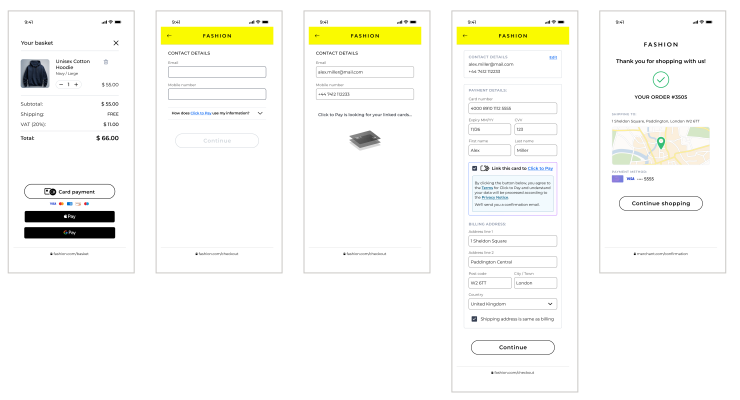
- The customer visits the merchant checkout.
- The customer is prompted to enter their email or phone number.
- A lookup request is sent to UCTP to check for an existingClick to Payaccount.
- The customer is not registered and is shown a manual card entry form with an option to link the card.
- The customer enters the required details and proceeds to checkout.
- UCTP then processes payment, registers the customer, and saves the card.
Find more details on code changes in the Use Case Dictionary.
Figure:
Guest Customer

- Set up your server side by generating the capture context. For information about how to set up your server side, see Server-Side Set Up.
- Set up your client side by initiating theUnified Click to PayJavaScript SDK. For a guest customer, you will load these functions from the SDK:
- initialize(capture context JWT)
- getCards(consumer identity - email)
- checkout(card details)
Supplementary Flows
The following flows are supplementary flows offered in
Unified Click to Pay
.Link Card for a Returning Customer
When completing manual card entry as a returning user, UCTP will prompt the customer to
link their card.
Returning customers entering a new card are presented with the following payment
flow.
Figure:
Journey
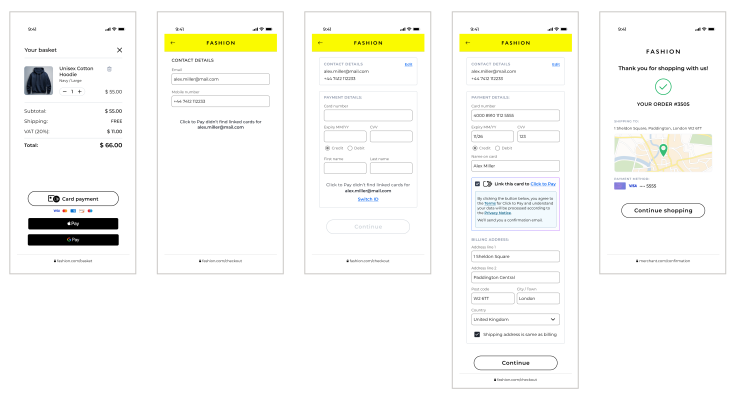
- The customer visits the merchant checkout and is prompted to enter their email or phone number.
- Click to Payindicates that no cards are linked to the provided details.
- The customer proceeds with manual card entry.
- The customer enters the required details and proceeds, with an option to link the card toClick to Pay.
- TheUnified Click to Payprocess completes payment, registers the customer, and saves the card.
Find more details on code changes in the Use Case Dictionary.
Switch ID
If a customer wishes to use a different account, they can switch ID from the saved card
or manual entry screens.
Customers will press
Switch ID
during the checkout process to logout and be
prompted with a new login screen.Figure:
Journey
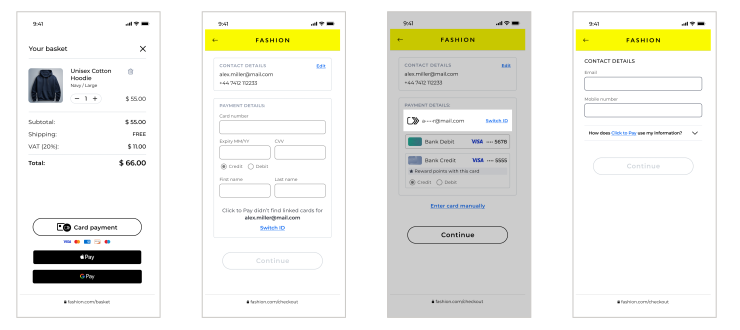
- The customer returns to checkout on a device with saved account data and wants to use a different account.
- Alternatively, the customer is returning to a merchant checkout on a device previously saved using the Remember me option.
- The customer is given the option to switch ID on the saved card or manual entry screen.
- After selectingswitch ID, the existing login is cleared and the customer is logged out.
- The customer is returned to the login screen and prompted to enter their email or phone number.
Find more details on code changes in the Use Case Dictionary.
Retrigger One Time Password
If the customer enters the provided OTP incorrectly,
Unified Click to Pay
can resend an
OTP. The customer can then try again with the provided OTP.A customer that enters the OTP will be presented with the following flow.
Figure:
Journey
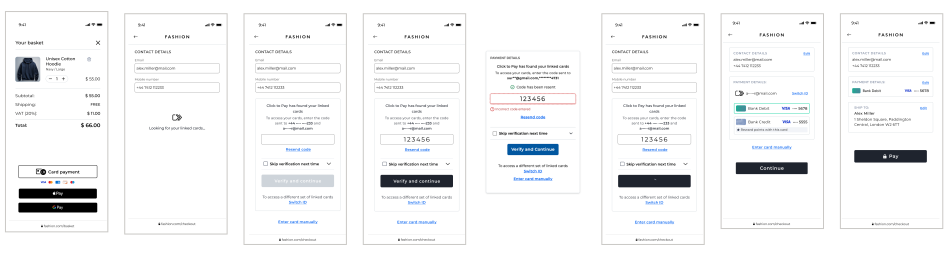
- The customer visits the merchant checkout.
- The customer is prompted to enter their email or phone number.
- An OTP is sent, and the customer is prompted to enter it.
- The customer enters an incorrect OTP.
- The customer is informed the code is incorrect and prompted to resend it.
- A new OTP is sent, and the customer is prompted to enter it again.
- After entering the correct OTP, the customer can access their saved cards.
- The customer completes the checkout.
Find more details on code changes in the Use Case Dictionary.
Unified Click to Pay Integration
Unified Click to Pay
IntegrationThis section describes how to integrate and launch
Unified Click to Pay
on your
website and process a transaction for you. For information about the detailed
specifications of the APIs described in this section see API Specifications. To integrate Unified Click to Pay
into
your platform, you must follow these integration steps:- You send a server-to-server API request for a capture context. This request is fully authenticated and returns a JSON Web Token (JWT) that is necessary to invoke the frontend JavaScript library. For information on setting up the server side, see Server-Side Set Up.
- You invoke theUnified Click to PayJavaScript library using the JWT response from the capture context request. For information on setting up the client side, see Client-Side Set Up.
IMPORTANT
Each request that you send to
Visa Acceptance Solutions
requires
header information. For information about constructing the headers for your request, see
the Getting Started with REST Developer
Guide.Server-Side Set Up
This section contains the information you need to
set up your server. Initializing
Unified Click to Pay
within your webpage begins
with a server-to-server call to the sessions API. This step authenticates your merchant
credentials, and establishes how Unified Click to Pay
manages your capture
context configuration. This includes supported locales, currencies, and country
availability. The sessions API request contains parameters that define how Unified Click to Pay
performs.For information about sessions API requests, see Generate Unified Click to Pay Capture
Context
in the
Visa Acceptance Solutions
API Reference.The server-side component provides this information:
- A transaction-specific public key is used by the customer's browser to protect the transaction.
- An authenticated context description package that manages the payment experience on the client side. It includes available payment options such as card networks, and payment methods.
The functions are compiled in a JSON Web Token (JWT)
object referred to as the
capture context
. The header of each JWT header contains
a key ID field (kid
) that references the specific RSA public key that
Visa Acceptance Solutions
used to sign that token. The integrator must retrieve
this public key from Visa Acceptance Solutions
and use it to verify the JWT's
signature. If the signature is invalid, the JWT must be rejected. For information about
JWTs, JWT validation keys, and API authentication keys, see these topics:Capture Context
The capture context request is a signed JSON Web Token (JWT) that includes all of the
merchant-specific parameters. This request tells the frontend JavaScript library how
to behave within your payment experience. The request provides authentication,
one-time keys, in addition to allowed card networks and payment types. The capture
context, at a minimum, requires these elements:
- allowedCardNetworks
- amountDetails
- billingType
- country
- currency
- data.orderInformation.amountDetails.totalAmount
- data.orderInformation.amountDetails.currency
- locale
- totalAmount
- version
Capture Context Example
{
    // -------- REQUIRED VALUES ----------
    "data": {
        "orderInformation": {
            "amountDetails": {
                "totalAmount": "123.94",
                "currency": "USD"
            }
        }
    },
    "allowedCardNetworks": [
        "VISA",
        "MASTERCARD",
        "AMEX"
    ],
    "billingType": "FULL",
    "country": "US",
    "locale": "en_US",
    "version":"0.6"
}
Versioning
Unified Checkout
uses Semantic Versioning (SemVer). Version
numbers use the MAJOR.MINOR.PATCH
format:- MAJOR: breaking changes that require code modifications
- MINOR: new features that are backwards compatible
- PATCH: bug fixes and improvements that are backwards compatible
The server controls which SDK version is loaded for each session that you request.
When your server creates a session, the response JWT includes a
clientLibrary
field that contains the full URL to the correct
version of the SDK. Your server parses the JWT, extracts the URL, and passes it to
the frontend to load dynamically. IMPORTANT
The
clientVersion
field in the session
request is optional. When you do not include this field, the server
automatically resolves the appropriate version for every session. This ensures
that the client-side library and server-side features are compatible.Visa Acceptance Solutions
recommends that you do not include the
clientVersion
field in your request and that you use the
most recent version. When you do this, your integration benefits from new
features, payment methods, and improvements and there are no code changes
required.Pin to a Version
If you must set your integration to a specific version, you can set the
clientVersion
field to a MAJOR
version such as
1
, or a MAJOR.MINOR
version such as
1.2
. The server uses the latest compatible patch release within
that range. This ensures that you continue to receive security fixes and bug
fixes.IMPORTANT
You cannot pin to a specific patch version
(
MAJOR.MINOR.PATCH
). This ensures that all integrations
receive critical patches. Visa Acceptance Solutions
recommends omitting
clientVersion
from your request unless you have a
specific need for pinned behavior.Client Version History
This is a list of client versions and the features included in each version. For more
details on specific changes from version to version, see Client Version Changes in the appendix.
IMPORTANT
Visa Acceptance Solutions
recommends that you use the most recent client version in your integration.- 0.10
- The SDK supports FIDO/passkey authentication for Mastercard.
- payloadTypeIndicatorCheckoutsupports a summary payload type.
- bindingStatusis now accurate for Mastercard DCF-less checkout.
- 0.9
- The SDK supports multi-email session handling.
- checkout()no longer throwsSDK_NOT_INITIALIZEDafter aCHANGE_CARDaction code.
- dpaTransactionOptionsis now served from the backend for Mastercard DCF-less checkout.
- Mastercard 3-D Secure reaches parity with Visa.
- dpaTransactionOptionsauthentication configuration is unified through session configuration.
- getCards()card objects now includepaymentCardDescriptor.
- checkout()supports transaction amount and currency updates throughdpaTransactionOptions.
- initialize()now returns void.
- checkout()supports theSWITCH_CONSUMERaction code.
- The guest card details model supports CPF (Brazilian tax ID).
- The decoded checkout response includesassuranceData.
- 0.8
- initialize()no longer double-wraps the JWT.
- OTP errors are now thrown instead of returned as anERRORaction code.
- checkout()returns a restructured response object.
- dpaTransactionOptionssupportsdpaPresentationNamefor Mastercard.
- checkout()supports 3-D Secure for Mastercard.
- 0.7
- initialize()now takes the raw JWT string.
- getCards()no longer throwsERRORon the guest flow.
- initialize()failures now include anerror.reasonproperty.
Client-Side Set Up
This section contains the information you need to set up the client side. You use the
Unified Click to Pay
JavaScript library to add the payment interface to your
e-commerce site.Follow these steps to set up the client:
- Load the JavaScript library.
- Initialize the SDK with the JWT by passing the JWT as a parameter in the initialization method. For information JSON Web Tokens, see JSON Web Tokens.
After you initialize the SDK, you can use the unified SDK as a single integration across
multiple
Click to Pay
schemes.Loading the JavaScript Library
Use the
clientLibrary
asset path and
clientLibraryIntegrity
value that is returned by the capture
context response to invoke Unified Click to Pay
.You must retrieve these values from the :
clientLibrary
and
clientLibraryIntegrity
fields that are returned in the JWT from
https://apitest.visaacceptance.com
/uctp/v1/sessions"data": { "clientLibrary": "[EXTRACT clientLibrary VALUE from here]", "clientLibraryIntegrity": "[EXTRACT clientLibraryIntegrity VALUE from here]" }
You can use these values to create your script
tags:
<script src="[INSERT clientLibrary VALUE HERE]"
integrity=”[INSERT clientLibraryIntegrity VALUE
HERE]” crossorigin=”anonymous”></script>
<script>
var vsdk = window.VSDK
</script>
You must perform this process for each transaction, as these values are unique for each
transaction. You must avoid hard-coding values for the
clientLibrary
and clientLibraryIntegrity
fields to prevent client-side errors.IMPORTANT
Use the
clientLibrary
and
clientLibraryIntegrity
parameter values in the capture context
response to obtain the Unified Click to Pay
JavaScript library URL and the
integrity value. This ensures that you are always using the most up-to-date library and
protects against fraud. Do not hard-code the Unified Click to Pay
JavaScript
library URL or integrity value.When you load the library, the capture context from your initial server-side request is
used to invoke the accept function.
Get Started with Unified Click to Pay
Unified Click to Pay
This section describes the specifications for these
Unified Click to Pay
API
methods and their parameters:Unified Click to Pay
integration, see Client and Server Keys.initialize()
This method initializes the application with the common state. The initialize method must
be called before any other methods.
JavaScript Example
window.onload = async function() {
            // Create a shorthand reference to the Unified Click to Pay SDK
            const vsdk = window.VSDK;
            // fetch the JWT from Capture Context
            // Initialize the Unified Click to Pay SDK with your JWT received from capture context
            try {
                await vsdk.initialize ({captureContext});
                //Invoke getCards and other apis here onwards
            } catch (error) {
                console.error('Error initializing SDK:', error);
In this example,
captureContext
refers to the capture context
JWT.Syntax
Your
initialize()
request must have this syntax:initialize({ required jwtcaptureContext optional DpaTransactionOptions}); });
getCards()
getCards
encapsulates all your identity calls. Make the
getCards
with the email. For unrecognized user, you’d receive
PENDING_CONSUMER_IDV
. This would trigger an OTP generation. Make
the getCards
call again with the OTP. JavaScript Example
// Get cards sample request
 let consumerIdentity = {
    identityProvider: "SRC",
    identityValue: "[email protected]",
    identityType: "EMAIL_ADDRESS"
 };
 let cards = await vsdk.getCards({ consumerIdentity });
 let { actionCode } = cards;
 switch (actionCode) {
    case 'SUCCESS':
        //handle getCards response in UI
        console.log('Handle getCards response in the UI ', cards);
        break;
    // If cards status is "PENDING_CONSUMER_IDV", call getCards    again with validationData
    case 'PENDING_CONSUMER_IDV':
        const validationDataInput = { consumerIdentity,    validationData: "654321"}; // Replace with your actual validation data
        cards = await vsdk.getCards(validationDataInput);
        break;
    case 'ERROR':
        console.log('Handle error cases:');
        break;
    default:
        console.log('No cards found >> ', cards.actionCode);
        break;
}
Syntax
Your
getCards()
request must have this syntax:getCards({ required ConsumerIdentity consumerIdentity; conditional String validationData; })
checkout()
This method performs checkout using the specified digital card or PAN. If successful, the
response contains summary checkout information and, conditionally, an encrypted payload
signed by the SRC System containing PCI and/or PII data.
This method is called after the consumer has chosen a card for checkout from the card
list or when the consumer enrolls a new card.
To add a card, the partner or merchant must provide the encrypted card object, instead of
ID of the digital card identifier, as an input parameter. The card will be enrolled into
the SRC system and used for checkout.
The
checkout()
method uses three types of keys:- JWT validation keys: The checkout response fromvsdk.checkout()is a signed JWT with the payment credentials. The response must be verified server-side by retrieving the RSA public key fromusing thehttps://api.visaacceptance.com/flex/v2/public-keyskidfrom the header of each JWT.Visa Acceptance Solutionsrecommends that you do not skip this step, as this verification exposes the integration to payload tampering. For information about JWT validation keys, see JWT Validation Keys.
- Client-side PAN encryption keys: When you add a card toUnified Click to Pay, the customer manually enters their card details in the UI. The raw PAN must be JWE-encrypted in the browser before it is passed tocheckout(encryptedCard). The encryption key is a per-network RSA JWK from the/sessionsAPI response frompaymentConfigurations.[SRCVISA|SRCMASTERCARD|SRCAMEX].panEncryptionKey. The encyrypted key is selected using the PAN's BIN range. For information about client-side PAN encryption keys, see Client-Side PAN Encryption Keys.
- Token Management MLE keys: Thecheckout()response can include PCI/PII data that is in theencryptedPayloadfield. This data is encrypted byVisa Acceptance Solutionsusing the merchant's RSA public key uploaded to theVisa Acceptance SolutionsBusiness Center. The merchant decrypts it server-side using their corresponding private key. For information about Token Management MLE keys, see Token Management MLE Keys.
JavaScript Example
//sample checkoutParameters
 const checkoutParameters = {
    srcDigitalCardId: 'nE5xhI3jQcSis6Vf7IAH-A000000000000US',
    dpaTransactionOptions: {
        dpaBillingPreference: 'POSTAL_COUNTRY',
        dpaAcceptedBillingCountries: ['US', 'CA'],
        consumerNationalIdentifierRequested: false,
        merchantCategoryCode: '4829',
        merchantCountryCode: 'US',
        merchantOrderId: '8e15ce5c-58a3-4748-acab-71c67432dfa7',
        paymentOptions: [
            {
                dpaDynamicDataTtlMinutes: 2,
                dynamicDataType:  'CARD_APPLICATION_CRYPTOGRAM_LONG_FORM'
            }
        ]
    },
    payloadTypeIndicatorCheckout: 'FULL'
 };

 // Call checkout
 const checkoutResponse = await vsdk.checkout(checkoutParameters);
 // Log the checkout response
 console.log(checkoutResponse);
Syntax
Your
checkout()
request must have this syntax:checkout({ conditional String srcDigitalCardId; conditional JWE<Card> encryptedCard; optional Consumer consumer; optional DpaTransactionOptions dpaTransactionOptions; optional PayloadTypeIndicator payloadTypeIndicatorCheckout; conditional Window windowRef; conditional ComplianceSettings complianceSettings; optional AssuranceData assuranceData; })
initiateIdentityValidation()
This can be used to trigger resend the OTP.
JavaScript Example
await vsdk.initiateIdentityValidation({ consumerIdentity });
Syntax
Your
initiateIdentityValidation()
request must have this
syntax:initiateIdentityValidation({ optional String requestedValidationChannelId })
unbindAppInstance()
This method unbinds a device identity (an application instance) from an SRC profile.
JavaScript Example
await vsdk.unbindAppInstance();
Syntax
Your
unbindAppInstance()
request must have this syntax:unbindAppInstance()
API Specifications
This section describes the specifications for all
Unified Click to Pay
API
methods and their parameters. Sessions API
Use the sessions API to generate a capture context. The capture context contains all
of the merchant-specific parameters that tell the front-end JavaScript library what to
do within your payment experience.
Capture Context Components
Capture context is a signed JSON Web Token (JWT) containing the following
information:
- Merchant-specific parameters that dictate the customer payment experience for the current payment transaction.
- A one-time public key that secures the information flow during the current payment transaction.
The request provides authentication, one-time keys, in addition to allowed card
networks and payment types.
These are the minimum required elements for capture context:
- allowedCardNetworks
- amountDetails
- billingType
- country
- currency
- data.orderInformation.amountDetails.totalAmount
- data.orderInformation.amountDetails.currency
- locale
- totalAmount
- version
Request Parameters
Your
getCards()
request can include these parameters:Request Parameters
Field | Required? | Description |
|---|---|---|
version Type : String | Required | Specifies which version of Unified Click to Pay to use. Maximum length: 60 characters. |
targetOrigins Type : List<String> | Required | Defines the website origins where Unified Click to Pay is
launched. Each entry must include scheme (protocol), hostname
(domain), and optional port. Must use https://hostname (except http://localhost). Wildcards are not supported; all
subdomains and ports must be explicitly listed. Any valid
top‑level domain is supported (such as .com, .co.uk, .gov.br).
If multiple nested iframes are used, the origins of all browser
contexts must be included.
|
data Type : object | Required | Required container object that holds Unified Click to Pay
configuration parameters. |
allowedCardNetworks Type : object | Required | Lists the card networks enabled for the Unified Click to Pay
transaction. Currently supported values are:
|
country Type : string | Required | Country where the purchase originates (typically the merchant’s
country). Must be a two‑character ISO 3166‑1 country code.
Examples:
|
locale Type : string | Required | Defines the language and regional localization of the checkout
experience. Must conform to ISO 639‑1 language codes combined with
two‑character ISO country codes. Refer to the list of Supported Locales for Unified Checkout. Examples:
|
billingType Type : string | Reqyured | Configures the level of billing address information collected
during checkout. Maximum length: 25 characters. Supported values:
|
billingCountries Type : List<String> | Optional | List of countries from which billing addresses are accepted. Must
use two‑character ISO 3166‑1 country codes. |
shippingCountries Type : List<String> | Optional | List of countries from which shipping addresses are accepted.
Must use two‑character ISO 3166‑1 country codes. |
consumerNationalIdentifierRequested Type : boolean | Optional | Indicates whether to request the consumer’s national identifier
during checkout. Applicable primarily for Brazil. Defaults to
false if not provided. |
data
Data Element | Required? | Description |
|---|---|---|
orderInformation Type : object | Required | Contains the order information for the transaction including the
order amount and currency. |
Order Information
Data Element | Required? | Description |
|---|---|---|
amountDetails Type : object | Required | Contains the information about the transaction amount. |
amountDetails
Data Element | Required? | Description |
|---|---|---|
totalAmount Type : String | Required | This field defines the total order amount. |
currency Type : String | Required | This field defines the currency applicable to the order. |
Response
Status code: 201 – Capture context created. Returns a JSON Web Token (JWT) data
object.
Handle Errors
Status code: 400 – Bad request
An error response notifies the user that the action relating to the request has failed.
Use the
error.reason
field to determine how to handle the error. Error reasons and messages appear in a standard error structure, which is returned when
the API request could not be handled. For programmatic actions, you should only rely on
the value in the
error.reason
field. Errors include a description in the
error.message
field. You can use this field to understand the error. You can
provide your own description based on the value in the error.reason
field. In
some cases, the error.details.message
and error.details.location
provide
additional information. Error Field | Type | Description |
|---|---|---|
error.correlationId | String | Returns Correlation ID |
error.details.location | String | The value of this field uses an XPATH expression to point to the
field that fails validation. |
error.details.message | String | The specific error associated with the field. |
error.informationLink | String | Returns Information link |
error.message | String | Returned from the backend call |
error.reason | String | These options can be used to override transaction options for the
DPA that were configured during the DPA Registration. |
For a full capture context with all possible fields, their definitions, see
Unified Click to Pay Capture Context
Validating the Capture Context
The capture context that you generate is a JSON Web Token (JWT) data object. The JWT is
digitally signed using a public key and confirms the validity of the JWT and that it
comes from Visa Acceptance Solutions.
Refer to JWT Validation Keys to understand how to validate the capture
context.
initialize()
dpaTransactionOptions
is an optional field in a
initialize()
request. You can include the
dpaTransactionOptions
field in the initialize()
request if your system supports it. You must consider this information if you include
the dpaTransactionOptions
field in your request:- You must include the transaction amount and currency in the backend of the request payload that is sent to/sessionsAPI. The values that are included in the request to the/sessionsAPI are used and any value included indpaTransactionOptionsare ignored.
- You must configure authentication fields in theBusiness Center. The values of these fields are retrieved from the merchant or partner profiles and not from thedpaTransactionOptionsfield.
initialize()
request must have this syntax:initialize({ required jwtcaptureContext optional DpaTransactionOptions}); });
Request Parameters
Your
initialize()
request can include these parameters:Request Parameters
Name | Required? | Description |
|---|---|---|
dpaTransactionOptions Type : DpaTransactionOptions | Optional | These options can override default transaction options configured
during DPA Registration. |
N/A Type : String<JWT> | Required | JWT from the /sessions API response. |
DpaTransactionOptions
Data Element | Required? | Description |
|---|---|---|
dpaAcceptedBillingCountries Type : List<String> | Optional | Billing restrictions. Payments from these countries are accepted. ISO 3166‑1 alpha‑2 country codes. ["US","CA","AU"] |
dpaBillingPreference Type : AddressPreference | Optional | Type of billing address required. Possible values:
|
dpaLocale Type : String | Optional | Merchant preferred locale in ISO 639‑1 and ISO 3166‑1 format. ["en_US", "fr_CA"] |
merchantCategoryCode Type : StringLength : 4 | Optional | Merchant category code. |
merchantCountryCode Type : String | Optional | Merchant country in ISO 3166‑1 alpha‑2 format. |
merchantName Type : String | Optional | Merchant name. |
merchantOrderId Type : String, UUID | Optional | DPA-generated order or invoice number. |
paymentOptions Type : List<PaymentOptions > | Optional | Dynamic Data requirements. |
recurringData Type : RecurringData | Optional | Recurring transaction data. |
PaymentOptions
Data Element | Required? | Description |
|---|---|---|
dpaDynamicDataTtlMinutes
Type : String (Numeric) | Optional | TTL of the dynamic data in minutes. |
dynamicDataType Type : DynamicDataType | Optional | Type of dynamic data required.
|
AuthenticationPreferences
Data Element | Required? | Description |
|---|---|---|
authenticationMethods Type : List<AuthenticationMethod> | Optional | List of authentication methods. |
payloadRequested Type : PayloadRequested | Optional | Indicates preferred payload type. |
supressChallenge Type : Boolean | Optional | SRCI preference to suppress challenges. |
AuthenticationMethod
AuthenticationMethod
Data Element | Required? | Description |
|---|---|---|
authenticationMethodType Type : AuthenticationMethodType | Required | Indicates whether C2P should perform managed
authentication. Possible values:
|
authenticationSubject Type : AuthenticationSubject | Required | Authentication subject. Possible values:
|
uriData Type : UriData | Optional | URI used to launch authentication. Relevant data is returned asynchronously. |
authenticationCredentialReference Type : StringMaximum Length : 255 | Optional | Reference returned by identity provider. |
methodAttributes Type : JSONObject | Optional | Method‑specific attributes. |
The content of the
methodAttributes
object depends on the
authenticationMethodType
field value and the method that is
requested. The methodAttributes
object is included within the
checkout response for the authentication flow or as part of the
AuthenticationMethod
object in the checkout authentication
request flow.If
authenticationMethodType
is any of the these values.- CSC_VALIDATION
- SMS_OTP
- EMAIL_OTP
- APP_AUTHENTICATON
- 3DS
authenticationMethodType | Data Element | Description |
|---|---|---|
CSC_VALIDATION | cardSecurityCode Type :
StringMaximum Length : 4 | Card security code. |
SMS_OTP | otpValue Type : StringMaximum Length : 16 | OTP value. |
EMAIL_OTP or
APP_AUTHENTICATON | stepUpIdentifier Type : String | Step-up identification. |
3DS | challengeIndicator Type : String | Challenge indicator value related to 3-D Secure
authentication.For SRC orchestrated 3-D Secure is
authentication method, SRCIs can specify the preference of
challenge indicator here. Please refer to EMV 3-D Secure specification for more details.IMPORTANT
If no preference provided, SRC will set up the
default value of 01 for 3-D Secure and 04 when followed by FIDO
registration.If value is set to 05 by the SRCI
then do not override the indicator to
03 though it is a FIDO compliant
device.Possible values:
|
UriData
Data Element | Required? | Description |
|---|---|---|
uri Type : StringMaximum Length : 2048 | Required | Specifies the URI for the given authentication method. |
uriType Type : UriType | Required | URI type. Possible values:
|
RecurringData
Data Element | Required? | Description |
|---|---|---|
recurringAmount Type : String (Numeric)Maximum Length : 48 | Required when recurringInd.AmountInd =
01 | Recurring amount in minor units of currency with all punctuation removed. For example, when the purchase amount is USD 123.45, these values are acceptable:
|
recurringCurrency Type : String | Required when recurringAmount is included. | Currency in which recurringAmount is expressed. Currency must be in ISO 4217 format. |
recurringDate Type : String (Numeric)Length : 8 | Required when recurringInd.frequencyInd =
01 | Effective date in YYYYMMDD format. |
recurringExpiry Type : String (Numeric)Length : 8 | Required when there is an end date. | Date after which no further authorizations occur, in YYYYMMDD format. |
recurringExponent Type : String (Numeric)Length : 1 | Required when recurringAmount is included. | Minor units of currency according to ISO 4217 (e.g., USD=2, JPY=0). |
recurringFrequency Type : StringMaximum Length : 4 | Required when recurringInd.frequencyInd =
01 | Minimum number of days between authorizations (1–9999). |
recurringInd Type : JSONObject | Required | Indicates recurring/instalment amount and frequency type. Possible values for amountInd :
Possible values for frequencyInd :
Example:
|
Handle Errors
An error response notifies the user that the action relating to the request
has failed. Use the
error.reason
field to determine how
to handle the error. Errors such as INVALID_PARAMETER
or
INVALID_REQUEST
are considered integration errors.Error reasons and messages appear in a standard error structure, which is
returned when the API request could nxot be handled. For programmatic
actions, you should only rely on the value in the
error.reason
field. Errors include a description in
the error.message
field.You can use this field to
understand the error. You can provide your own description based on the
value in the error.reason
field. In some cases, the
error.details.message
and
error.details.location
provide additional
information.Error Field | Type | Description |
|---|---|---|
error.details.location | String | The value of this field uses an XPATH expression to point to
the field that fails validation. |
error.details.message | String | The specific error associated with the field. |
error.message | String | Returned from the backend call |
error.reason | String | These options can be used to override transaction options for
the DPA that were configured during the DPA
Registration. |
This is an example error:
error {
    "message": "Input parameters validation failed.",
    "reason": "INVALID_PARAMETER",
    "details": [ // Optional structure, used with input data validation error
        { // Types to specify the fields with errors "location": "creditCard",
            "message": "Should be a numeric value"
        }
    ]
}
Error Code | Description |
|---|---|
AUTH_ERROR | The server understands the request, but cannot
authenticate. |
INVALID_PARAMETER | The value provided for one or more request parameters is
considered invalid. This error is also generated in case of
a missing required field. Typically, this is an integration
error; whenever possible, should provide client-side
validation to avoid a round trip to the server. For user errors, handle this error by prompting the user to
change the value. |
INVALID_REQUEST | The server could not interpret the request. Usually, these are the cases, when a data field has to be in
a particular format but is not. Examples include:
The message field may provide additional clarification of
what part or field of the request is considered
incorrect. Please, refer to the API specification for the structure,
format, and constraints on the API request. |
NOT_FOUND | The requested resource/business entity does not exist. The
resource might also be hidden for security reasons. |
RATE_LIMIT_EXCEEDED | Too many requests have been sent in a given amount of time.
Intended for use with rate limiting schemes.
|
REQUEST_TIMEOUT | Request timeout. |
SERVER_ERROR | General server error. |
SERVICE_ERROR | An error occurred on the server. Either show a generic message, or retry the same request
again (it might succeed). |
UNKNOWN_ERROR | Unknown error. |
getCards()
Your
getCards()
request must have this syntax:getCards({ required ConsumerIdentity consumerIdentity; conditional String validationData; })
Request Parameters
Your
getCards()
request can include these parameters:Request Parameters
Field | Required? | Description |
|---|---|---|
consumerIdentity Type : ConsumerIdentity | Required | Primary verifiable consumer identity within an SRC profile (e.g.
an email address). IMPORTANT
If an SRC system recognizes the user then
this identity can be ignored. |
validationData Type : String | Required when a prior call within the same transaction returns a
field value of PENDING_CONSUMER_IDV for the
actionCode field. | The validation data (e.g. the OTP value) entered by the user. IMPORTANT
When a merchant calls
getCards() for the first time and the
user is not recognized, Visa initiates identity validation
and returns a value of PENDING_CONSUMER_IDV
for the actionCode field. This field is
required the second time the merchant calls
getCards() after the OTP is
provided. |
ConsumerIdentity
Data Element | Required? | Description |
|---|---|---|
identityProvider Type : IdentityProvider | Optional | Entity or organization that collected and verified the
identity. The default value is SRC . |
identityType Type : ConsumerIdentityType | Required | Type of consumer identity transmitted or
collected.
|
identityValue Type : StringMaximum Length : 255 | Required | Consumer identity value used to locate profile information. This is not an SRC consumer reference identifier but a
consumer‑provided value. |
SrcProfile
Data Element | Required? | Description |
|---|---|---|
maskedCards Type : List<MaskedCard > | Required | Masked card data associated with the SRC profile. May be
empty. |
maskedConsumer Type : MaskedConsumer | Optional | Masked consumer data associated with the profile. |
MaskedCard
Data Element | Required? | Description |
|---|---|---|
srcDigitalCardId Type : StringUniversally Unique Identifier (UUID) | Required | A reference identifier of the card to be used for
checkout. |
panBin Type : String (Numeric)Maximum Length : (PAN Length -10) | Required | First significant digits of the PAN in unmasked form. |
panLastFour Type : String (Numeric)Length : 4 | Required | Last four digits of the PAN in unmasked form. |
panExpirationMonth Type : String (Numeric)Length : 2 | Required when specified for the PAN. | Expiration month (MM). |
panExpirationYear Type : String (Numeric)Length : 4 | Required when specified for the PAN. | Expiration year in YYYY format. |
tokenBinRange Type : String (Numeric)Maximum Length : (Payment token length -10) | Required when a payment token is used. | BIN range used for issuing payment tokens (unmasked). |
tokenLastFour Type : String (Numeric)Length : 4 | Required when a payment token is used. | Last four digits of the payment token (unmasked). |
digitalCardData Type : DigitalCardData | Required | Digital card information used in UI and acceptance
environments. |
maskedCardholderFullName Type : StringMaximum Length : 100 | Optional | Masked full cardholder name. |
maskedCardholderFirstName Type : StringMaximum Length : 50 | Optional | Masked first name. |
maskedCardholderLastName Type : StringMaximum Length : 50 | Optional | Masked last name. |
paymentCardDescriptor Type : StringMaximum Length : 32 | Optional | Card brand descriptor. |
paymentCardType Type : StringMaximum Length : 32 | Optional | Card type. |
digitalCardFeatures Type : List<DigitalCardFeature > | Optional | Attributes related to digital card features for consumer
display. |
countryCode Type : String | Optional | Issuer country code in ISO 3166‑1 alpha‑2 format. |
maskedBillingAddress Type : MaskedAddress | Optional | Masked billing address. |
dcf Type : Dcf | Optional | Digital Card Facilitator. Present when MaskedCard is used in Checkout or
Get Payload. |
paymentAccountReference Type : StringMaximum Length : 29 | Optional | Reference tying PAN to its associated tokens. |
dateOfCardCreated Type : String (Numeric)UTC Unix epoch | Required | Date the card was enrolled. |
dateOfCardLastUsed Type : String (Numeric)UTC Unix epoch | Optional | Date when card was last used. |
DigitalCardData
Data Element | Required? | Description |
|---|---|---|
status Type : DigitalCardStatus | Required | State of the digital card. Possible values:
|
presentationName Type : StringMaximum Length : 64 | Optional | Consumer-defined text to help recognize the card. |
descriptorName Type : StringMaximum Length : 64 | Required | System‑defined card description. |
artUri Type : StringMaximum Length : 1024 | Required | URI hosting the card image. |
artHeight Type : String (Numeric)Maximum Length : 4096 | Optional | Card art height in pixels. |
artWidth Type : String (Numeric)Maximum Length : 4096 | Optional | Card art width in . |
pendingEvents Type : List<CardPendingEvent > | Required when the status is PENDING . | Pending events. Possible values:
|
authenticationMethods List< AuthenticationMethod > | Optional | List of supported authentication methods. |
AuthenticationMethod
Data Element | Required? | Description |
|---|---|---|
authenticationMethodType Type : AuthenticationMethodType | Required | SRCi to indicate for a particular transaction if Click to Pay
needs to perform managed authentication or not. Possible
values:
|
authenticationSubject Type : AuthenticationSubject | Required | Authentication subject. Possible values:
|
uriData Type : UriData | Optional | URI associated with the authentication method. When authentication is invoked by launching the URI then
AssuranceData ,
AuthenticationStatus ,
AuthenticationResult and any relevant
session ids should be provided back asynchronously when
authentication completes.It can be achieved by cross‑origin post message between the
windows (caller and authenticator). |
authenticationCredentialReference Type : StringMaximum Length : 255 | Optional | May be provided by the identity provider to qualify the nature of
the authentication method. |
methodAttributes Type : JSONObject | Optional | Attributes associated with the authentication method
type. |
The content of the
methodAttributes
object depends on the
authenticationMethodType
field value and the method that is
requested. The methodAttributes
object is included within the
checkout response for the authentication flow or as part of the
AuthenticationMethod
object in the checkout authentication
request flow.If
authenticationMethodType
is any of the these values.- CSC_VALIDATION
- SMS_OTP
- EMAIL_OTP
- APP_AUTHENTICATON
- 3DS
authenticationMethodType | Data Element | Description |
|---|---|---|
CSC_VALIDATION | cardSecurityCode Type :
StringMaximum Length : 4 | Card security code. |
SMS_OTP | otpValue Type : StringMaximum Length : 16 | OTP value. |
EMAIL_OTP or
APP_AUTHENTICATON | stepUpIdentifier Type : String | Step-up identification. |
3DS | challengeIndicator Type : String | Challenge indicator value related to 3-D Secure
authentication.For SRC orchestrated 3-D Secure is
authentication method, SRCIs can specify the preference of
challenge indicator here. Please refer to EMV 3-D Secure specification for more details.IMPORTANT
If no preference provided, SRC will set up the
default value of 01 for 3-D Secure and 04 when followed by FIDO
registration.If value is set to 05 by the SRCI
then do not override the indicator to
03 though it is a FIDO compliant
device.Possible values:
|
UriData
Data Element | Required? | Description |
|---|---|---|
uri Type : StringMaximum Length : 2048 | Required | Specifies the URI for the given authentication
method. |
uriType Type : UriType | Required | URI type. Possible values:
|
DigitalCardFeature
Data Element | Required? | Description |
|---|---|---|
content Type : StringMaximum Length : 1024 | Required | Content of the digital card feature. |
contentType Type :
DigitalCardFeatureContentType | Required | Content type of the digital card feature. Possible values:
|
style Type : StringMaximum Length : 1024 | Optional | URL of a CSS file defining style. |
width Type : String (Numeric) | Optional | Width of card feature. |
height Type : String (Numeric) | Optional | Height of card feature. |
MaskedAddress
The allowed characters for the address line 1, 2, and 3 are:
.',:_#/()ÁáÀàÂâÄäÃãÇçÉéÈèÊêËëÍíÎîÏïÑñÓóÔôÕõOEoeÚúÙùÛûÜüŸÿÆæĄąĆćĘꣳŃńŚśŹźŻż/
Data Element | Required? | Description |
|---|---|---|
addressId Type : StringUniversally Unique Identifier (UUID) | Required | Identifier used to point to the address. |
name Type : StringMaximum Length : 100 | Optional | Name of the individual receiving the delivered goods or service.
Only applicable for the shipping address. |
line1 Type : StringMaximum Length : 75 | Optional | Address line 1. |
line2 Type : StringMaximum Length : 75 | Optional | Address line 2. |
line3 Type : StringMaximum Length : 75 | Optional | Address line 3. |
city Type : StringMaximum Length : 50 | Optional | Address city. |
state Type : StringMaximum Length : 30 | Optional | Address state in ISO 3166‑2 format. |
countryCode Type : String | Optional | Address country code in ISO 3166‑1 alpha‑2 country code
format. |
zip Type : StringMaximum Length : 16 | Optional | Address zip/postal code. |
createTime Type : String (Numeric), UTC Unix epoch | Optional | Date and time the address was created. |
lastUsedTime Type : String (Numeric), UTC Unix epoch | Optional | Date and time the address was last used. |
Dcf
Data Element | Required? | Description |
|---|---|---|
applicationType Type : ApplicationType | Optional | Type of environment of the DCF. |
uri Type : StringMaximum Length : 1024 | Optional | DCF URI. |
logoUri Type : StringMaximum Length : 1024 | Optional | Logo image URI provided by DCF. |
name Type : StringMaximum Length : 60 | Optional | Legal name of the DCF. |
MaskedConsumer
Data Element | Required? | Description |
|---|---|---|
srcConsumerId Type : StringUniversally Unique Identifier (UUID) | Optional | Reference identifier generated by the SRC System. |
maskedConsumerIdentity Type : MaskedConsumerIdentity | Conditional | Masked value of the primary verifiable consumer identity. |
maskedEmailAddress Type : StringMaximum Length : 255 | Optional | Masked consumer email address. |
MaskedConsumerIdentity
Data Element | Required? | Description |
|---|---|---|
identityProvider Type : IdentityProvider | Optional | Entity or organization that collected and verified the
identity. |
identityType Type : ConsumerIdentityType | Optional | Type of consumer identity transmitted or collected. |
maskedIdentityValue Type : StringMaximum Length : 255 | Required | Masked identity value. |
Response Attributes
Field | Required? | Description |
|---|---|---|
actionCode Type : ActionCode enum | Required | A code indicating the behavior to be handled by the SRC
Initiator. Values applicable:
|
profiles Type : List<SrcProfile > | Required | List of SRC profile(s) associated with each recognized consumer
identity. If actionCode is SUCCESS and no SRC profiles are recognized, Or If actionCode is PENDING_CONSUMER_IDV or ADD_CARD, then an empty list is returned. |
maskedValidationChannel Type : String | Conditional | Masked value of the channel (e.g. email) that the SRC System used
to deliver the validation data (e.g. OTP). Conditionality: Required when actionCode is
PENDING_CONSUMER_IDV. |
supportedValidationChannels Type : List<IdentityValidationChannel> | Conditional | List of additional channels that are supported and can be used to
perform identity validation. If returned by the SRC System, these choices may be presented to
the consumer. Conditionality: Optionally returned when actionCode is
PENDING_CONSUMER_IDV and returned by the SRC System. |
SrcProfile
Data Element | Required? | Description |
maskedCards Type : List<MaskedCard>See MaskedCard | Required | Masked card data associated with the SRC profile. May be an
empty list. |
maskedConsumer Type : MaskedConsumerSee MaskedConsumer | Optional | Masked consumer data associated with the SRC profile. |
MaskedCard
Data Element | Required? | Description |
srcDigitalCardId Type : StringUniversally Unique Identifier (UUID) | Required | A reference identifier of the card to be used for
checkout. |
panBin Type : String (Numeric)Maximum Length : (PAN Length -10) | Required | First significant digits of the PAN included in an unmasked
form. |
panLastFour Type : String (Numeric)Length : 4 | Required | Last four digits of the PAN in an unmasked form. |
panExpirationMonth Type : String (Numeric)Length : 2 | C | Expiration month expressed as a two-digit month (MM) used for
presentation purposes. Conditionality: Required when specified for the card
(PAN). |
panExpirationYear Type : String (Numeric)Length : 4 | C | Expiration year expressed as four-digit calendar year (YYYY),
used for presentation purposes. Conditionality: Required when specified for the card
(PAN). |
tokenBinRange Type : String (Numeric)Maximum Length : (Payment Token Length -10) | C | Specific BIN range or subset of the BIN Range that has been
designated only for the purpose of issuing payment tokens in
an unmasked form. Conditionality: Required when a payment token is used. |
tokenLastFour Type : String (Numeric)Length : 4 | C | Last four digits of the payment token in an unmasked
form. Conditionality: Required when a payment token is used. |
digitalCardData Type : DigitalCardData See DigitalCardData | Required | Contains digital card information that is used in the
acceptance environment and user interface. It refers to the
actual PAN or payment token without disclosing either. |
maskedCardholderFullName Type : StringMaximum Length : 100 | Optional | Masked cardholder name. |
maskedCardholderFirstName Type : StringMaximum Length : 50 | Optional | Masked cardholder first name. |
maskedCardholderLastName Type : StringMaximum Length : 50 | Optional | Masked cardholder last name. |
paymentCardDescriptor Type : StringMaximum Length : 32 | Optional | Conveys the card brand defined within an SRC System. |
paymentCardType Type : StringMaximum Length : 32 | Optional | Conveys the card type. |
digitalCardFeatures Type : List<DigitalCardFeature >See DigitalCardFeature | Optional | Attributes related to the digital card features that should
be displayed to the consumer. |
countryCode Type : StringISO 3166-1 alpha 2 country code | Optional | Country code of issuance associated with the card issuer’s
BIN license. |
maskedBillingAddress Type : MaskedAddress See MaskedAddress | Optional | Masked billing address associated with the card. |
dcf Type : DcfSee Dcf | Optional | Digital Card Facilitator (DCF) associated with the card. It is present only when the MaskedCard is used in the
Checkout or Get Payload operation. |
paymentAccountReference Type : StringMaximum Length : 29 | Optional | A non-financial reference assigned to each unique PAN and
used to link a payment account represented by that PAN to
affiliated payment tokens. |
dateOfCardCreated Type : String (Numeric)UTC time in Unix epoch format | Required | Date when card was enrolled into the SRC System. |
dateOfCardLastUsed Type : String (Numeric)UTC time in Unix epoch format | Optional | Date when card was last used for an SRC transaction. |
DigitalCardData
Data Element | Required? | Description |
status Type : DigitalCardStatusSee DigitalCardStatus enum | Required | State of the digital card. |
presentationName Type : StringMaximum Length : 64 | Optional | Presentation text created by the consumer to enable
recognition of the PAN. This value is defined by the consumer
(e.g. nickname). |
descriptorName Type : StringMaximum Length : 64 | Required | Presentation text defined by the SRC System that describes
the PAN presented as a digital card. |
artUri Type : StringMaximum Length : 1024 | Required | URI that hosts the card art image to be used for presentation
purposes. Can be provided by SRC Issuer (SRCPI). |
artHeight Type : String (Numeric)Maximum Length : 4096 | Optional | Height of the card art in pixels. |
artWidth Type : String (Numeric)Maximum Length : 4096 | Optional | Width of the card art in pixels. |
pendingEvents Type : List<CardPendingEvent>See CardPendingEvent enum | C | Set of events that are pending completion. Conditionality: Required when the value of status is set to
PENDING. |
authenticationMethods List<AuthenticationMethod> See AuthenticationMethod | Optional | List of available authentication methods. May be provided when SRC System identifies a need to perform
verification. |
DigitalCardStatus
Enumeration Name | Possible Values |
DigitalCardStatus | ACTIVE SUSPENDED EXPIRED PENDING CANCELLED |
CardPendingEvent
Enumeration Name | Possible Values |
CardPendingEvent | PENDING_AVS PENDING_CSC PENDING_CONSUMER_IDV PENDING_ CARDHOLDER_AUTHENTICATION |
AuthenticationMethod
Data Element | Required? | Description |
authenticationMethodType Type : AuthenticationMethodTypeSee AuthenticationMethodType enum | Required | SRCi to indicate for a particular transaction if Click to Pay
needs to perform managed authentication or not. |
authenticationSubject Type : AuthenticationSubjectSee AuthenticationSubject enum | Required | Authentication subject. |
uriData Type : UriDataSee UriData | Optional | URI associated with the authentication method. When authentication is invoked by launching the URI then
AssuranceData, AuthenticationStatus, AuthenticationResult and
any relevant session ids should be provided back asynchronously
when authentication completes. It can be achieved by cross origin post message between the
windows i.e. the caller and the authenticator. |
authenticationCredentialReference Type : StringMaximum Length : 255 | Optional | May be provided by the identity provider once an authentication
is initiated to qualify the nature of the authentication method
(e.g. for SMS_OTP, this may include the masked mobile number
"***-***-1234", which can be displayed to the consumer to aid method
selection). |
methodAttributes Type : JSONObject | Optional | Attributes associated with the authentication method type. (See
AuthenticationMethod Attributes JSON Values) |
AuthenticationMethod MethodAttributes JSON Values
The contents of methodAttributes depends on the value of authenticationMethodType and
on the API operation / SDK method being called.
The methodAttributes is included as follows:
Within the Checkout response for authenticate flow.
As part of AuthenticationMethod within the Checkout request for authenticate
flow.
If authenticationMethodType is any of the following.
CSC_VALIDATION
Data Element | Description |
cardSecurityCode Type : String, Length : 3 or 4 | Card Security Code. |
If authenticationMethodType is any of the following.
SMS_OTP
EMAIL_OTP
Data Element | Description |
otpValue Type : String, Maximum Length : 16 | OTP value. |
stepUpIdentifier Type : String | Step-up identification. |
If authenticationMethodType is any of the following.
APP_AUTHENTICATON
Data Element | Description |
stepUpIdentifier Type : String | Step-up identification. |
If authenticationMethodType is any of the following.
3DS
Data Element | Description |
challengeIndicator Type : String | Challenge indicator value related to 3DS authentication. For SRC orchestrated 3DS is authentication method, SRCIs can
specify the preference of challenge indicator here. Please refer
to EMV 3DS specification for more details. Note: If no preference provided, SRC will set up the default
value of 01 for 3DS and 04 when followed by FIDO
registration. If value is set to 05 by the SRCI then do not override the
indicator to 03 though it is a FIDO compliant device. Possible Values are: 01 - No preference 02 - No challenge requested 03 - Challenge requested (3DS Requestor Preference) 04 - Challenge requested (Mandate) 05 - No challenge requested (transactional risk analysis is
already performed) 06 - No challenge requested (Data share only) 07 - No challenge requested (strong consumer authentication is
already performed) 08 - No challenge requested (utilize trust list exemption if no
challenge required) 09 - Challenge requested (trust list prompt requested if
challenge required) |
AuthenticationMethodType
Enumeration Name | Possible Values |
AuthenticationMethodType | CSC_VALIDATION EMAIL_OTP SMS_OTP APP_AUTHENTICATION 3DS |
AuthenticationSubject
Enumeration Name | Possible Values |
AuthenticationSubject | CARD CARDHOLDER CONSUMER |
UriData
Data Element | Required? | Description |
uri Type : StringMaximum Length : 2048 | Required | Specifies the URI for the given authentication method. |
uriType Type : UriTypeSee UriType enum | Required | URI type. |
UriType
Enumeration Name | Possible Values |
UriType | APP_URI WEB_URI |
DigitalCardFeature
Data Element | Required? | Description |
content Type : StringMaximum Length : 1024 | Required | Content of the digital card feature. The value is specific for
the 'contentType’. |
contentType Type : DigitalCardFeatureContentTypeSee DigitalCardFeatureContentType enum | Required | Type of the content of the digital card feature. |
style Type : StringMaximum Length : 1024 | Optional | URL of a CSS style sheet that describes how to present the card
feature. |
width Type : String (Numeric) | Optional | Width to be applied to display of card feature. |
height Type : String (Numeric) |
DigitalCardFeatureContentType
Enumeration Name | Possible Values |
DigitalCardFeatureContentType | TEXT_STRING IMAGE_URL CONTENT_URL LINK_URL |
MaskedAddress
The allowed characters for the address line 1, 2, and 3 are:
.',:_#/()ÁáÀàÂâÄäÃãÇçÉéÈèÊêËëÍíÎîÏïÑñÓóÔôÕõOEoeÚúÙùÛûÜüŸÿÆæĄąĆćĘꣳŃńŚśŹźŻż/
Data Element | Required? | Description |
addressId Type : StringUniversally Unique Identifier (UUID) | Required | Identifier used to point to the address. |
name Type : StringMaximum Length : 100 | Optional | Name of the individual receiving the delivered goods or service.
Only applicable for the shipping address. |
line1 Type : StringMaximum Length : 75 | Optional | Address line 1. |
line2 Type : StringMaximum Length : 75 | Optional | Address line 2. |
line3 Type : StringMaximum Length : 75 | Optional | Address line 3. |
city Type : StringMaximum Length : 50 | O | Address city. |
state Type : StringMaximum Length : 30 | Optional | Address state. Recommendation to support ISO 3166-2 format i.e. made up of ISO
3166-1 alpha 2 country code, followed by an alphanumeric string
of 3 characters representing the state or sub-division. |
countryCode Type : StringISO 3166-1 alpha 2 country code | Optional | Address country code. |
zip Type : StringMaximum Length : 16 | Optional | Address zip/postal code. |
createTime Type : String (Numeric), UTC time in Unix epoch format | Optional | Date and time the address was created. |
lastUsedTime Type : String (Numeric), UTC time in Unix epoch format | Optional | Date and time the address was last used. |
Dcf
Data Element | Required? | Description |
applicationType Type : ApplicationTypeSee ApplicationType enum | Optional | Type of the environment of the DCF. |
uri Type : StringMaximum Length : 1024 | Optional | DCF URI as provided by DCF. |
logoUri Type : StringMaximum Length : 1024 | Optional | Logo image URI provided by the DCF to support
presentation. |
name Type : StringMaximum Length : 60 | Optional | Legal Name of DCF onboarded to the SRC System. |
MaskedConsumer
Data Element | Required? | Description |
srcConsumerId Type : StringUniversally Unique Identifier (UUID) | Optional | Reference identifier generated by the SRC System. Note: Optionally may be returned in Get Payload operation. |
maskedConsumerIdentity Type : MaskedConsumerIdentitySee MaskedConsumerIdentity | C | Masked value of the primary verifiable consumer identity within
an SRC profile (e.g. an email address or a mobile phone
number). Conditionality: Returned in Get Payload operation. |
maskedEmailAddress Type : StringMaximum Length : 255 | Optional | Masked consumer email address. |
MaskedConsumerIdentity
Data Element | Required? | Description |
identityProvider Type : IdentityProviderSee IdentityProvider enum | Optional | Entity or organization that collected and verifies the
identity. The default value is SRC. |
identityType Type : ConsumerIdentityTypeSee ConsumerIdentityType enum | Optional | Type of consumer identity transmitted or collected. |
maskedIdentityValue Type : StringMaximum Length : 255 | Required | Masked consumer identifier value. For example, masked email
address or masked mobile phone number. |
Handle Errors
An error response notifies the user that the action relating to the request has
failed. Use the
error.reason
field to determine how to handle the
error. Errors such as INVALID_PARAMETER
or
INVALID_REQUEST
are considered integration errors.Error reasons and messages appear in a standard error structure, which is returned
when the API request could not be handled. For programmatic actions, you should only
rely on the value in the
error.reason
field. Errors include a
description in the error.message
field.You can use this field to
understand the error. You can provide your own description based on the value in the
error.reason
field. In some cases, the
error.details.message
and
error.details.location
provide additional information.Error Field | Type | Description |
|---|---|---|
error.details.location | String | The value of this field uses an XPATH expression to point to
the field that fails validation. |
error.details.message | String | The specific error associated with the field. |
error.message | String | Returned from the backend call |
error.reason | String | These options can be used to override transaction options for
the DPA that were configured during the DPA
Registration. |
This is an example error:
error {
    "message": "Input parameters validation failed.", "reason": "INVALID_PARAMETER",
        "details":
    [// Optional structure, used with input data validation error
        {// Types to specify the fields with errors "location": "creditCard",
            "message": "Should be a numeric value"
        }
    ]
}
Error Code | Description |
|---|---|
ACCT_FRAUD | The user account was locked or disabled. |
ACCT_INACCESSIBLE | The user account exists but is not currently
accessible. |
AUTH_ERROR | The server understands the request, but cannot
authenticate. |
AUTH_INVALID | Invalid federated id token. |
CONSUMER_ID_FORMAT_INVALID | Invalid consumer identity. |
CONSUMER_ID_FORMAT_UNSUPPORTED | Unsupported consumer identity type. |
CONSUMER_ID_MISSING | The consumerIdentity parameter is
missing. |
INVALID_PARAMETER | The value provided for one or more request parameters is
considered invalid. This error is also generated in case of
a missing required field. Typically, this is an integration
error; whenever possible, should provide client-side
validation to avoid a round trip to the server. For user errors, handle this error by prompting the user to
change the value. |
INVALID_REQUEST | The server could not interpret the request. Usually, these are the cases, when a data field has to be in
a particular format but is not. Examples include:
The message field may provide additional clarification of
what part or field of the request is considered
incorrect. Please, refer to the API specification for the structure,
format, and constraints on the API request. |
NOT_FOUND | The requested resource/business entity does not exist. The
resource might also be hidden for security reasons. |
OTP_SEND_FAILED | The OTP could not be sent to the recipient. |
RATE_LIMIT_EXCEEDED | Too many requests have been sent in a given amount of time.
Intended for use with rate limiting schemes.
|
REQUEST_TIMEOUT | Request timeout. |
RETRIES_EXCEEDED | The limit for the number of retries exceeded. |
SERVER_ERROR | General server error. |
SERVICE_ERROR | An error occurred on the server. Either show a generic message, or retry the same request
again (it might succeed). |
UNKNOWN_ERROR | Unknown error. |
VALIDATION_DATA_EXPIRED | The validationData is expired. |
VALIDATION_DATA_INVALID | The supplied validationData is
invalid. |
VALIDATION_DATA_MISSING | The validationData parameter is
missing. |
checkout()
dpaTransactionOptions
is an optional field in a
checkout()
request. You can include the
dpaTransactionOptions
field in the checkout()
request if your system supports it. You must consider this information if you include
the dpaTransactionOptions
field in your request:- You must include the transaction amount and currency in the backend of the request payload that is sent to/sessionsAPI. The values that are included in the request to the/sessionsAPI are used and any value included indpaTransactionOptionsare ignored.
- You must configure authentication fields in theBusiness Center. The values of these fields are retrieved from the merchant or partner profiles and not from thedpaTransactionOptionsfield.
The
checkout()
method uses three types of keys:- JWT validation keys: The checkout response fromvsdk.checkout()is a signed JWT with the payment credentials. The response must be verified server-side by retrieving the RSA public key fromusing thehttps://api.visaacceptance.com/flex/v2/public-keyskidfrom the header of each JWT.Visa Acceptance Solutionsrecommends that you do not skip this step, as this verification exposes the integration to payload tampering. For information about JWT validation keys, see JWT Validation Keys.
- Client-side PAN encryption keys: When you add a card toUnified Click to Pay, the customer manually enters their card details in the UI. The raw PAN must be JWE-encrypted in the browser before it is passed tocheckout(encryptedCard). The encryption key is a per-network RSA JWK from the/sessionsAPI response frompaymentConfigurations.[SRCVISA|SRCMASTERCARD|SRCAMEX].panEncryptionKey. The encyrypted key is selected using the PAN's BIN range. For information about client-side PAN encryption keys, see Client-Side PAN Encryption Keys.
- Token Management MLE keys: Thecheckout()response can include PCI/PII data that is in theencryptedPayloadfield. This data is encrypted byVisa Acceptance Solutionsusing the merchant's RSA public key uploaded to theVisa Acceptance SolutionsBusiness Center. The merchant decrypts it server-side using their corresponding private key. For information about Token Management MLE keys, see Token Management MLE Keys.
Your
checkout()
request must have this syntax:checkout({ conditional String srcDigitalCardId; conditional JWE<Card> encryptedCard; optional Consumer consumer; optional DpaTransactionOptions dpaTransactionOptions; optional PayloadTypeIndicator payloadTypeIndicatorCheckout; conditional Window windowRef; conditional ComplianceSettings complianceSettings; optional AssuranceData assuranceData; })
Request Parameters
Your
checkout()
request can include these parameters:Request Parameters
Field | Required? | Description |
|---|---|---|
srcDigitalCardId Type : String | Required for checkout when a card is selected from a candidate
list. | A reference identifier of the card to be used for checkout. IMPORTANT
If
srcDigitalCardId and
encryptedCard both are provided
then srcDigitalCardId takes
precedence. |
encryptedCard Type : JWE | Required for a combined flow where this card is being enrolled during
checkout. | The card being enrolled with the SRC System. IMPORTANT
If srcDigitalCardId
and encryptedCard both are provided then
srcDigitalCardId takes
precedence. |
consumer Type : Consumer | Optional | Consumer identity or profile information collected by an SRCi. |
complianceSettings Type : ComplianceSettings | Conditional | The consumer’s compliance settings. |
assuranceData Type : AssuranceData | Optional | Assurance data supplied to support risk management. |
dpaTransactionOptions Type : DpaTransactionOptions | Optional | Options to override DPA‑registered transaction settings. |
transactionAmount Type : TransactionAmount | Optional | |
paymentOptions Type : List<PaymentOptions > | Optional | |
payloadTypeIndicatorCheckout Type : PayloadTypeIndicator enum | Optional | Indicates the scope of encrypted payload in the response. Possible values:
|
windowRef Type : Window | Conditional | Reference to a browsing context (iframe, popup, etc.). |
Card
Data Element | Required? | Description |
|---|---|---|
primaryAccountNumber Type : String (Numeric)Minimum Length : 9Maximum Length : 19 | Required | The account number of the card. |
panExpirationMonth Type : String (Numeric)Length : 2 | Conditional | Expiration month in MM format. |
panExpirationYear Type : String (Numeric)Length : 4 | Conditional | Expiration year in YYYY format. |
cardSecurityCode Type : String (Numeric)Maximum Length : 4 | Conditional | Card security code. |
cardholderFullName Type : StringMaximum Length : 100 | Conditional | Cardholder name. |
cardholderFirstName Type : StringMaximum Length : 50 | Optional | Cardholder first name. |
cardholderLastName Type : StringMaximum Length : 50 | Optional | Cardholder last name. |
billingAddress Type : Address | Optional | Billing address. |
paymentAccountReference Type : StringMaximum Length : 29 | Optional | Reference linking PAN to tokens. |
BillingAddress
Data Element | Required? | Description |
|---|---|---|
billingAddress Type : Address | Conditional | Billing address associated with the card. |
Address
The allowed characters for the address line 1, 2, and 3 are:
.',:_#/()ÁáÀàÂâÄäÃãÇçÉéÈèÊêËëÍíÎîÏïÑñÓóÔôÕõOEoeÚúÙùÛûÜüŸÿÆæĄąĆćĘꣳŃńŚśŹźŻż/
Data Element | Required? | Description |
|---|---|---|
addressId Type : StringUniversally Unique Identifier (UUID) | Optional | Reference identifier of the address in the SRC System. |
name Type : StringMaximum Length : 100 | Optional | Name of the consumer. |
line1 Type : StringMaximum Length : 75 | Required if this is a shipping address. | Address line 1 |
line2 Type : StringMaximum Length : 75 | Optional | Address line 2. |
line3 Type : StringMaximum Length : 75 | Optional | Address line 3. |
city Type : StringMaximum Length : 50 | Required if this is a shipping address. | Address city. |
state Type : StringMaximum Length : 30 | Required if this is a shipping address. | Address state. |
zip Type : StringMaximum Length : 16 | Required if applicable for that country. | Address zip/postal code. |
countryCode Type : String | Required | Address country code in ISO 3166‑1 alpha‑2 country code format. |
createTime Type : String (Numeric) | Optional | Date and time the address was created in UTC Unix epoch format. |
lastUsedTime Type : String (Numeric) | Optional | Date and time the address was last used in UTC Unix epoch format. |
Consumer
Data Element | Required? | Description |
|---|---|---|
consumerIdentity Type : ConsumerIdentity | Required | Primary verifiable consumer identity. |
firstName Type : StringMaximum Length : 50 | Optional | Consumer-provided first name. |
lastName Type : StringMaximum Length : 50 | Optional | Consumer-provided last name. |
fullName Type : StringMaximum Length : 100 | Conditional | Consumer-provided full name. |
emailAddress Type : StringMaximum Length : 255 | Optional | Consumer email address. |
mobileNumber Type : PhoneNumber | Conditional | Consumer mobile number. |
nationalIdentifier Type : StringMaximum Length : 20 | Optional | National identifier. |
countryCode Type : String | Optional | Country code associated with the consumer in ISO 3166‑1 alpha‑2
format. |
locale Type : String | Optional | Consumer locale. |
ConsumerIdentity
Data Element | Required? | Description |
|---|---|---|
identityProvider Type : IdentityProvider | Optional | Entity or organization that verified the identity. Possible value:
|
identityType Type : ConsumerIdentityType | Required | Type of consumer identity. Possible values:
|
identityValue Type : StringMaximum Length : 255 | Required | Consumer identity value. |
PhoneNumber
Data Element | Required? | Description |
|---|---|---|
countryCode Type : StringMinimum Length : 1Maximum Length : 4 | Required | Phone number country code per ITU in international calling
code format. |
phoneNumber Type : StringMinimum Length : 4Maximum Length : 14 | Required | Phone number without country code. |
ComplianceSettings
Data Element | Required? | Description |
|---|---|---|
complianceResources Type :
List<ComplianceResource > | Required | One or more compliance resources. |
ComplianceResource
Data Element | Required? | Description |
|---|---|---|
complianceType Type : ComplianceType | Required | Compliance type. Possible values:
|
uri Type : StringMaximum Length : 1024 | Required | URI or URL. |
version Type : StringMaximum Length : 10 | Optional | Version. |
datePublished Type : String | Optional | Date published in UTC Unix epoch. |
AssuranceData
Data Element | Required? | Description |
|---|---|---|
verificationData Type : List<VerificationData > | Required | Verification data structures. |
eci Type : StringMaximum Length : 2 | Optional | E-commerce authentication indicator. |
Response Attributes
Response Attributes
Field | Required? | Description |
actionCode Type : ActionCode enum | Required | A code indicating the behavior to be handled by the SRC
Initiator. Values applicable: SUCCESS ERROR |
checkoutResponse Type : JWS <CheckoutPayloadResponse> | C | Signed checkout response. Conditionality: Required when the actionCode is set to
SUCCESS. encryptedPayload will be not present within the checkoutResponse
when: payloadTypeIndicatorCheckout is set to SUMMARY. |
bindingStatus Type : BindingStatus enum | Optional | Status of the binding/unbinding request. The value BIND indicates that the consumer has chosen to be
“remembered” on the consumer device. |
ActionCode
Enumeration Name | Possible Values |
ActionCode | SUCCESS PENDING_CONSUMER_IDV PENDING_AUTHENTICATION CHANGE_CARD ADD_CARD CANCEL ERROR |
CheckoutPayloadResponse
Data Element | Required? | Description |
srciTransactionId Type : StringMaximum Length : 255 | Required | A unique identifier generated by Visa SRCi. |
maskedConsumer Type : MaskedConsumerSee MaskedConsumer | C | Masked consumer data associated with the SRC profile. Conditionality: Required for the Checkout and Get Payload
operations if the associated SRC profile contains consumer
data. |
maskedCard Type : MaskedCardSee MaskedCard | Required | Masked card data. |
shippingAddressZip Type : StringMaximum Length : 16 | C | Zip or postal code of selected shipping address. Conditionality: Required, depending on the dpaShippingPreference
option in the dpaTransactionOptions structure. |
shippingAddressCountryCode Type : StringISO 3166-1 alpha-2 country code | C | Country code of selected shipping address. Conditionality: Required, depending on the dpaShippingPreference
option in the dpaTransactionOptions structure. |
customOutputData Type : JSONObject | Optional | SRC System-specific data. |
assuranceData Type : AssuranceDataSee AssuranceData | Optional | Assurance data related to the checkout flow. |
encryptedPayload Type : JWE<Payload>See Payload | C | SRC Payload. Encrypted for the specific recipient. Conditionality: encryptedPayload will be not present when: payloadTypeIndicatorCheckout is set to SUMMARY or actionCode in checkout operation response is set to
PENDING_AUTHENTICATION. |
MaskedConsumer
Data Element | Required? | Description |
srcConsumerId Type : StringUniversally Unique Identifier (UUID) | Optional | Reference identifier generated by the SRC System. Note: Optionally may be returned in Get Payload operation. |
maskedConsumerIdentity Type : MaskedConsumerIdentitySee MaskedConsumerIdentity | C | Masked value of the primary verifiable consumer identity within
an SRC profile (e.g. an email address or a mobile phone
number). Conditionality: Returned in Get Payload operation. |
maskedEmailAddress Type : StringMaximum Length : 255 | Optional | Masked consumer email address. |
MaskedConsumerIdentity
Data Element | Required? | Description |
identityProvider Type : IdentityProviderSee IdentityProvider enum | Optional | Entity or organization that collected and verifies the
identity. The default value is SRC. |
identityType Type : ConsumerIdentityTypeSee ConsumerIdentityType enum | Optional | Type of consumer identity transmitted or collected. |
maskedIdentityValue Type : StringMaximum Length : 255 | Required | Masked consumer identifier value. For example, masked email
address or masked mobile phone number. |
ConsumerIdentityType
Enumeration Name | Possible Values |
ConsumerIdentityType | EMAIL_ADDRESS MOBILE_PHONE_NUMBER |
MaskedCard
Data Element | Required? | Description |
srcDigitalCardId Type : StringUniversally Unique Identifier (UUID) | Required | A reference identifier of the card to be used for
checkout. |
panBin Type : String (Numeric)Maximum Length : (PAN Length -10) | Required | First significant digits of the PAN included in an unmasked
form. |
panLastFour Type : String (Numeric)Length : 4 | Required | Last four digits of the PAN in an unmasked form. |
panExpirationMonth Type : String (Numeric)Length : 2 | C | Expiration month expressed as a two-digit month (MM) used for
presentation purposes. Conditionality: Required when specified for the card
(PAN). |
panExpirationYear Type : String (Numeric)Length : 4 | C | Expiration year expressed as four-digit calendar year (YYYY),
used for presentation purposes. Conditionality: Required when specified for the card
(PAN). |
tokenBinRange Type : String (Numeric)Maximum Length : (Payment Token Length -10) | C | Specific BIN range or subset of the BIN Range that has been
designated only for the purpose of issuing payment tokens in
an unmasked form. Conditionality: Required when a payment token is used. |
tokenLastFour Type : String (Numeric)Length : 4 | C | Last four digits of the payment token in an unmasked
form. Conditionality: Required when a payment token is used. |
digitalCardData Type : DigitalCardDataSee DigitalCardData | Required | Contains digital card information that is used in the
acceptance environment and user interface. It refers to the
actual PAN or payment token without disclosing either. |
maskedCardholderFullName Type : StringMaximum Length : 100 | Optional | Masked cardholder name. |
maskedCardholderFirstName Type : StringMaximum Length : 50 | Optional | Masked cardholder first name. |
maskedCardholderLastName Type : StringMaximum Length : 50 | Optional | Masked cardholder last name. |
paymentCardDescriptor Type : StringMaximum Length : 32 | Optional | Conveys the card brand defined within an SRC System. |
paymentCardType Type : StringMaximum Length : 32 | Optional | Conveys the card type. |
digitalCardFeatures Type : List<DigitalCardFeature>See DigitalCardFeature | Optional | Attributes related to the digital card features that should
be displayed to the consumer. |
countryCode Type : StringISO 3166-1 alpha 2 country code | Optional | Country code of issuance associated with the card issuer’s
BIN license. |
maskedBillingAddress Type : MaskedAddressSee MaskedAddress | Optional | Masked billing address associated with the card. |
dcf Type : DcfSee Dcf | Optional | Digital Card Facilitator (DCF) associated with the card. It is present only when the MaskedCard is used in the
Checkout or Get Payload operation. |
paymentAccountReference Type : StringMaximum Length : 29 | Optional | A non-financial reference assigned to each unique PAN and
used to link a payment account represented by that PAN to
affiliated payment tokens. |
dateOfCardCreated Type : String (Numeric)UTC time in Unix epoch format | Required | Date when card was enrolled into the SRC System. |
dateOfCardLastUsed Type : String (Numeric)UTC time in Unix epoch format |
DigitalCardData
Data Element | Required? | Description |
status Type : DigitalCardStatusSee DigitalCardStatus enum | Required | State of the digital card. |
presentationName Type : StringMaximum Length : 64 | Optional | Presentation text created by the consumer to enable recognition
of the PAN. This value is defined by the consumer (e.g.
nickname). |
descriptorName Type : StringMaximum Length : 64 | Required | Presentation text defined by the SRC System that describes the
PAN presented as a digital card. |
artUri Type : StringMaximum Length : 1024 | Required | URI that hosts the card art image to be used for presentation
purposes. Can be provided by SRC Issuer (SRCPI). |
artHeight Type : String (Numeric)Maximum Length : 4096 | Optional | Height of the card art in pixels. |
artWidth Type : String (Numeric)Maximum Length : 4096 | Optional | Width of the card art in pixels. |
pendingEvents Type : List<CardPendingEvent>See CardPendingEvent enum | C | Set of events that are pending completion. Conditionality: Required when the value of status is set to
PENDING. |
authenticationMethods List<AuthenticationMethod> See AuthenticationMethod | Optional | List of available authentication methods. May be provided when SRC System identifies a need to perform
verification. |
DigitalCardStatus
Enumeration Name | Possible Values |
DigitalCardStatus | ACTIVE SUSPENDED EXPIRED PENDING CANCELLED |
CardPendingEvent
Enumeration Name | Possible Values |
CardPendingEvent | PENDING_AVS PENDING_CSC PENDING_CONSUMER_IDV PENDING_ CARDHOLDER_AUTHENTICATION |
AuthenticationMethod
Data Element | Required? | Description |
authenticationMethodType Type : AuthenticationMethodTypeSee AuthenticationMethodType enum | Required | SRCi to indicate for a particular transaction if Click to Pay
needs to perform managed authentication or not. |
authenticationSubject Type : AuthenticationSubjectSee AuthenticationSubject enum | Required | Authentication subject. |
uriData Type : UriDataSee UriData | Optional | URI associated with the authentication method. When authentication is invoked by launching the URI then
AssuranceData, AuthenticationStatus, AuthenticationResult and
any relevant session ids should be provided back asynchronously
when authentication completes. It can be achieved by cross origin post message between the
windows i.e. the caller and the authenticator. |
authenticationCredentialReference Type : StringMaximum Length : 255 | Optional | May be provided by the identity provider once an authentication
is initiated to qualify the nature of the authentication method
(e.g. for SMS_OTP, this may include the masked mobile number
"***-***-1234", which can be displayed to the consumer to aid method
selection). |
methodAttributes Type : JSONObject | Optional | Attributes associated with the authentication method type. (See
AuthenticationMethod Attributes JSON Values) |
AuthenticationMethod MethodAttributes JSON Values
The contents of methodAttributes depends on the value of authenticationMethodType and
on the API operation / SDK method being called.
The methodAttributes is included as follows:
Within the Checkout response for authenticate flow.
As part of AuthenticationMethod within the Checkout request for authenticate
flow.
If authenticationMethodType is any of the following.
CSC_VALIDATION
Data Element | Description |
cardSecurityCode Type : String, Length : 3 or 4 | Card Security Code. |
If authenticationMethodType is any of the following.
SMS_OTP
EMAIL_OTP
Data Element | Description |
otpValue Type : String, Maximum Length : 16 | OTP value. |
stepUpIdentifier Type : String | Step-up identification. |
If authenticationMethodType is any of the following.
APP_AUTHENTICATON
Data Element | Description |
stepUpIdentifier Type : String | Step-up identification. |
If authenticationMethodType is any of the following.
3DS
Data Element | Description |
challengeIndicator Type : String | Challenge indicator value related to 3DS authentication. For SRC orchestrated 3DS is authentication method, SRCIs can
specify the preference of challenge indicator here. Please refer
to EMV 3DS specification for more details. Note: If no preference provided, SRC will set up the default
value of 01 for 3DS and 04 when followed by FIDO
registration. If value is set to 05 by the SRCI then do not override the
indicator to 03 though it is a FIDO compliant device. Possible Values are: 01 - No preference 02 - No challenge requested 03 - Challenge requested (3DS Requestor Preference) 04 - Challenge requested (Mandate) 05 - No challenge requested (transactional risk analysis is
already performed) 06 - No challenge requested (Data share only) 07 - No challenge requested (strong consumer authentication is
already performed) 08 - No challenge requested (utilize trust list exemption if no
challenge required) 09 - Challenge requested (trust list prompt requested if
challenge required) |
AuthenticationMethodType
Enumeration Name | Possible Values |
AuthenticationMethodType | CSC_VALIDATION EMAIL_OTP SMS_OTP APP_AUTHENTICATION 3DS |
AuthenticationSubject
Enumeration Name | Possible Values |
AuthenticationSubject | CARD CARDHOLDER CONSUMER |
UriData
Data Element | Required? | Description |
uri Type : StringMaximum Length : 2048 | Required | Specifies the URI for the given authentication method. |
uriType Type : UriTypeSee UriType enum | Required | URI type. |
UriType
Enumeration Name | Possible Values |
UriType | APP_URI WEB_URI |
DigitalCardFeature
Data Element | Required? | Description |
content Type : StringMaximum Length : 1024 | Required | Content of the digital card feature. The value is specific for
the 'contentType’. |
contentType Type : DigitalCardFeatureContentTypeSee DigitalCardFeatureContentType enum | Required | Type of the content of the digital card feature. |
style Type : StringMaximum Length : 1024 | Optional | URL of a CSS style sheet that describes how to present the card
feature. |
width Type : String (Numeric) | Optional | Width to be applied to display of card feature. |
height Type : String (Numeric) | Optional | Height to be applied to display of card feature. |
DigitalCardFeatureContentType
Enumeration Name | Possible Values |
DigitalCardFeatureContentType | TEXT_STRING IMAGE_URL CONTENT_URL LINK_URL |
MaskedAddress
The allowed characters for the address line 1, 2, and 3 are:
.',:_#/()ÁáÀàÂâÄäÃãÇçÉéÈèÊêËëÍíÎîÏïÑñÓóÔôÕõOEoeÚúÙùÛûÜüŸÿÆæĄąĆćĘꣳŃńŚśŹźŻż/
Data Element | Required? | Description |
addressId Type : StringUniversally Unique Identifier (UUID) | Required | Identifier used to point to the address. |
name Type : StringMaximum Length : 100 | Optional | Name of the individual receiving the delivered goods or service.
Only applicable for the shipping address. |
line1 Type : StringMaximum Length : 75 | Optional | Address line 1. |
line2 Type : StringMaximum Length : 75 | Optional | Address line 2. |
line3 Type : StringMaximum Length : 75 | Optional | Address line 3. |
city Type : StringMaximum Length : 50 | O | Address city. |
state Type : StringMaximum Length : 30 | Optional | Address state. Recommendation to support ISO 3166-2 format i.e. made up of ISO
3166-1 alpha 2 country code, followed by an alphanumeric string
of 3 characters representing the state or sub-division. |
countryCode Type : StringISO 3166-1 alpha 2 country code | Optional | Address country code. |
zip Type : StringMaximum Length : 16 | Optional | Address zip/postal code. |
createTime Type : String (Numeric), UTC time in Unix epoch format | Optional | Date and time the address was created. |
lastUsedTime Type : String (Numeric), UTC time in Unix epoch format | Optional | Date and time the address was last used. |
Dcf
Data Element | Required? | Description |
applicationType Type : ApplicationTypeSee ApplicationType enum | Optional | Type of the environment of the DCF. |
uri Type : StringMaximum Length : 1024 | Optional | DCF URI as provided by DCF. |
logoUri Type : StringMaximum Length : 1024 | Optional | Logo image URI provided by the DCF to support
presentation. |
name Type : StringMaximum Length : 60 | Optional | Legal Name of DCF onboarded to the SRC System. |
ApplicationType
Enumeration Name | Possible Values |
ApplicationType | IOT_DEVICE MOBILE_APP WEB_BROWSER OTHER |
AssuranceData
Data Element | Required? | Description |
verificationData Type : List<VerificationData>See VerificationData | Required | Set of verification data structures relating to different types
of assurance. |
eci Type : StringMaximum Length : 2 | Optional | If present, a value indicating the result of the authentication
performed or attempted during a transaction. Use this value in
the e-commerce authorization message to VisaNet. It is one of the following values: 05 – Successful authentication 06 – Authentication attempted 07 – Authentication not performed |
VerificationData
Data Element | Required? | Description |
verificationType Type : VerificationTypeSee VerificationType enum | Required | Type of the verification data. |
verificationEntity Type : String (Numeric)Length : 2 | Required | Entity performing the verification. See VerificationData Values |
verificationEvents Type : List<String (Numeric)>Array of two digit codes | Optional | Event where the verification occurred. See VerificationData Values |
verificationMethod Type : String (Numeric)Length : 2 | Required | Method of the verification. See VerificationData Values |
verificationResults Type : String (Numeric)Length : 2 | Required | Result of the verification. See VerificationData Values |
verificationTimestamp Type : String (Numeric)UTC time in Unix epoch format | Required | Date and time when the verification was conducted. |
methodResults Type : JSONObject | Optional | Attributes associated with the authentication method (See
AuthenticationMethod MethodResults JSON Values). |
VerificationData Values
Verification Type | Verification Entity | Verification Event | Verification Method | Verification Results |
CARDHOLDER | Entity performing or initiating Cardholder authentication. Valid
values are: 01 SRC Initiator 02 SRC System (Not supported) 03 SRCPI 04 DCF (Not supported) 05 DPA (Not supported) 06– 20 EMVCo future use (Not supported) 21 – 99 SRC System specific (Not supported) | Event where the verification occurred. Possible Values are: 01 Payment transaction 02 Add card/Card enrollment 03 SRC Profile Access 04 Account Verification 05 – 20 EMVCo future use (Not supported) 21 – 99 SRC System specific (Not supported) | Card Issuer verification of the Cardholder. Possible Values are: 01 Use of an EMV 3-D Secure ACS (Not supported) 02 App based authentication 03 Federated login systems (Not supported) 04 A shared secret between the Card Issuer and the Cardholder
such as One Time Passcode (OTP), activation code 05 No authentication (Not supported) 06 Proprietary method of authentication (Not supported) 07 FIDO2 (Not supported) 08 SPC (Not supported) 09 – 20 EMVCo future use (Not supported) 21 – 99 SRC System specific (See below) 21 – Visa Token Service step–up: Device binding 22 – Visa Token Service step–up: Cardholder verification | Indicates whether the Cardholder was verified or not, and what
the results are when verified. Possible Values are: 01 Verified 02 Not Verified 03 Not performed 04 Not required 05 – 20 EMVCo future use (Not supported) 21 – 99 SRC System specific (See below) 21 – Not allowed |
AuthenticationMethod MethodResults JSON Values
The methodResults is part of VerficationData which is part of AssuranceData, which is
returned in the Checkout/Authenticate response.
Within methodResults, threeDsData may contain data such as tranStatus and
tranStatusReason when 3DS is completed.
Data Element | Description |
transStatus Type : String | Whether a transaction qualifies as an authenticated transaction
(for 3DS authentication). Format: It is one of the following string values: "Y" "R" "C" "N" "U" "A" "D" "I" |
dsTransId Type : String, UUID | ID assigned by the DS to identify the transaction (for 3DS
authentication). |
acsTransId Type : String, UUID | ID assigned by the ACS to identify the transaction (for 3DS
authentication). |
Payload
Data Element | Required? | Description |
card Type : CardSee Card | C | Card data associated with the PAN used for the purchase. Conditionality: Required when the: value of the relevant data element of type PayloadTypeIndicator
was set to FULL; and SRC System determines that a PAN-based payload must be
returned. A card is required if a token is not present. Card and token are
mutually exclusive. |
token Type : PaymentTokenSee PaymentToken | C | Payment Token data associated with the PAN used for the
purchase. Conditionality: Required when the: Value of the relevant data element of type PayloadTypeIndicator
was set to FULL; and SRC System determines that a payment token-based payload must be
returned. A token is required if a card is not present. Card and token are
mutually exclusive. |
shippingAddress Type : AddressSee Address | C | Shipping address as required for the delivery of the
goods/services being purchased. Conditionality: Required when: The value of the relevant data element of type
PayloadTypeIndicator was set to FULL; and Identified shipping address is available in the SRC Profile;
and Shipping address was requested (based on
dpaShippingPreference) |
consumerEmailAddress Type : StringMaximum Length : 255 | C | Consumer-provided email address. Conditionality: Required when: The value of the relevant data element of type
PayloadTypeIndicator was set to FULL; and Email address is available in the SRC profile; and Email address was requested (consumerEmailAddressRequested set to
true) |
consumerFirstName Type : String, Maximum Length : 50 | C | Consumer-provided first name. Conditionality: Required when: The value of the relevant data element of type
PayloadTypeIndicator was set to FULL; and Consumer first name is available in the SRC profile; and Consumer name was requested (consumerNameRequested set to
true) |
consumerLastName Type : StringMaximum Length : 50 | C | Consumer-provided last name. Conditionality: Required when: The value of the relevant data element of type
PayloadTypeIndicator was set to FULL; and Consumer last name is available in the SRC profile; and Consumer name was requested (consumerNameRequested set to
true) |
consumerFullName Type : StringMaximum Length : 100 | C | Consumer-provided name. Conditionality: Required when: The value of the relevant data element of type
PayloadTypeIndicator was set to FULL; and Consumer name is available in the SRC profile; and Consumer name was requested (consumerNameRequested set to
true) |
consumerMobileNumber Type : PhoneNumberSee Phonenumber | C | Consumer-provided mobile number. Conditionality: Required when: The value of the relevant data element of type
PayloadTypeIndicator was set to FULL; and Consumer mobile number is available in the SRC profile; and Consumer mobile number is requested (consumerPhoneNumberRequested
set to true) |
consumerNationalIdentifier Type : StringMaximum Length : 20 | Optional | Consumer national identifier as available in SRC profile. |
dynamicData Type : List<DynamicData>See DynamicData | Required | Dynamic data, generated using the dynamicDataType preference
indicated in paymentOptions. |
billingAddress Type : AddressSee Address | C | Billing address associated with the card used for the
purchase. Conditionality: Required when: The value of the relevant data element of type
PayloadTypeIndicator was set to FULL; and Billing address is available in the SRC profile; and Billing address was requested (based on dpaBillingPreference or
statically derived using the default configured during DPA
Registration) |
PaymentToken
Data Element | Required? | Description |
paymentToken Type : StringISO/IEC 7812 format | Required | The tokenized payment instrument. |
tokenExpirationMonth Type : String (Numeric)Length : 2 | Required | Expiration month expressed as a two-digit month (MM). |
tokenExpirationYear Type : String (Numeric)Length : 4 | C | Expiration year expressed as a four-digit calendar year
(YYYY). |
cardholderFullName Type : StringMaximum Length : 100 | Optional | Cardholder name. |
cardholderFirstName Type : StringMaximum Length : 50 | Optional | Cardholder first name. |
cardholderLastName Type : StringMaximum Length : 50 | Optional | Cardholder last name. |
paymentAccountReference Type : StringMaximum Length : 29 | Optional | A non-financial reference assigned to each unique PAN and
used to link a payment account represented by that PAN to
affiliated payment tokens. |
Address
The allowed characters for the address line 1, 2, and 3 are:
.',:_#/()ÁáÀàÂâÄäÃãÇçÉéÈèÊêËëÍíÎîÏïÑñÓóÔôÕõOEoeÚúÙùÛûÜüŸÿÆæĄąĆćĘꣳŃńŚśŹźŻż/
Data Element | Required? | Description |
addressId Type : StringUniversally Unique Identifier (UUID) | Optional | Reference identifier of the address in the SRC System. |
name Type : StringMaximum Length : 100 | Optional | Name of the consumer. |
line1 Type : StringMaximum Length : 75 | C | Address line 1 Conditionality: Required if this is a shipping address in a
valid format for the country. |
line2 Type : StringMaximum Length : 75 | Optional | Address line 2. |
line3 Type : StringMaximum Length : 75 | Optional | Address line 3. |
city Type : StringMaximum Length : 50 | C | Address city. Conditionality: Required if this is a shipping address in a
valid format for the country. |
state Type : StringMaximum Length : 30 | C | Address state. Recommendation to support ISO 3166-2 format i.e. made up of ISO
3166-1 alpha 2 country code, followed by an alphanumeric string
of 3 characters representing the state or sub-division Conditionality: Required if this is a shipping address in a
valid format for the country. |
zip Type : StringMaximum Length : 16 | C | Address zip/postal code. Conditionality: Required if this is a shipping address in a
valid format for the country and has a postal code or zip
code. |
countryCode Type : StringISO 3166-1 alpha-2 country code | Required | Address country code. |
createTime Type : String (Numeric)UTC time in Unix epoch format | Optional | Date and time the address was created. |
lastUsedTime Type : String (Numeric)UTC time in Unix epoch format | Optional | Date and time the address was last used. |
PhoneNumber
Data Element | Required? | Description |
countryCode Type : StringMin Length : 1Maximum Length : 4 (International calling code format) | Required | Phone number country code as defined by the International
Telecommunication Union. |
phoneNumber Type : StringMin Length : 4Maximum Length : 14 | Required | Phone number without country code. |
DynamicDataType
Enumeration Name | Possible Values |
DynamicDataType | CARD_APPLICATION_CRYPTOGRAM_SHORT_FORM CARD_APPLICATION_CRYPTOGRAM_LONG_FORM DYNAMIC_CARD_SECURITY_CODE CARDHOLDER_AUTHENTICATION_CRYPTOGRAM NONE |
BindingStatus
Enumeration Name | Possible Values |
BindingStatus | BIND UNBIND |
Handle Errors
An error response notifies the user that the action relating to the request has
failed. Use the
error.reason
field to determine how to handle the
error. Errors such as INVALID_PARAMETER
or
INVALID_REQUEST
are considered integration errors.Error reasons and messages appear in a standard error structure, which is returned
when the API request could not be handled. For programmatic actions, you should only
rely on the value in the
error.reason
field. Errors include a
description in the error.message
field.You can use this field to
understand the error. You can provide your own description based on the value in the
error.reason
field. In some cases, the
error.details.message
and
error.details.location
provide additional information.Error Field | Type | Description |
|---|---|---|
error.details.location | String | The value of this field uses an XPATH expression to point to
the field that fails validation. |
error.details.message | String | The specific error associated with the field. |
error.message | String | Returned from the backend call |
error.reason | String | These options can be used to override transaction options for
the DPA that were configured during the DPA
Registration. |
This is an example error:
error {
    "message": "Input parameters validation failed.", "reason": "INVALID_PARAMETER",
        "details":
    [// Optional structure, used with input data validation error
        {// Types to specify the fields with errors "location": "creditCard",
            "message": "Should be a numeric value"
        }
    ]
}
Error Code | Description |
|---|---|
ACCT_INACCESSIBLE | The user account exists but is not currently
accessible. |
AUTH_ERROR | The server understands the request, but cannot
authenticate. |
AUTH_INVALID | Invalid federated id token. |
AUTHENTICATION_METHOD_NOT_SUPPORTED | The supplied authentication method is not supported. |
BILLING_ADDRESS_REQUIRED | The billing address must be provided. |
CARD_ADD_FAILED | Unable to add the card. |
CARD_EXP_INVALID | Invalid card expiry date. |
CARD_INVALID | Invalid primaryAccountNumber
parameter. |
CARD_MISSING | The srcDigitalCardId or
encryptedCard parameter is required but
is missing. |
CARD_NOT_RECOGNIZED | The provided srcDigitalCardId is not
recognized. |
CARD_NOT_RECOGNIZED | The provided srcDigitalCardId is not
recognized. |
CARD_SECURITY_CODE_MISSING | Card Security Code (CSC) must be supplied in the
encryptedCard parameter. |
INVALID_PARAMETER | The value provided for one or more request parameters is
considered invalid. This error is also generated in case of
a missing required field. Typically, this is an integration
error; whenever possible, should provide client-side
validation to avoid a round trip to the server. For user errors, handle this error by prompting the user to
change the value. |
INVALID_REQUEST | The server could not interpret the request. Usually, these are the cases, when a data field has to be in
a particular format but is not. Examples include:
The message field may provide additional clarification of
what part or field of the request is considered
incorrect. Please, refer to the API specification for the structure,
format, and constraints on the API request. |
NOT_FOUND | The requested resource/business entity does not exist. The
resource might also be hidden for security reasons. |
OTP_SEND_FAILED | The OTP could not be sent to the recipient. |
RATE_LIMIT_EXCEEDED | Too many requests have been sent in a given amount of time.
Intended for use with rate limiting schemes.
|
REQUEST_TIMEOUT | Request timeout. |
RETRIES_EXCEEDED | The limit for the number of retries exceeded. |
SERVER_ERROR | General server error. |
SERVICE_ERROR | An error occurred on the server. Either show a generic message, or retry the same request
again (it might succeed). |
TERMS_AND_CONDITIONS_ NOT_ACCEPTED | Terms and conditions not accepted. |
UNABLE_TO_CONNECT | Unable to connect to or launch card experience. |
UNKNOWN_ERROR | Unknown error. |
VALIDATION_DATA_EXPIRED | The validationData is expired. |
VALIDATION_DATA_INVALID | The supplied validationData is
invalid. |
VALIDATION_DATA_MISSING | The validationData parameter is
missing. |
initiateIdentityValidation()
Your
initiateIdentityValidation()
request must have this
syntax:initiateIdentityValidation({ optional String requestedValidationChannelId })
Request Parameters
Your
initiateIdentityValidation()
request can include these
parameters:Request Parameters
Field | Required? | Description |
|---|---|---|
requestedValidationChannelId Type : String | Optional | Identifier of the channel over which the identity validation
should be initiated. |
Response Attributes
Field | Required? | Description |
|---|---|---|
maskedValidationChannel Type : String | Required | Masked value of the channel (e.g. email) that the SRC
System used to deliver the validation data (e.g.
OTP) Example: "sen*****@mailinator.com" |
Handle Errors
An error response notifies the user that the action relating to the request has
failed. Use the
error.reason
field to determine how to handle the
error. Errors such as INVALID_PARAMETER
or
INVALID_REQUEST
are considered integration errors.Error reasons and messages appear in a standard error structure, which is returned
when the API request could not be handled. For programmatic actions, you should only
rely on the value in the
error.reason
field. Errors include a
description in the error.message
field.You can use this field to
understand the error. You can provide your own description based on the value in the
error.reason
field. In some cases, the
error.details.message
and
error.details.location
provide additional information.Error Field | Type | Description |
|---|---|---|
error.details.location | String | The value of this field uses an XPATH expression to point to
the field that fails validation. |
error.details.message | String | The specific error associated with the field. |
error.message | String | Returned from the backend call |
error.reason | String | These options can be used to override transaction options for
the DPA that were configured during the DPA
Registration. |
This is an example error:
error {
    "message": "Input parameters validation failed.", "reason": "INVALID_PARAMETER",
        "details":
    [// Optional structure, used with input data validation error
        {// Types to specify the fields with errors "location": "creditCard",
            "message": "Should be a numeric value"
        }
    ]
}
Error Code | Description |
|---|---|
AUTH_ERROR | The server understands the request, but cannot
authenticate. |
INVALID_PARAMETER | The value provided for one or more request parameters is
considered invalid. This error is also generated in case of
a missing required field. Typically, this is an integration
error; whenever possible, should provide client-side
validation to avoid a round trip to the server. For user errors, handle this error by prompting the user to
change the value. |
INVALID_REQUEST | The server could not interpret the request. Usually, these are the cases, when a data field has to be in
a particular format but is not. Examples include:
The message field may provide additional clarification of
what part or field of the request is considered
incorrect. Please, refer to the API specification for the structure,
format, and constraints on the API request. |
NOT_FOUND | The requested resource/business entity does not exist. The
resource might also be hidden for security reasons. |
RATE_LIMIT_EXCEEDED | Too many requests have been sent in a given amount of time.
Intended for use with rate limiting schemes.
|
REQUEST_TIMEOUT | Request timeout. |
SERVER_ERROR | General server error. |
SERVICE_ERROR | An error occurred on the server. Either show a generic message, or retry the same request
again (it might succeed). |
UNKNOWN_ERROR | Unknown error. |
unbindAppInstance()
Your
unbindAppInstance()
request must have this syntax:unbindAppInstance()
Handle Errors
An error response notifies the user that the action relating to the request has
failed. Use the
error.reason
field to determine how to handle the
error. Errors such as INVALID_PARAMETER
or
INVALID_REQUEST
are considered integration errors.Error reasons and messages appear in a standard error structure, which is returned
when the API request could not be handled. For programmatic actions, you should only
rely on the value in the
error.reason
field. Errors include a
description in the error.message
field.You can use this field to
understand the error. You can provide your own description based on the value in the
error.reason
field. In some cases, the
error.details.message
and
error.details.location
provide additional information.Error Field | Type | Description |
|---|---|---|
error.details.location | String | The value of this field uses an XPATH expression to point to
the field that fails validation. |
error.details.message | String | The specific error associated with the field. |
error.message | String | Returned from the backend call |
error.reason | String | These options can be used to override transaction options for
the DPA that were configured during the DPA
Registration. |
This is an example error:
error {
    "message": "Input parameters validation failed.", "reason": "INVALID_PARAMETER",
        "details":
    [// Optional structure, used with input data validation error
        {// Types to specify the fields with errors "location": "creditCard",
            "message": "Should be a numeric value"
        }
    ]
}
Error Code | Description |
|---|---|
AUTH_ERROR | The server understands the request, but cannot
authenticate. |
INVALID_PARAMETER | The value provided for one or more request parameters is
considered invalid. This error is also generated in case of
a missing required field. Typically, this is an integration
error; whenever possible, should provide client-side
validation to avoid a round trip to the server. For user errors, handle this error by prompting the user to
change the value. |
INVALID_REQUEST | The server could not interpret the request. Usually, these are the cases, when a data field has to be in
a particular format but is not. Examples include:
The message field may provide additional clarification of
what part or field of the request is considered
incorrect. Please, refer to the API specification for the structure,
format, and constraints on the API request. |
NOT_FOUND | The requested resource/business entity does not exist. The
resource might also be hidden for security reasons. |
RATE_LIMIT_EXCEEDED | Too many requests have been sent in a given amount of time.
Intended for use with rate limiting schemes.
|
REQUEST_TIMEOUT | Request timeout. |
SERVER_ERROR | General server error. |
SERVICE_ERROR | An error occurred on the server. Either show a generic message, or retry the same request
again (it might succeed). |
UNKNOWN_ERROR | Unknown error. |
Test Your Click to Pay Configuration
Click to Pay
ConfigurationThis section contains information about testing your
Click to Pay
configuration. Test Payment Details
Use these test card numbers to test your
Click to Pay
configuration. Combine the BIN with the card number when sending to
Click to Pay
.Visa Click to Pay Test Cards
Click to Pay
Test CardsThese Visa test cards can be added to your
Click to Pay
wallet. Replace the X in the card number with 4.
To manage Visa test cards for customer
authentication, contact your implementation consultant or technical account
manager.
IMPORTANT
These test cards are not valid for testing in
production. To test in production, you must leverage production
credentials.
Card Number | Expiration Date | CVV |
|---|---|---|
x6229x3123123755 | 12/2029 | 728 |
x6229x3123123763 | 12/2029 | 605 |
x6229x3123123771 | 12/2029 | 694 |
x6229x3123123789 | 12/2029 | 881 |
x6229x3123123797 | 12/2029 | 678 |
x6229x3123123805 | 12/2029 | 084 |
x6229x3123123813 | 12/2029 | 127 |
x6229x3123123821 | 12/2029 | 218 |
x6229x3123123839 | 12/2029 | 114 |
x6229x31231238x7 | 12/2029 | 867 |
x6229x312312385x | 12/2029 | 301 |
To manage Visa test cards for customer
authentication, contact your implementation consultant or technical account
manager.
IMPORTANT
These test cards are not valid for testing in
production. To test in production, you must leverage production
credentials.
These Visa test card numbers can be used to test ECI05 frictionless authentication.
Replace the X in the card number with 4.
Card Number | Expiration Date | CVV |
|---|---|---|
X6229X3123113723 | 12/2027 | 929 |
X6229X3123113731 | 12/2027 | 217 |
These Visa test card numbers can be used to enroll in Passkey Service. Replace the X
in the card number with 4.
Card Number | Expiration Date | CVV |
|---|---|---|
X3958X0327800110 | 12/2027 | 832 |
X3958X0328300110 | 12/2027 | 474 |
Mastercard Test Cards
Mastercard test cards can be added to your
Click to Pay
wallet.
You must retrieve Mastercard test cards from their Click to Pay
test page: #test-cardsFor Mastercard
Click to Pay
, the user will see a loading
Mastercard window where they will be prompted to enter additional information into
this windowMastercard has different test cards for retrieving tokenized and non-tokenized data.
Visa Acceptance Solutions
recommends that you use these test cards as follows:- Test cards to retrieve PAN data: Use these cards when the customer is completing checkout as a one-time guest and does not have aClick to Payaccount or want to create one.
- Test cards to retrieve token data: Use these cards for tokenizedClick to Paytransactions.
- Tokenize eligible test cards for token authentication: Use these test cards to attemptClick to Payauthentication whenClick to Payauthentication is enabled.
Mastercard authentication test cards are available on the
Mastercard Checkout
Solutions
page in the Mastercard Developer Center.Appendix
This section contains supplementary information for
Unified Click to Pay
.Client and Server Keys
You must use four types of cryptographic keys to complete your
Unified Click to Pay
integration:- API keys server side
- JWT keys
- PAN encryption keys
- MLE keys
API Authentication Keys
API authentication keys are credentials that are required to authenticate every
server-to-server request to
Visa Acceptance Solutions
APIs. They are used to
construct the HTTP signature header that Visa Acceptance Solutions
validates
before processing requests. You must use valid API authentication keys to retrieve a
capture context JWT and start the SDK integration workflow.API authentication keys are made up of three credentials:
- MERCHANT_ID: Uniquely identifies the merchant account onVisa Acceptance Solutions. You must include theMERCHANT_IDas thev-c-merchant-idHTTP header on every API request. Merchants must get theMERCHANT_IDfrom theVisa Acceptance SolutionsBusiness Centerwhen their account is created.
- API_KEY_ID: Identifies which hash-based message authentication code (HMAC) key is used for HTTP signature authentication. You must include theAPI_KEY_IDas thekeyidparameter in theSignatureheader. Merchants may have multiple API keys.Visa Acceptance Solutionsuses theAPI_KEY_IDto determine which key to use for signature verification.
- API_SECRET_KEY: The Base64-encoded HMAC shared secret that is paired with theAPI_KEY_ID. Used with theHmacSHA256algorithm to compute the HTTP Signature over specific request headers. This secret must never be logged, committed to source control, or sent to the client.
These credentials are configured under
Payment Configuration > Key
Management
in the Visa Acceptance Solutions
Business Center
: - Production URL:
IMPORTANT
You must store these credentials on the server side in
environment variables or a secrets manager. Do not hard-code the credentials in
source files, embed them in client bundles, or expose them in API responses. If
the credentials get exposed, an attacker could make authenticated API calls on
the merchant's behalf.
JavaScript Example: HTTP Signature Authentication
const crypto = require('crypto');

function generateSignatureHeaders(method, resourcePath, body) {
  const date = new Date().toUTCString();
  const digest = body
    ? 'SHA-256=' + crypto.createHash('sha256').update(body).digest('base64')
    : null;

  const headers = ['host', 'date', '(request-target)'];
  const signingParts = [
    `host: ${API_HOST}`,
    `date: ${date}`,
    `(request-target): ${method.toLowerCase()} ${resourcePath}`
  ];

  if (body) {
    headers.push('digest', 'v-c-merchant-id');
    signingParts.push(`digest: ${digest}`, `v-c-merchant-id: ${MERCHANT_ID}`);
  } else {
    headers.push('v-c-merchant-id');
    signingParts.push(`v-c-merchant-id: ${MERCHANT_ID}`);
  }

  const signature = crypto
    .createHmac('sha256', Buffer.from(API_SECRET_KEY, 'base64'))
    .update(signingParts.join('\n'))
    .digest('base64');

  return {
    host: API_HOST,
    date: date,
    'v-c-merchant-id': MERCHANT_ID,
    signature: `keyid="${API_KEY_ID}", algorithm="HmacSHA256", headers="${headers.join(' ')}", signature="${signature}"`,
    'Content-Type': 'application/json',
    ...(digest ? { digest } : {})
  };
}

// Make the capture context request
const headers = generateSignatureHeaders('POST', '/uctp/v1/sessions', requestBody);
JWT Validation Keys
Unified Click to Pay
uses JWTs to transfer data. These Unified Click to Pay
integration elements are JWTs:- The capture context that is returned by the/uctp/v1/sessionsrequest. You must verify this JWT immediately on your server to ensure that the SDK script URL, PAN encryption keys, and session configuration have not been tampered with.For information about/uctp/v1/sessionsrequests, see Generate Unified Click to Pay Capture Context in theVisa Acceptance SolutionsAPI Reference.
- The response that is returned bycheckout(). You must verify this JWT on your server after you receive it from the client.
IMPORTANT
The header of each JWT header contains a key ID field
(
kid
) that references the specific RSA public key that
Visa Acceptance Solutions
used to sign that token. The integrator must
retrieve this public key from Visa Acceptance Solutions
and use it to verify
the JWT's signature. If the signature is invalid, the JWT must be
rejected.JWT validation keys are composed of these elements located in the JWT header:
- kid: Key ID that references the RSA public key that signed the JWT. Each JWT may have a differentkid.
- alg: The signing algorithm. This is oftenRS256(RSA with SHA-256).
You can retrieve the RSA public key as a JSON Web Key from these endpoints:
- Test: GEThttps://apitest.visaacceptance.com/flex/v2/public-keys/{kid}
- Production: GEThttps://api.visaacceptance.com/flex/v2/public-keys/{kid}
IMPORTANT
You can store RSA public keys, however,
Visa Acceptance Solutions
recommends that you use the keys from the URL. This
ensures that you use the most current key.JavaScript Example: JWT Signature Authentication
async function verifyJwt(token) {
  const [headerB64, payloadB64, signatureB64] = token.split('.');
  const header = JSON.parse(base64UrlDecode(headerB64));

  // Fetch the public key using the kid from the JWT header
  const response = await fetch(`https://${API_HOST}/flex/v2/public-keys/${header.kid}`, {
    headers: generateSignatureHeaders('GET', `/flex/v2/public-keys/${header.kid}`, null)
  });
  const jwk = await response.json();
  const publicKey = crypto.createPublicKey({ key: jwk, format: 'jwk' });

  // Verify the signature
  const signedData = `${headerB64}.${payloadB64}`;
  const signatureBuffer = base64UrlDecode(signatureB64);
  const valid = crypto.verify('RSA-SHA256', Buffer.from(signedData), publicKey, signatureBuffer);

  if (!valid) throw new Error('JWT signature verification failed');

  return {
    header,
    payload: JSON.parse(base64UrlDecode(payloadB64)),
    signature: signatureB64,
    raw: token
  };
}
Client-Side PAN Encryption Keys
During the guest checkout flow, the customer enters their card details such as the
PAN, expiration date, CVV, and billing address directly into the merchant UI. This
sensitive data must be encrypted before it is sent to
Click to Pay
for card enrollment and checkout. You can use PAN encryption keys to encrypt the
sensitive data.Every card network provides an RSA public key for encrypting card data. These RSA
public keys are included in the decoded JWT response from the
/uctp/v1/sessions
request. Your client-side code must extract
the correct key based on the card number that is entered by the customer and then
use that key to generate a JSON Web Encryption (JWE) compact serialization
string.The encrypted card data is passed to the
checkout()
method as
encryptedCard
in the SDK. The SDK then forwards the encrypted
card data to Click to Pay
, where it is decrypted using the
corresponding key. This means that the unencrypted PAN does not pass through the
payment network or pass through your server.IMPORTANT
You can store RSA public keys, however,
Visa Acceptance Solutions
recommends that you use the keys from the URL.
This ensures that you use the most current key.Key in Capture Context JWT
Card Network | JWT Path | Key Format |
|---|---|---|
Visa | payload.ctx[0].data.paymentConfigurations.SRCVISA.panEncryptionKey | RSA JWK |
Mastercard | payload.ctx[0].data.paymentConfigurations.SRCMASTERCARD.panEncryptionKey | |
American Express | payload.ctx[0].data.paymentConfigurations.SRCAMEX.panEncryptionKey
|
IMPORTANT
Keys are located in the
paymentConfigurationa
field object within the
data
object. You must ensure the correct path to the key
within the field object. If you do not do this and the path is incorrect, the
key will be empty.- Visa: PAN starts with4.
- Mastercard: PAN starrds with51through55, or2221through2720.
- American Express: PAN starts with34or37.
Encryption Algorithm
The card data is encrypted using a two-layer scheme per the JWE standard (RFC
7516):
- RSA-OAEP-256: A random 256-bit AES content encryption key (CEK) is generated and encrypted (wrapped) using the network's RSA public key.
- A256GCM: The card data JSON is encrypted using the CEK with AES-256-GCM, which provides both confidentiality and integrity.
The result is a JWE Compact Serialization string with five Base64URL-encoded parts
separated by dots:
header.encryptedKey.iv.ciphertext.authTag
. The
kid
from the PAN encryption key JWK is included in the JWE
header. This enables the SRC receiving system to know which private key to use for
decryption.JavaScript Example: Extract PAN Encryption Keys from Capture Context
After you verify the capture context JWT on your server, extract the PAN encryption
keys from the payload and pass them to the client alongside the decoded JWT. The
keys are located within the
paymentConfigurations
field object
for each card network.// Server-side: extract PAN encryption keys from the verified JWT payload function extractPanEncryptionKeys(jwtPayload) { const networks = ['SRCVISA', 'SRCMASTERCARD', 'SRCAMEX']; const panEncryptionKeys = {}; for (const entry of (jwtPayload.ctx || [])) { for (const network of networks) { const key = entry?.data?.paymentConfigurations?.[network]?.panEncryptionKey; if (key) { panEncryptionKeys[network] = key; } } } return panEncryptionKeys; } // After verifying the capture context JWT: const decoded = await verifyJwt(captureContextJwt); const panEncryptionKeys = extractPanEncryptionKeys(decoded.payload); // Return both the decoded JWT and the keys to the client res.json({ captureContext: captureContextJwt, decoded, panEncryptionKeys });
JavaScript Example: JWE Encrypt Card Data
These functions run in the browser using the Web Crypto API. The
jweEncrypt
function takes a pre-stringified JSON payload and
the RSA JWK public key, and returns a JWE Compact Serialization string.// Base64url-encode a Uint8Array (no padding) function base64UrlEncode(data) { let binary = ''; for (const byte of data) { binary += String.fromCharCode(byte); } return btoa(binary).replace(/\+/g, '-').replace(/\//g, '_').replace(/=+$/, ''); } // Base64url-encode a string (UTF-8) function base64UrlEncodeString(str) { return base64UrlEncode(new TextEncoder().encode(str)); } // JWE-encrypt a plaintext string using an RSA-OAEP-256 public key (JWK) async function jweEncrypt(plaintext, jwk) { // Import the RSA public key for key wrapping const publicKey = await crypto.subtle.importKey( 'jwk', jwk, { name: 'RSA-OAEP', hash: 'SHA-256' }, false, ['wrapKey'] ); // Generate a random 256-bit Content Encryption Key (CEK) const cek = await crypto.subtle.generateKey( { name: 'AES-GCM', length: 256 }, true, ['encrypt'] ); // Wrap (encrypt) the CEK with the RSA public key const wrappedKey = new Uint8Array( await crypto.subtle.wrapKey('raw', cek, publicKey, { name: 'RSA-OAEP' }) ); // Generate a random 96-bit IV for AES-GCM const iv = crypto.getRandomValues(new Uint8Array(12)); // Build the JWE protected header (include kid if present on the JWK) const header = { alg: 'RSA-OAEP-256', enc: 'A256GCM' }; if (jwk.kid) { header.kid = jwk.kid; } const encodedHeader = base64UrlEncodeString(JSON.stringify(header)); // The Additional Authenticated Data (AAD) is the ASCII bytes of the encoded header const aad = new TextEncoder().encode(encodedHeader); // Encrypt the plaintext with AES-256-GCM using the CEK const plaintextBytes = new TextEncoder().encode(plaintext); const encrypted = await crypto.subtle.encrypt( { name: 'AES-GCM', iv, additionalData: aad, tagLength: 128 }, cek, plaintextBytes ); // AES-GCM appends the 16-byte auth tag to the ciphertext const encryptedArray = new Uint8Array(encrypted); const ciphertext = encryptedArray.slice(0, encryptedArray.length - 16); const authTag = encryptedArray.slice(encryptedArray.length - 16); // Build JWE Compact Serialization: header.encryptedKey.iv.ciphertext.tag return [ encodedHeader, base64UrlEncode(wrappedKey), base64UrlEncode(iv), base64UrlEncode(ciphertext), base64UrlEncode(authTag), ].join('.'); } // Usage: encrypt card data with the appropriate network key const cardPayload = { card: { primaryAccountNumber: 'XXXXXXXXXXX, /* ... */ } }; const encryptedCard = await jweEncrypt(JSON.stringify(cardPayload), panEncryptionKeys['SRCVISA']);
Token Management MLE Keys
When a checkout is completed with the
payloadTypeIndicatorCheckout
field set to FULL
, the checkout response includes the
encryptedPayload
field which contains sensitive PCI/PII data.
This sensitive data includes the actual card number (or token), expiration date,
billing address, consumer details, and dynamic cryptogram data. This payload is
encrypted by cVisa Acceptance Solutions
using Message-Level Encryption (MLE) so
that only the authorized payment service provider (PSP) can read it.MLE keys are required when the
payloadTypeIndicatorCheckout
field
is set to FULL
in the checkout request. When the field is set to
SUMMARY
, the encryptedPayload
field is not
present and the MLE key is not required. MLE keys are also required when the
decrypted payload is needed to obtain the actual payment credentials (PAN or token,
cryptogram) for downstream payment processing, such as authorization through
Visa Acceptance Solutions
or another processor.The public key is generated by the PSP or by the merchant, and uploaded to the
Visa Acceptance Solutions
Business Center
in the Key Management section. Visa Acceptance Solutions
uses this public key to encrypt the checkout payload. The private key is securely
retained by the PSP or merchant and is never shared. It is preferably used on
server-side to decrypt the encryptedPayload
JWE. This design
ensures that even Visa Acceptance Solutions
cannot read the decrypted payload
after encryption and only the entity holding the private key can access the
cardholder data. This is critical for ensuring PCI DSS compliance.Use Encryption Keys
This table shows how encryption keys are used:
Key Aspect | Details |
|---|---|
Generating Party | PSP or merchant |
Public Key Upload Location | Business Center > Key Management (Token Management
MLE section) |
Format | Base64-encoded RSA public key |
Private Key Storage | PSP or merchant, in a secure key vault or HSM |
Purpose | Decrypt encryptedPayload JWE in checkout
responses |
Encryption Format | JWE Compact Serialization (RSA-OAEP-256 / A256GCM) |
Payload Contents | Card or token data, billing address, consumer
email/name/phone, shipping address, dynamic data (cryptograms) |
Key Setup
Follow these steps to set up your key:
- Generate an RSA key pair (minimum 2048-bit, recommended 4096-bit).
- Extract the public key in Base64 format.
- Upload the public key inBusiness Center> Key Management.
- Store the private key securely on your server (key vault, HSM, or encrypted secrets store).
When you need to rotate the key, you must generate a new key pair, upload the new
public key to
Business Center
, and update your server with the new private
key. Visa Acceptance Solutions
uses the new public key for subsequent checkout
responses. You must keep the old private key available temporarily to decrypt any
in-flight responses that were encrypted with the previous key.JavaScript Example: Decrypt Checkout Payload
const crypto = require('crypto');

async function decryptPayload(jweCompact, privateKeyPem) {
  const [headerB64, encKeyB64, ivB64, ciphertextB64, tagB64] = jweCompact.split('.');

  // Import the merchant's private key
  const privateKey = crypto.createPrivateKey(privateKeyPem);

  // Unwrap the content encryption key (CEK)
  const wrappedKey = base64UrlDecode(encKeyB64);
  const cek = crypto.privateDecrypt(
    { key: privateKey, padding: crypto.constants.RSA_PKCS1_OAEP_PADDING, oaepHash: 'sha256' },
    wrappedKey
  );

  // Decrypt the payload with AES-256-GCM
  const iv = base64UrlDecode(ivB64);
  const ciphertext = base64UrlDecode(ciphertextB64);
  const authTag = base64UrlDecode(tagB64);
  const aad = Buffer.from(headerB64, 'ascii');

  const decipher = crypto.createDecipheriv('aes-256-gcm', cek, iv);
  decipher.setAAD(aad);
  decipher.setAuthTag(authTag);

  const decrypted = Buffer.concat([decipher.update(ciphertext), decipher.final()]);
  return JSON.parse(decrypted.toString());
}

// Usage: decrypt the encryptedPayload from a checkout response
const payload = await decryptPayload(checkoutResponse.encryptedPayload, merchantPrivateKey);
// payload contains: { card, billingAddress, consumerEmailAddress, dynamicData, ... }
Key Summary
Key | Side | Source | When Used | Purpose |
|---|---|---|---|---|
API Authentication Keys | Server | Business Center credentials. | Every server-to-server API call | Authenticate requests to Visa Acceptance Solutions
(/uctp/v1/sessions and
/flex/v2/public-keys/{kid} ) . |
JWT Validation Key ( kid ) | Server | Retrieved from /flex/v2/public-keys/{kid}
per JWT | Every JWT received (capture context, checkout response, inner
credentials JWT) | Verify JWT signature integrity and reject tampered
tokens. |
PAN Encryption Keys | Client | Extracted from capture context JWT at
ctx[0].data.paymentConfigurations.[NETWORK].panEncryptionKey
| Guest checkout flow only when consumer enters card
manually. | JWE-encrypt card data so raw PAN does not travel
unencrypted. |
Token Management MLE Key | Server | RSA key pair generated by PSP and the public key is uploaded
to the Business Center . | Checkout responses with
payloadTypeIndicatorCheckout set to
FULL . | Decrypt encryptedPayload to access
PCI/PII payment credentials. |
Client Version Changes
This topic lists client version updates for
Click to Pay
.Client Version 0.10 (13 Aug 2026)
These changes apply to client version 0.10:
- 1. Mastercard FIDO/passkey authentication support
- The SDK supports Fast IDentity Online (FIDO)/passkey authentication for Mastercard. FIDO/passkey authentication lets the cardholder authenticate with a device biometric or device PIN instead of entering a one-time password, which removes a step from checkout while still returning an authenticated payload. The existing integration supports this feature and introduces no new SDK methods.Requesting an authenticated payload requires settingauthenticationPreferences.payloadRequestedtoAUTHENTICATEDinsidedpaTransactionOptions, along with the acquirer and merchant identifiers used to construct the authentication request.
- 2. Summary payload type support
- The SDK supports thepayloadTypeIndicatorCheckoutfield, which controls how much data the checkout response returns. The field acceptsFULLandSUMMARY. When you do not specify a value, the field defaults toSUMMARY."payloadTypeIndicatorCheckout": "SUMMARY"Integrations that depend on the complete checkout payload require the valueFULL. Because the field defaults toSUMMARYwhen omitted, response handling needs to account for the summary payload before adopting client version 0.10.
- 3. AccuratebindingStatusfor Mastercard DCF-less checkout
- Mastercard checkout that does not use a Digital Card Facilitator (DCF) returns the accuratebindingStatusvalue for each combination of user recognition and Remember Me consent. The SDK supports this internally; no integration code changes are required.The SDK returns thesebindingStatusvalues, based on user recognition and Remember Me consent:
- Unrecognized user, no Remember Me:UNBIND
- Unrecognized user, withREMEMBER_MEcompliance:BIND
- Recognized user:BIND
Client Version 0.9 (29 Jun 2026)
These changes apply to client version 0.9:
- 1. Multi-email session handling supported
- The SDK verifies a newly entered email address or mobile number against the identifier associated with the existingClick to Paycookie before it matches the identifier and retrieves the user's saved cards. If the identifiers do not match, the SDK navigates the user to the one-time password (OTP) verification flow instead of matching the session to the wrong identity. The SDK supports this internally.
- 2.CHANGE_CARDaction code now supported withoutSDK_NOT_INITIALIZEDerrors
- Whencheckout()returnsactionCode: 'CHANGE_CARD', the SDK no longer enters an inconsistent state. Previously, receivingCHANGE_CARDcould cause the SDK to throwSDK_NOT_INITIALIZEDon the next call, making the flow unrecoverable without a page reload. The SDK supports this internally; no integration code changes are required. Integrations can now add aCHANGE_CARDhandler to theircheckout()response switch; earlier versions could not do so reliably.
- 3.dpaTransactionOptionsserved from the backend for Mastercard DCF-less checkout
- The merchant server returnsSERVER_INITIALIZE_OPTIONSalongside the capture context in the same API response, as a separate field rather than embedded inside the capture context JWT. The client uses the capture context as the first argument toinitialize()andSERVER_INITIALIZE_OPTIONSas the second argument. In client version 0.8, the server returned only the capture context, and the client had no server-owned initialize options to apply.Now (v0.9):const SERVER_INITIALIZE_OPTIONS = { dpaTransactionOptions: { customInputData: { // Suppress Mastercard's DCF overlay so checkout stays within the merchant page 'com.mastercard.dcfExperience': 'WITHIN_CHECKOUT' } } };The client automatically applies the server-owned options as the default forinitialize().IMPORTANTCybersource does not receivedpaTransactionOptionsdirectly. The merchant server sends a request to/uctp/v1/sessionsto obtain the capture context JWT from Cybersource, and that request does not includedpaTransactionOptions(Cybersource rejects the request if the field is present). Separately, the merchant server returnsSERVER_INITIALIZE_OPTIONSto its client alongside the capture context, and the client passes it toinitialize()locally.
- 4. Mastercard3-D Secureparity with Visa
- The sameauthenticationPreferencesstructure that triggers3-D Securefor Visa also works for Mastercard. No integration code change is required for integrations that are already passingauthenticationPreferences.
- 5.dpaTransactionOptionsauthentication configuration unified through session configuration
- A singledpaTransactionOptionsobject returned from the server covers both Visa and Mastercard. Previously, authentication options had to be positioned differently depending on the network. The server structures and returnsSERVER_INITIALIZE_OPTIONS, as described in item 3, and the client automatically applies it beforeinitialize()is called.
- 6.paymentCardDescriptoradded togetCards()card objects
- The SDK now exposespaymentCardDescriptoras a top-level field on each card object in thegetCards()response. This is an SDK-level change; the SDK now populates the field where it was previously absent. The sample code usespaymentCardDescriptoras the primary value, falling back todigitalCardData.descriptorNamefor backwards compatibility.{{ card.paymentCardDescriptor || card.digitalCardData?.descriptorName || '' }}
- 7. Transaction amount and currency updates throughdpaTransactionOptions
- You can update the transaction amount and currency after card selection through override support incheckout().transactionAmount: { transactionAmount: '21.00', transactionCurrencyCode: 'USD' },
- 8.initialize()returns void
- Callinginitialize()now resolves as void and does not return a meaningful value. In client version 0.8, the SDK returned a payload; code that inspects the return value ofinitialize()requires an update.
- 9.SWITCH_CONSUMERsupport
- The SDK supports theSWITCH_CONSUMERaction code:checkout()can returnactionCode: 'SWITCH_CONSUMER'when the cardholder wants to check out under a differentClick to Payaccount. This is an SDK-level addition; integrations can add aSWITCH_CONSUMERcase to theircheckout()response switch to route the user back to email entry, and re-initializing the SDK is not required.
- 10. CPF (Brazilian tax ID) support
- Brazilian merchants can include the cardholder's Cadastro de Pessoas Físicas (CPF) number to satisfy local regulatory requirements for consumer identification within theClick to Paynetwork. The guest card details model includes a genericnationalIdentifierfield that can carry a CPF value. The SDK API reference documents the specificconsumerIdentityfield structure required to pass a CPF value.nationalIdentifier?: string; // can carry CPF for Brazilian merchants
- 11.assuranceDatain the decoded checkout response
- The decoded checkout response includes anassuranceDataobject containing network-provided trust signals such as account score and card verification results. The restructuredprocessCheckoutResponse()introduced in client version 0.8 (item 3) surfaces this field automatically by spreading the entire decoded JWS payload.
Client Version 0.8 (19 May 2026)
These changes apply to client version 0.8:
- 1. Consistent raw JWT handling supported
- The raw JWT string is passed consistently across all internal SDK initialization paths, both the primaryinitializeSdk()path and thereinitializeSdk()path called afterunbindAppInstance(). In client version 0.7, the decoded JWT object was passed in both paths, which caused the SDK to wrap it again internally and produce a double-wrapped token that the server could not decrypt. The Unified Checkout (UC) integration path is supported as of the 19 May 2026 release; the Flex integration path required a separate release and reached full support on 3 Jun 2026.IMPORTANTThis behavior is supported automatically; no changes are required in your integration code. If you saw server-side decryption failures afterinitialize(), upgrading to client version 0.8 (UC) or the 3 Jun 2026 Flex release supports the corrected decryption flow.
- 2. OTP errors thrown instead of returned as anERRORaction code
- When a user submits an incorrect, expired, or exhausted OTP, the SDK throws an error with a specific reason code rather than returningactionCode: 'ERROR'. This is an SDK-level behavioral change; the client-side error handling pattern of readingerror.reasonin a catch block was already in place.The catch block handles OTP errors usingerror.reason, as shown in this example:try { const result = await this.uctpService.verifyOtp(otp); this.handleGetCardsResponse(result); } catch (error: any) { const reason = error.reason || ''; if (reason === 'VALIDATION_DATA_INVALID') { this.setStatus('Invalid code. Please try again.', 'error'); } else if (reason === 'VALIDATION_DATA_EXPIRED') { this.setStatus('Code expired. Click "Resend Code" to get a new one.', 'error'); } else if (reason === 'RETRIES_EXCEEDED') { this.setStatus('Too many attempts. Please start over.', 'error'); } else { this.setStatus(`Verification failed: ${reason || error.message}`, 'error'); } }
- 3. Restructured checkout response
- The shape of whatcheckout()returns changed from a raw JWT string to a response object containing acheckoutResponseJWS alongsideactionCodeandbindingStatus. TheprocessCheckoutResponse()helper was rewritten to match, and the new structure surfaces all fields that were present in the legacy UCTP response.Before (v0.7):checkout()returned a raw JWT string directly.processCheckoutResponse()performed a two-level nested JWT decode to extract the outer payload and inner credentials.Now (v0.8):checkout()returns{ checkoutResponse: JWS, actionCode, bindingStatus }.processCheckoutResponse()decodes only thecheckoutResponseJWS and spreads all other fields through.
- 4.dpaPresentationNamefor Mastercard
- AdpaPresentationNamefield is available insidedpaTransactionOptionswhen callinginitialize(). This field sets the merchant display name shown to cardholders within the MastercardClick to PayUI and applies to Mastercard flows only.
- 5. Mastercard3-D Securesupport
- The SDK supports3-D Securefor Mastercard, configured by passingauthenticationPreferencesinsidedpaTransactionOptionsduringcheckout().Now (v0.8):authenticationPreferences: { authenticationMethods: [ { authenticationMethodType: '3DS', authenticationSubject: 'CARDHOLDER', methodAttributes: { challengeIndicator: '01' } } ], payloadRequested: 'AUTHENTICATED' },
Client Version 0.7 (5 May 2026)
These changes apply to client version 0.7:
- 1. initialize() takes the raw JWT string
- The SDK accepts the undecoded JWT string and decodes it internally.IMPORTANTThe SDK accepts only the raw JWT string; it rejects the decoded object.Before (v0.6):Integrators passed the decoded JWT object { header, payload, signature, raw } as the first argument.Now (v0.7):await vsdk.initialize(captureContextJwt, { // raw JWT string, not decoded dpaTransactionOptions: { /* ... */ } });IMPORTANTDecoding the JWT once is still necessary, but only to read payload.ctx[0].data.clientLibrary and clientLibraryIntegrity for loading the SDK <script>. That decoded object is not a valid initialize() argument.
- 2. getCards() no longer throws ERROR on the guest flow
- If noClick to Payaccount is found for the email (guest flow), getCards() resolves with actionCode: 'ADD_CARD' instead of throwing an error. ADD_CARD is handled as a normal actionCode branch, not inside a catch block.Before (v0.6):An "unknown email" lookup rejected the promise; you had to detect the guest flow inside a catch block.Now (v0.7):The promise resolves, and response.actionCode indicates which branch applies:const res = await vsdk.getCards({ consumerIdentity }); switch (res.actionCode) { case 'SUCCESS': /* show saved cards */ break; case 'PENDING_CONSUMER_IDV': /* prompt for OTP */ break; case 'ADD_CARD': /* enter guest card-entry flow */ break; }
- 3. error.reason surfaced on initialize failures
- Ifinitialize()fails, the rejected error includes areasonproperty.
JSON Web Tokens
JSON Web Tokens (JWTs) are digitally signed JSON objects based on the open standard RFC 7519. These tokens provide a compact, self-contained
method for securely transmitting information between parties. These tokens are
signed with an RSA-encoded public/private key pair. The signature is calculated
using the header and body, which enables the receiver to validate that the content
has not been tampered with.
A JWT takes the form of a string, and consists of three parts separated by dots:
<Header>.<Payload>.<Signature>
The header and payload is
Base64-encoded JSON
and contains these claims:- Header: The algorithm and token type. For example:{ "kid": "zu", "alg": "RS256" }
- Payload: The claims of what the token represents. For example:{ "sub": "1234567890", "name": "John Doe", "iat": 1516239022 }
- Signature: The signature is computed from the header and payload using a secret or private key.
IMPORTANT
When working with JWTs,
Visa Acceptance Solutions
recommends that you use a well- maintained JWT library to ensure proper decoding
and parsing of the JWT. IMPORTANT
When parsing the JWT’s JSON payload, you must ensure that you
implement a robust solution for transversing JSON. Additional elements can be
added to the JSON in future releases. Follow JSON parsing best practices to
ensure that you can handle the addition of new data elements in the future.
Merchant Boarding for Portfolio Users
This section contains information about enabling and configuring
Unified Click to Pay
for your merchants using the Business Center
.Prerequisites
You must meet these requirements to enable and configure
Unified Click to Pay
for your merchants:- Unified Checkoutmust be enabled at the portfolio level before it can be added to merchant accounts. To enable at theUnified Checkoutat the portfolio level, contact your sales representative.
- Create a REST API Shared Secret Key.
- Enable message-level encryption.
Add Unified Click to Pay to a Merchant Account
Unified Click to Pay
to a Merchant AccountFollow these steps to add
Unified Click to Pay
to
an organization:- In the left navigation panel, clickPortfolio Management.
- Under Merchants, clickManage Merchants. The Manage Merchants page appears.
- Click+ Add Merchant.
- Select where you want to board your merchant:
- SelectBoard a new merchant accountto create a new merchant account.
- SelectAdd to an existing accountto add a transacting merchant to an existing merchant organization.
ClickNext. - If you are adding a transacting organization to an existing merchant account, search for the merchant account in the Boarding Presets section.
- If you have more than one boarding package, choose a boarding package from the drop-down menu, or enter text in the search field to find one. ClickNext. If you have only one boarding package, the Boarding Package section does not display.
- ClickStartin the Merchant Account Information section to enter account information. For more information, see Add Merchant Account Information.
- Optional: clickSkipin the Hierarchy Details section to skip the hierarchy step.
- ClickStartin the Transacting Organization and Products section to set up a transacting organization and configure products for it. The Transacting Organization and Products page appears.
- Under Transacting Organization Details, enter the transacting organization name and the organization ID.
- Under Product Enablement, findUnified Checkoutand selectEnabledunder the Enablement drop-down menu.
- ClickConfigureto configureUnified Checkout.
- Under Payment methods, selectClick to PayandUnified Click to PaySDK.
- Under Card Brands, select the card brands you want to enable inUnified Checkout. These card brands are supported byUnified Click to Pay:
- American Express
- Mastercard
- Visa
You can selectAllow Allto enable all card brands for your merchants. When you selectAllow All, future additions to supported card brands are automatically available.IMPORTANTYou must select at least one card brand to support. - Under Integrated services, selectRetrieve Sensitive Information at Portfolio Level.
- ClickApplyto save your configuration.
Add Unified Click to Pay to an Existing Organization
Unified Click to Pay
to an Existing OrganizationFollow these steps to add
Unified Click to Pay
to
an
organization:- In the left navigation panel, clickPortfolio Management.
- Under Merchants, clickManage Merchants. The Manage Merchants page appears.
- Search for the organization on the Manage Merchant page.
- Find the organization in the Search Results table, and click the eyeball icon. The Merchant Details page appears.
- In the Products section, click+ Add Products. The Add a Product page appears.
- Select Unified Checkout and clickAdd. The Unified Checkout Set Up and Enablement page appears.
- Under Payment methods, selectClick to PayandUnified Click to PaySDK.
- Under Card Brands, select the card brands you want to enable inUnified Checkout. These card brands are supported byUnified Click to Pay:
- American Express
- Mastercard
- Visa
You can selectAllow Allto enable all card brands for your merchants. When you selectAllow All, future additions to supported card brands are automatically available.IMPORTANTYou must select at least one card brand to support. - Under Integrated services, selectRetrieve Sensitive Information at Portfolio Level.
- ClickApplyto save your configuration.
Modify a Unified Click to Pay Configuration for an Organization
Unified Click to Pay
Configuration for an OrganizationFollow these steps to modify
Unified Click to Pay
for an
organization:- In the left navigation panel, clickPortfolio Management.
- Under Merchants, clickManage Merchants. The Manage Merchants page appears.
- Search for the organization in the Manage Merchant page.
- Find the organization in the Search Results table and click the eyeball icon. The Merchant Details page appears.
- Under Products, clickModifynext to Unified Checkout. The Unified Checkout Set Up and Enablement page appears.
- Under Payment methods, selectClick to PayandUnified Click to PaySDK.
- Under Card Brands, select the card brands you want to enable inUnified Checkout. These card brands are supported byUnified Click to Pay:
- American Express
- Mastercard
- Visa
You can selectAllow Allto enable all card brands for your merchants. When you selectAllow All, future additions to supported card brands are automatically available.IMPORTANTYou must select at least one card brand to support. - Under Integrated services, selectRetrieve Sensitive Information at Portfolio Level.
- ClickApplyto save your configuration.
Use Case Dictionary
The following is a list of additional information for UCTP use cases.
Recognized Click to Pay Customer – Remember Me
The customer must select the checkbox in the UI to be remembered before making the
payment using the
checkout()
API. This allows integrators to
assess the expected flow (remember me).To enable the remember me flow in
Click to Pay
SDKs, add the following
to your checkout request payload:Checkout Request – checkout()
{
  "srcDigitalCardId": "f4ae684f-dfbf-60c1-c922-135e4ec66301",
  "payloadTypeIndicatorCheckout": "FULL",
  "complianceSettings": {
    "complianceResources": [
      {
        "complianceType": "REMEMBER_ME",
        "uri": "https://merchant.com/remember-me"
      }
    ]
  }
Recognized Click to Pay Customer – Unrecognized Device
When the customer enters an email or phone number recognized by
Click to Pay
, the system sends an OTP. Integrators must use the
getCards
API twice, first to trigger the OTP and second to
pass the OTP to the request payload. Below are samples for managing unrecognized devices:
Trigger OTP – getCards()
{
  "consumerIdentity": {
    "identityProvider": "SRC",
    "identityValue": "[email protected]",
    "identityType": "EMAIL_ADDRESS"
  }
}
Submit OTP – getCards()
{
  "consumerIdentity": {
    "identityProvider": "SRC",
    "identityValue": "[email protected]",
    "identityType": "EMAIL_ADDRESS"
  },
  "validationData": "847291"
}
New Customer Enrollment - Link Card
If the
Click to Pay
system does not find the customer, the UI prompts
the customer to add a new card and link it to Click to Pay
. Checkout Request – checkout()
{
  "consumer": {
    "emailAddress": "[email protected]",
    "consumerIdentity": {
      "identityProvider": "SRC",
      "identityValue": "[email protected]",
      "identityType": "EMAIL_ADDRESS"
    },
    "mobileNumber": {
      "phoneNumber": "XXXXXXXXXXX",
      "countryCode": "1"
    },
    "countryCode": "US",
    "locale": "en",
    "firstName": "XXXX",
    "lastName": "XXXXXXX",
    "fullName": "TestTool SampleData"
  },
  "payloadTypeIndicatorCheckout": "FULL",
  "encryptedCard": "eyJhbGciOiJSU0EtT0FFUC0yNTYiLCJlbmMiOiJBMjU2R0NNIiwia2lkIjoiVzBQWjhWWFVWRUJVOTVKTzZaRFkxM3NxNUotZHhUbjU2ZkliRFg2Tm1jM1pqOVdxYyJ9.qRQ8DS3aV1G3pNYZIvcLU6NUwyGpTYNMNsQXq90FX5Cry0d4U-fHT1VyRq8OG13koZHnpe1tD......."
}
Refer to the encrypted card payload for linking or adding a card to the existing
customer:
Encrypted Card Payload
{
  "cardholderFullName": "XX XXXXX",
  "primaryAccountNumber": "4XXXXXXXXXXXX011",
  "panExpirationMonth": "XX",
  "panExpirationYear": "20X7",
  "cardSecurityCode": "X06",
  "billingAddress": {
    "name": "TestTool SampleData",
    "line1": "1004 NW 65th Ave",
    "city": "Miami",
    "state": "FL",
    "zip": "33126",
    "countryCode": "US"
  }
}
Switch ID
When the customer needs to log out of their
Click to Pay
account, they
must use the switch id option in the UI. Integrators must call
unbindAppInstance
when switch id is clicked.
Unbind App Instance – unbindAppInstance()
unbindAppInstance();
Re-Trigger One Time Password
To resend an OTP, call the
initiateIdentityValidation()
method.
This sends an OTP to the customer.Initiate Identity Validation – initiateIdentityValidation()
initiateIdentityValidation();
Supported Countries for Unified Click to Pay
Unified Click to Pay
Unified Click to Pay
is supported in these countries:- Argentina
- Australia
- Austria
- Brazil
- Bulgaria
- Canada
- China
- Colombia
- Costa Rica
- Czech Republic
- Denmark
- Dominican Republic
- Ecuador
- El Salvador
- Finland
- France
- Germany
- Greece
- Honduras
- Hong Kong
- Hungary
- Indonesia
- Ireland
- Italy
- Japan
- Jordan
- Kuwait
- Malaysia
- Mexico
- Netherlands
- New Zealand
- Nicaragua
- Norway
- Panama
- Paraguay
- Peru
- Poland
- Qatar
- Romania
- Saudi Arabia
- Singapore
- Slovakia
- Slovenia
- South Africa
- Spain
- Sweden
- Switzerland
- Thailand
- Ukraine
- United Arab Emirates
- United Kingdom
- United States
- Uruguay
- Vietnam
Add Merchant Account Information
Follow these steps to add merchant account information:
- In Basic Information, enter the merchant account name and the organization ID in the provided text fields.
ADDITIONAL INFORMATION
- The merchant account name is the name of the business.
- The organization ID is the name or identifier of the account that you are creating. It must be unique, not just in the portfolio or account, but in the system.
- Enter the merchant information in the provided text fields. Required fields are noted with an asterisk (*).
- ClickSave. You are returned to the Add Merchant page. You can skip the optional hierarchy step by clickingSkip.
Supported Locales
The locale field within the capture context request consists of an ISO 639 language
code, an underscore (_), and an ISO 3166 region code. Set the
locale
field in your session request to display the checkout
UI in the customer's language. IMPORTANT
When the chosen language is Arabic,
Unified Checkout
supports right-to-left languages in the UI for
this locale.Unified Checkout
supports these locales:
Locale | ISO Language | ISO Region |
|---|---|---|
ar_AE | Arabic | United Arab Emirates |
ar_JO | Arabic | Jordan |
ar_QA | Arabic | Qatar |
bg_BG | Bulgarian | Bulgaria |
ca_ES | Catalan | Spain |
zh_CN | Chinese | China |
zh_HK | Chinese | Hong Kong |
zh_MO | Chinese | Macao |
zh_SG | Chinese | Singapore |
zh_TW | Chinese | Taiwan |
hr_HR | Croatian | Croatia |
cs_CZ | Czech | Czechia |
da_DK | Danish | Denmark |
nl_NL | Dutch | Netherlands |
en_AE | English | United Arab Emirates |
en_AU | English | Australia |
en_CA | English | Canada |
en_GB | English | United Kingdom |
en_IE | English | Ireland |
en_NZ | English | New Zealand |
en_PK | English | Pakistan |
en_QA | English | Qatar |
en_US | English | United States |
en_LK | English | Sri Lanka |
fi_FI | Finnish | Finland |
fr_CA | French | Canada |
fr_FR | French | France |
de_AT | German | Austria |
de_DE | German | Germany |
el_GR | Greek | Greece |
he_IL | Hebrew | Israel |
hu_HU | Hungarian | Hungary |
id_ID | Indonesian | Indonesia |
it_IT | Italian | Italy |
ja_JP | Japanese | Japan |
km_KH | Khmer | Cambodia |
ko_KR | Korean | South Korea |
lo_LA | Lao | Laos |
ms_MY | Malay | Malaysia |
nb_NO | Norwegian Bokmål | Norway |
pl_PL | Polish | Poland |
pt_BR | Portuguese | Brazil |
ro_RO | Romanian | Romania |
ru_RU | Russian | Russia |
si_LK | Sinhala | Sri Lanka |
sk_SK | Slovak | Slovakia |
sl_SI | Slovenian | Slovenia |
es_AR | Spanish | Argentina |
es_CL | Spanish | Chile |
es_CO | Spanish | Colombia |
es_ES | Spanish | Spain |
es_MX | Spanish | Mexico |
es_PE | Spanish | Peru |
es_US | Spanish | United States |
sv_SE | Swedish | Sweden |
tl_PH | Tagalog | Philippines |
ta_LK | Tamil | Sri Lanka |
th_TH | Thai | Thailand |
tr_TR | Turkish | Türkiye |
uk_UA | Ukrainian | Ukraine |
ur_PK | Urdu | Pakistan |
vi_VN | Vietnamese | Vietnam |
Set Up the Transacting Organization and Products
The transacting organization is the entity that processes transactions. Follow these
steps to create a transacting organization and configure products for it:
- ClickStartin the Transacting Organization and Products section. The Transacting Organization and Products page is displayed.
- Optional: Modify the name and ID of the organization by using the text fields in the Transacting Organization Details section. The ID must be unique, not just in the portfolio or account, but across the system. By default, the name is the merchant name with 001 added to the end of the name. If you accept this default, additional transacting organizations will have default names that iterate the numbers at the end of their names, beginning with 002.
- Optional: By default, the organization information is inherited from the parent organization. To edit the organization information, clickEditin the Transacting Organization Information section. After editing, clickApply.
- To enable a product in the Product Enablement section, click the Enablement drop-down menu and selectEnabled.
ADDITIONAL INFORMATION
For users of the Klarna Self-Enablement pilot program, see Configure Klarna Self-Enablement. - To modify the configuration, click theEditorConfigurebutton (depending on the product). Some products are not configurable.
- To confirm the configuration, clickApply.
- To save all product configurations, clickSave. You are returned to the Add Merchant page.
- To continue working with this organization, clickContinue working with this merchant. To finish and return to Merchant Management or to add another merchant, clickReturn to merchant management.
ADDITIONAL INFORMATION
The image below shows the Transacting Organization and Products page.Figure:
Transacting Organization and Products
Configure the Transacting Organization and Products
Follow these steps to modify the transacting organization details, or to enable and
configure products for the transacting organization:
- ClickStartin the Transacting Organization and Products section. The Transacting Organization and Products page is displayed.
- Optional: modify the name and ID of the organization by using the text fields in the Transacting Organization Details section. By default, the name is the merchant name with 001 added to the end of the name. If you accept this default, additional transacting organizations will have default names that iterate the numbers at the end of their names, beginning with 002.
- Optional: to edit the organization information, ClickEditin the Transacting Organization Information section. After editing, clickApply.
- To enable a product in the Product Enablement section, click the Enablement drop-down menu and selectEnabled.
- To modify the configuration, click theEditorconfigurebutton (depending on the product). Some products are not configurable.
- To confirm the configuration, clickApply.
- To save all product configurations, clickSave. You are returned to the Add Merchant page.
- To continue working with this organization, clickContinue working with this merchant. To finish and return to Merchant Management, clickReturn to merchant management.
Complete Data Collection
After the transacting organization is created and configured for Klarna self-enablement, the
merchant receives an email asking them log into the Business Center to complete data
collection. To complete the merchant portion of the process, follow these steps:
- ClickComplete Data Collection
- Log in to the Business Center.
- Navigate to AvailableProducts > Alternative Payment Method.
ADDITIONAL INFORMATION
In the Payment Methods table, the status of Klarna is Pending and the Status Reason says "Your underwriting review is in progress. Please check back soon". - Click theEdit
 button.
ADDITIONAL INFORMATION
The Product Enablement: Alternative Payment Methods page displays. - Enter your Business Tax ID (EID) and clickSubmit.
ADDITIONAL INFORMATION
The Merchant Application displays. - Fill out the merchant application using the instructions on the screen. At the end of the application, you will be asked to agree to the Klarna Terms and Conditions.
- After reviewing the application, clickSubmit.
ADDITIONAL INFORMATION
If you navigate to the Alternative Payment Methods page, the Klarna status is Active.
Configure Klarna Self-Enablement
If you are participating in the Klarna Self-Enablement pilot program, you can configure the
transacting merchant's account for self-enablement, for Klarna only. This is performed during
step 4 of the Set Up the Transacting Organization and Products
procedure.
The self-enablement option is part of a limited-availability pilot program and applies only to
Klarna as an alternative payment method. When the transacting organization sets Klarna as a
payment method, they are routed to the merchant application page to submit KYC/KYB details for
underwriting review. Contact your representative for more information.
- In the Transacting Organization and Products page, navigate to the Alternative Payment Methods section.
- Click the drop-down menu and choose enablement status asAllow self-enablement.
- ClickSave.
ADDITIONAL INFORMATION
The Configure Alternative Methods Page displays. - In the Configure Alternative Methods Page, navigate to theBuy Now Pay Latersection.
- ChooseKlarna.
- ClickContinue.
ADDITIONAL INFORMATION
After Klarna has been configured for self-enablement and the transacting organization is created, the merchant receives an email with further instructions. See Complete Data Collection for merchant instructions.