On This Page
Card Present Connect | Lodging Developer Guide
This section describes how to use this guide and where to find further
information.
- Audience and Purpose
- This guide is written for application developers who want to integrate payment processing for lodging services. These services are available using the REST API.Implementing these services requires software development skills and knowledge of lodging payment practices. You must write code that uses the REST API request and response fields to integrate the payment services into your existing lodging payment system.
- Customer Support
- For support information about any service, visit the Support Center:
Recent Revisions to This Document
26.05.01
This revision contains only editorial changes and no technical updates.
25.06.01
- RemovedprocessingInformation.industryDataTypefield from list of required fields and updated example REST request in Incremental Authorization.
25.02
- Added new section, Lodging EMV and Card Data.
- Updated the list of limitation in Incremental Authorization.
25.01
Initial pilot release.
Introduction to Card Present Connect | Lodging
Card Present Connect | Lodging is the
Visa Acceptance Solutions
solution for processing
lodging transactions. Visa Acceptance Solutions
lodging processing is based on the
global standards established by the card schemes for reliable, scalable, and secure
card-not-present transactions and contact and contactless EMV card-present
transactions.Supported Card Types
These card types can be used to process lodging transactions:
- Mastercard
- Visa
PIN debit cards are supported in North America only and can be used to process sales
transactions only. Other transaction types, such as refunds or pre-authorizations, are
not supported on PIN debit cards.
Prerequisites
Before integrating
Visa Acceptance Solutions
services for lodging transactions, you
must have these items in place: - Merchant account with an acquirer that is enabled for processing lodging transactions onVisa Platform Connect.
- Visa Acceptance Solutionsaccount for payment services.
- Payment technology provider (PTP) that is integrated withVisa Acceptance Solutionsand can perform message-level validation (MLV).
- EMV Level 1 certified terminals and EMV Level 2 certified software in preparation for EMV Level 3 Certification.
Validation and Certification
Work with your payment technology provider (PTP) to allocate time to complete the
message-level validation (MLV) and EMV Level 3 certification with your lodging
processing system. You must pass MLV before beginning EMV Level 3 certification. You
must complete validation and certification before your system can go live. For more
information, see Prerequisites.
Message-Level Validation
Message-level validation (MLV) is a script-based field-level validation against
Visa Acceptance Solutions
specifications.Your PTP uses amount-based test triggers to send transactions to a test environment and
the Visa Certification Management System for decryption. The test results are XML or
RESTful output,
Business Center
test transactions, and log prints.Visa Acceptance Solutions
uses these tests to validates the results: - Cross edit checks
- Data element validation
- Interchange compliance
- Data mapping validation
EMV Level 3 Certification
This topic is an overview of the Level 3 certification with
Visa Acceptance Solutions
and Visa Platform Connect
. For details on how to design an EMV Level 3 certified
payment application, see EMV Book 3 on the EMVCo website: https://www.emvco.comCertification is a formal process that is used to validate the device and application
compliance with card scheme acceptance requirements. The certification team uses a brand
test tool and simulator. The process involves these elements:
- Using a card simulator such as ICC or Fime.
- Failed case analysis and resolution.
- For Mastercard certification, your PTP submits results to Mastercard and pays the costs for approved partners that Mastercard uses.
- For Visa certification,Visa Acceptance Solutionssubmits results to Visa.
- Waivers from the card schemes for exceptions.
- Card scheme responses or Letter of Approval (LOA) to signify acceptance and Level 3 certification.
The processes and support for Global Card Present Connect projects and direct
merchant and acquirer projects are different, but the timelines are essentially the same.
Card-Present Transaction Risk Control Requirements
Card-present transactions carry lower risk than card-not-present transactions because the
customer and payment card are physically present, which can result in lower transaction
fees. However, acquirers must still apply standard risk-control measures. Acquirers must
monitor transaction activity and manage fraud and disputes in accordance with payment
network rules, including the Global Acquirer Risk Standards. They also must comply with
these Visa risk compliance programs:
- Visa Fraud Monitoring Program
- Visa Dispute Monitoring Program
- EnableVisa Acceptance Solutionstransaction and fraud monitoring tools.
- Ensure that their payment technology partners (PTPs) implement transaction and fraud monitoring tools.
- Deploy their own transaction and fraud monitoring tools.
Each option provides necessary fraud and risk controls for direct merchant relationships
and for PTPs that do not operate their own monitoring solutions.
Lodging Transaction Scenarios
This section describes the lodging transaction scenarios supported by
Visa Acceptance Solutions
.Check-In Transaction Scenario
Check-in is a crucial step in the guest's journey, and it sets the tone for their entire
stay. A smooth and efficient check-in process can make a positive impression on guests
and encourage them to return to your property.
Figure:
Check-In Transaction Workflow
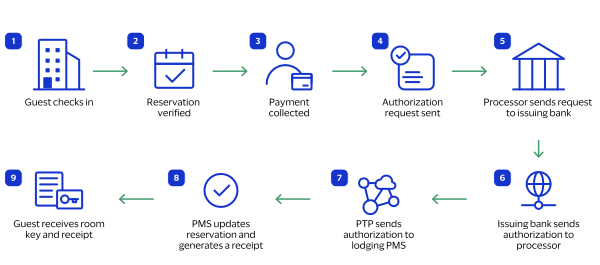
The lodging check-in transaction workflow typically includes this sequence of events:
- The guest arrives and presents their identification and reservation information.
- The front desk staff verifies the guest's reservation.
- The front desk staff collects the guest's payment card.
- The front desk staff inserts, swipes, or taps the guest's payment card or enters the payment information manually into their payment system. The authorization request sent to the processor includes the lodging fields.
- The processor sends an authorization request to the issuing bank.
- The issuing bank approves the transaction and sends an authorization response to the processor.
- The payment technology provider (PTP) sends the authorization response to the lodging's property management system (PMS).
- The PMS updates the guest's reservation with the payment information and generates a receipt.
- The front desk staff gives the guest a room key and receipt.
Incremental Authorization Scenario
An incremental transaction is an additional authorization that increases the original
amount of a transaction. The final authorized total combines the amounts from the
initial and the incremental authorizations.
This type of authorization is used to increase the total payment amount when the initial
authorization is insufficient to cover the total cost of lodging and associated
services.
Lodging transactions comprise these types of incremental authorizations:
- Initial authorization: Upon reservation or check-in, the guest's payment card is pre-authorized for an estimated amount based on the initial reservation details and potential additional charges. The lodging staff obtains explicit consent from the guest to process the incremental authorizations when charges exceed the initial authorization.
- Additional charges: As the guest's stay progresses and additional charges are incurred, such as dining, spa treatments, or minibar consumption, the initial pre-authorization might become insufficient to cover the total amount due for payment. To ensure adequate coverage for the guest's expenses, the lodging staff initiates an incremental authorization request for an additional amount.
For examples of scenarios in which an incremental authorization could be used, see Check-In Transaction Scenario and Check-Out Transaction Scenario.
Check-Out Transaction Scenario
The check-out process begins when the guest indicates that they are checking out of the
lodging.
Figure:
Check-Out Transaction Workflow
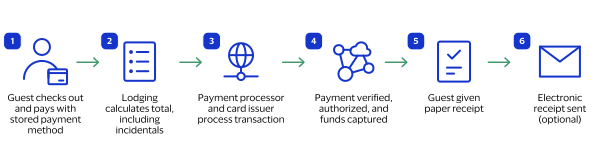
The lodging check-out transaction workflow typically includes this sequence of events:
- The guest confirms they want to pay their bill using the stored payment method.
- The lodging's system calculates the total amount due, including any remaining balance on the incremental authorization.
- The lodging's payment system processes the transaction, communicating with the payment processor and the card issuer.
- The lodging's payment system verifies the payment information, authorizes the transaction, and captures the funds.
- The front desk staff gives the guest a paper receipt, which includes charges and payment information.
- The lodging sends an electronic receipt or sends an email copy of the receipt to the guest (optional).
No-Show Transaction Scenario
A no-show occurs when a guest makes a reservation but does not check in or cancel the
reservation. No-show transactions are determined by the lodging's disclosed and
agreed-upon cancellation policy.
A lodging business can handle no-shows in several ways, including these options:
- Charging a no-show fee: This fee is charged to the guest's credit card if they do not cancel their reservation within a certain amount of time. The amount of the fee is typically based on the room rate and the length of the stay.
- Requiring a deposit: This is a payment that the guest is required to make upfront in order to secure their reservation. The deposit is typically refunded if the guest cancels their reservation by a certain date.
Figure:
No-Show Transaction Workflow
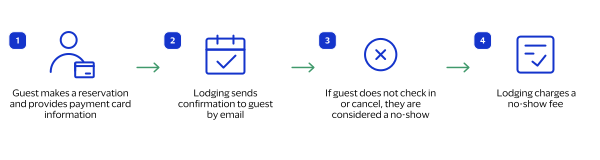
The no-show transaction workflow typically includes this sequence of events:
- The guest makes a reservation online, by phone, or in person. At the time of booking, the guest provides their credit card information.
- The lodging staff sends the guest a confirmation email or text message with the details of the reservation. The guest confirms their reservation by replying to the email or text message.
- The guest does not check in or cancel their reservation by the time their reservation is scheduled to start, which is considered a no-show.
- The lodging charges the guest a no-show fee using the same payment method the guest used to make the reservation. The amount of the fee is based on the lodging's no-show policy.
Lodging Payment Services
Use this information to process lodging transactions.
Lodging EMV and Card Data
You can request these payment services for lodging with EMV and card data:
- Authorization: standard and incremental
- Capture
- Stand-alone credit
This table shows the requirement for EMV tags using these categories:
- M: mandatory
- P: prohibited
- O: optional
- C: conditional (send tag when it is present in card and terminal)
Data Element | EMV Tag | Mastercard | Visa |
|---|---|---|---|
Transaction Date | 9A | M | M |
Transaction Type | 9C | M | M |
Transaction Currency Code | 5F2A | M | M |
Terminal Country Code | 9F1A | M | M |
Amount Authorized | 9F02 | M | M |
Amount Other | 9F03 | M | M |
Application PAN Sequence Number | 5F34 | C | O |
Application Transaction Counter (ATC) | 9F36 | M | M |
Application Interchange Profile (AIP) | 82 | M | M |
Dedicated File (DF) Name | 84 | M | M |
Terminal Verification Results (TVR) | 95 | M | M |
Issuer Application Data | 9F10 | M | M |
Application Cryptogram | 9F26 | M | M |
Cryptogram Information Data (CID) | 9F27 | M | O |
Terminal Capabilities | 9F33 | M | M |
Cardholder Verification Method (CVM) Results | 9F34 | M | O |
Unpredictable Number (UN) | 9F37 | M | M |
Form Factor Indicator | 9F6E | O (Authorization) P (Refund) | C |
Lodging Transaction Descriptions
Use the lodging transaction descriptions listed in the tables to help you identify types
of request messages for production transactions in the
Business Center
and in
your transaction reports. Include the
clientReferenceInformation.comments
field with a transaction
description value when you submit a request. IMPORTANT
After you add this enhancement to your transaction requests, test the field before
deploying it to production. This change does not affect your Level 3 or MLV status
if you make no other changes.
If you want
Visa Acceptance Solutions
to review your test environment result after you
add the comments
field, contact customer support.Service | Card Present (CP) or Card Not Present (CNP) | Comments Field Value | Description |
|---|---|---|---|
Authorization | CNP | Checkin Auth CNP | Authorization when the guest makes the reservation online or by
phone. |
Sale | CNP | Checkin Sale CNP | Sale when the guest pays for the whole stay when they make the
reservation online or by phone. |
Authorization | CP | Checkin Auth CP | Authorization when the guest reserves their stay at check in. |
Sale | CP | Checkin Sale CP | Sale when the guest pays for their stay and services at check
in. |
Service | Card Present (CP) or Card Not Present (CNP) | Comments Field Value | Description |
|---|---|---|---|
Incremental Authorization | CP | Incremental Auth CP | Incremental authorization in person. |
Incremental Authorization | CNP | Incremental Auth CNP | Incremental authorization using a token. |
Service | Card Present (CP) or Card Not Present (CNP) | Comments Field Value | Description |
|---|---|---|---|
Capture | CP | Checkout Capture CP | Capture when the guest is checking out. |
Sale | CP | Checkout Sale CP | Sale when the guest already paid for their stay and needs to pay for
additional services. |
Void | CP | Checkout Void CP | Void the capture when the guest uses a different form of payment,
such as cash. A transaction can be voided only when the capture request
has not already been submitted to your processor. |
* There are no card-not-present transactions
during the check-out procedure. | |||
Service | Card Present (CP) or Card Not Present (CNP) | Comments Field Value | Description |
|---|---|---|---|
Sale | CNP | Noshow Sale CNP | Sale when the guest is a no-show. |
Refund | CNP | Noshow Refund CNP | Refund when the customer already paid for the whole stay. Refund the
amount that is not included the no-show fee. |
Service | Card Present (CP) or Card Not Present (CNP) | Comments Field Value | Description |
|---|---|---|---|
Refund | CNP | Service REFUND CNP | Follow-on refund for a previous capture or sale. |
Credit | CNP | Service CREDIT CNP | Stand-alone credit. |
Refund | CP | Service REFUND CP | Follow-on refund for a previous capture or sale. |
Credit | CP | Service CREDIT CP | Stand-alone credit. |
Service | Card Present (CP) or Card Not Present (CNP) | Comments Field Value | Description |
|---|---|---|---|
Reversal | CNP | Error REVERSAL Timeout CNP | Reversal for a previous authorization that timed out. |
Void | CNP | Error VOID Timeout CNP | Void for a previous capture or credit that timed out. |
Void | CNP | Error VOID Payment CNP | Void for a previous payment that completed and had to be voided
within the same day. |
Void | CNP | Error VOID Capture CNP | Void for a previous capture that completed and had to be voided
within the same day. |
Reversal | CP | Error REVERSAL Timeout CP | Reversal for a previous authorization that timed out. |
Void | CP | Error VOID Timeout CP | Void for a previous capture or credit that timed out. |
Void | CP | Error VOID Payment CP | Void for a previous payment that completed and had to be voided
within the same day. |
Void | CP | Error VOID Capture CP | Void for a previous capture that completed and had to be voided
within the same day. |
Void | CNP | Error VOID Refund | Void for a previous refund that completed and had to be voided within
the same day. |
Void | CNP | Error VOID Credit | Void for a previous credit that completed and had to be voided within
the same day. |
Lodging Data Fields
This is a list of the required data fields for lodging transactions. To view required fields by
transaction type, see the
Required Fields
section for the specific payment
service in this section.- processingInformation.industryDataType
- Set the value tolodging.
- travelInformation.agency.code
- travelInformation.agency.name
- travelInformation.duration
- travelInformation.lodging.additionalDiscountAmount
- travelInformation.lodging.adjustmentAmount
- travelInformation.lodging.audioVisualCost
- travelInformation.lodging.banquetCost
- travelInformation.lodging.businessCenterCost
- travelInformation.lodging.cashDisbursementCost
- travelInformation.lodging.checkInDate
- travelInformation.lodging.checkOutDate
- travelInformation.lodging.conferenceRoomCost
- travelInformation.lodging.corporateClientCode
- travelInformation.lodging.customerServicePhoneNumber
- travelInformation.lodging.earlyCheckOutCost
- travelInformation.lodging.foodAndBeverageCost
- travelInformation.lodging.giftShopCost
- travelInformation.lodging.gratuityAmount
- travelInformation.lodging.guestName
- travelInformation.lodging.healthClubCost
- travelInformation.lodging.internetAccessCost
- travelInformation.lodging.laundryCost
- travelInformation.lodging.loungeBarCost
- travelInformation.lodging.miniBarCost
- travelInformation.lodging.miscellaneousCost
- travelInformation.lodging.movieCost
- travelInformation.lodging.nonRoomCost
- travelInformation.lodging.nonRoomTaxAmount
- travelInformation.lodging.numberOfGuests
- travelInformation.lodging.numberOfRooms
- travelInformation.lodging.phoneCost
- travelInformation.lodging.prepaidCost
- travelInformation.lodging.restaurantCost
- travelInformation.lodging.room.dailyRate
- travelInformation.lodging.room.numberOfNights
- travelInformation.lodging.roomBedType
- travelInformation.lodging.roomLocation
- travelInformation.lodging.roomRateType
- travelInformation.lodging.roomServiceCost
- travelInformation.lodging.roomTaxAmount
- travelInformation.lodging.roomTaxType
- travelInformation.lodging.smokingPreference
- travelInformation.lodging.specialProgramCode
- travelInformation.lodging.totalTaxAmount
- travelInformation.lodging.transportationCost
- travelInformation.lodging.valetParkingCost
Check-In Authorization with Contact EMV and TMS Token
Creation
TMS
Token
CreationUse this information to process an authorization with contact EMV and to create a
Token Management Service
token.Endpoint
Production:
POST
https://api.visaacceptance.com
/pts/v2/paymentsTest:
POST
https://apitest.visaacceptance.com
/pts/v2/paymentsRequired Fields for a Check-In Authorization with Contact EMV and TMS Token Creation
TMS
Token Creation- clientReferenceInformation.code
- clientReferenceInformation.comments
- Set the value toCheckin Auth CP.
- clientReferenceInformation.partner.developerId
- Visa Acceptance Solutionsprovides the value for this field.
- clientReferenceInformation.partner.solutionId
- Visa Acceptance Solutionsprovides the value for this field.
- clientReferenceInformation.partner. thirdPartyCertificationNumber
- clientReferenceInformation.transactionId
- Set this field to a unique value to manage timeout scenarios when a response message is not received.
- orderInformation.amountDetails.currency
- orderInformation.amountDetails.totalAmount
- paymentInformation.card.type
- pointOfSaleInformation.emv.cardSequenceNumber
- Set the value to01.
- pointOfSaleInformation.emv.tags
- pointOfSaleInformation.entryMode
- Set the value tocontact.
- pointOfSaleInformation.terminalCapability
- Set the value to4.
- pointOfSaleInformation.terminalId
- This field is required if it is within project scope. Merchant configuration is required in order to support multiple terminal IDs. Otherwise,Visa Acceptance Solutionsuses the default terminal ID in the merchant configuration.
- pointOfSaleInformation.trackData
- processingInformation.actionList
- Set the value toTOKEN_CREATE.
- processingInformation.actionTokenTypes
- Set the field to one of these values:
- customer
- instrumentIdentifier
- paymentInstrument
- processingInformation.commerceIndicator
- Set the value toretail.
- processingInformation.industryDataType
- Set the value tolodging.
- processingInformation.reconciliationId
- Set the value to the room or folio number.
- travelInformation.duration
REST Example: Check-In Authorization with Contact EMV and TMS
Token Creation
TMS
Token CreationThis example shows you how to authorize a payment at check in with contact EMV while
creating customer, payment instrument, and instrument identifier tokens.
Request
{
    "clientReferenceInformation": {
        "code": "TestCode123",
        "comments": "Checkin Auth CP",
        "_comment": "Include the transactionId - A unique value used to manage timeout scenarios when response message is not received.",
        "partner": {
            "thirdPartyCertificationNumber": "123456789012",
            "developerId": "AssignedDevID",
            "solutionId": "AssignedSolutionID"
        }
    },
    "processingInformation": {
        "actionList": [
            "TOKEN_CREATE"
        ],
        "actionTokenTypes": [
            "instrumentIdentifier",
            "paymentInstrument",
            "customer"
        ],
        "commerceIndicator": "retail",
        "capture": false,
        "industryDataType": "lodging",
        "_comment": "reconciliationId field - Please pass ROOM/folio Number for Lodging",
        "reconciliationId": "214"
    },
    "travelInformation": {
        "duration": "2"
    },
    "pointOfSaleInformation": {
        "_comment": "terminalId field required if in project scope.  Merchant configuration required to support multiple TID.  Otherwise, default TID in merchant configuration used",
        "terminalId": "12345678",
        "emv": {
            "cardSequenceNumber": "01",
            "tags": "9A032203289C01005F2A0206049F1A0206049F02060000000202009F03060000000000005F3401019F36020002820200208407A0000000031010950500000000009F10201F220100A00000000000000000000000000000000000000000000000000000009F2608CE9652E31FCB34C79F2701809F33036068C89F34030200009F3704548FF8CF9F6E0420700000"
        },
        "trackData": ";4761731xxxx00027=241220119058254?",
        "entryMode": "contact",
        "terminalCapability": "4"
    },
    "paymentInformation": {
        "card": {
            "type": "001"
        }
    },
    "orderInformation": {
        "amountDetails": {
            "totalAmount": "500.00",
            "currency": "USD"
        }
    }
}
Response to a Successful Request
{
    "_links": {
        "authReversal": {
            "method": "POST",
            "href": "/pts/v2/payments/7334466205036952804953/reversals"
        },
        "self": {
            "method": "GET",
            "href": "/pts/v2/payments/7334466205036952804953"
        },
        "capture": {
            "method": "POST",
            "href": "/pts/v2/payments/7334466205036952804953/captures"
        }
    },
    "clientReferenceInformation": {
        "code": "TestCode123",
        "comments": "Checkin Auth CP",
        "partner": {
            "developerId": "AssignedDevID",
            "solutionId": "AssignedSolutionID"
        }
    },
    "id": "7334466205036952804953",
    "orderInformation": {
        "amountDetails": {
            "authorizedAmount": "500.00",
            "currency": "USD"
        }
    },
    "paymentAccountInformation": {
        "card": {
            "type": "001"
        }
    },
    "paymentInformation": {
        "accountFeatures": {
            "category": "A",
            "group": "0"
        },
        "tokenizedCard": {
            "type": "001"
        },
        "card": {
            "type": "001"
        }
    },
    "pointOfSaleInformation": {
        "emv": {
            "tags": "9F360200029108970A2A7200860000"
        }
    },
    "processorInformation": {
        "systemTraceAuditNumber": "023821",
        "paymentAccountReferenceNumber": "V0010013019319455709071563112",
        "approvalCode": "034508",
        "networkTransactionId": "304341034201726",
        "settlementDate": "4346",
        "retrievalReferenceNumber": "434000023821",
        "transactionId": "304341034201726",
        "responseCode": "00",
        "avs": {
            "code": "2"
        }
    },
    "reconciliationId": "214",
    "status": "AUTHORIZED",
    "submitTimeUtc": "2025-12-06T00:57:00Z",
    "tokenInformation": {
        "instrumentidentifierNew": false,
        "instrumentIdentifier": {
            "state": "ACTIVE",
            "id": "7034970000031910027"
        },
        "paymentInstrument": {
            "id": "28906F4B4175D130E063AF598E0A1E0C"
        },
        "customer": {
            "id": "28907456CBDCCBBFE063AF598E0A8A5F"
        }
    }
}
Check-In Authorization with Contact EMV PIN Debit
Use this information to process a check-in authorization when a guest checks in with a contact
EMV PIN debit payment card. Request a PIN debit purchase with contact EMV.
Endpoint
Production:
POST
https://api.visaacceptance.com
/pts/v2/paymentsTest:
POST
https://apitest.visaacceptance.com
/pts/v2/paymentsRequired Fields for a Check-In Authorization with Contact EMV PIN Debit
- clientReferenceInformation.code
- clientReferenceInformation.comments
- clientReferenceInformation.partner.developerId
- Visa Acceptance Solutionsprovides the value for this field.
- clientReferenceInformation.partner.solutionId
- Visa Acceptance Solutionsprovides the value for this field.
- clientReferenceInformation.partner.thirdPartyCertificationNumber
- Visa Acceptance Solutionsprovides the value for this field.
- clientReferenceInformation.transactionId
- orderInformation.amountDetails.currency
- orderInformation.amountDetails.totalAmount
- paymentInformation.paymentType.name
- Set this field toCARD.
- paymentInformation.paymentType.subTypeName
- Set this field toDEBIT.
- pointOfSaleInformation.deviceId
- pointOfSaleInformation.emv.cardSequenceNumber
- Required only when the card has a sequence number configured on the EMV chip.
- pointOfSaleInformation.emv.tags
- pointOfSaleInformation.encryptedKeySerialNumber
- pointOfSaleInformation.encryptedPin
- pointOfSaleInformation.entryMode
- Set this field tocontact.
- pointOfSaleInformation.pinBlockEncodingFormat
- Set this field to1.
- pointOfSaleInformation.terminalCapability
- pointOfSaleInformation.terminalID
- pointOfSaleInformation.terminalPinCapability
- pointOfSaleInformation.trackData
- processingInformation.commerceIndicator
- Set the value toretail.
- processingInformation.networkRoutingOrder
- travelInformation.duration
REST Example: Check-In Authorization with Contact EMV PIN
Debit
This example shows you how to authorize a payment at check in with contact EMV while
creating customer, payment instrument, and shipping address tokens. The example
includes optional lodging fields.
Request
{
    "clientReferenceInformation": {
        "comments": "Checkin Auth CP",
        "code": "9876543219",
        "transactionId": "tid9876",
        "partner": {
            "developerId": "developer9876",
            "solutionId": "solution9876"
        }
    },
    "processingInformation": {
        "commerceIndicator": "retail",
        "industryDataType": "lodging",
        "networkRoutingOrder": "7MF8VGEH"
    },
    "paymentInformation": {
        "paymentType": {
            "name": "CARD",
            "subTypeName": "DEBIT"
        }
    },
    "orderInformation": {
        "amountDetails": {
            "totalAmount": "150",
            "currency": "USD"
        }
    },
    "travelInformation": {
        "duration": "11",
        "lodging": {
            "room": [
                {
                    "dailyRate": "120.00",
                    "numberOfNights": 1
                }
            ],
            "roomTaxType": "3.00",
            "totalTaxAmount": "5.00",
            "prepaidCost": "5.00",
            "foodAndBeverageCost": "15.00",
            "cashDisbursementCost": "2.00"
        }
    },
    "pointOfSaleInformation": {
        "terminalId": "12345678",
        "entryMode": "contact",
        "terminalCapability": 4,
        "terminalPinCapability": 12,
        "emv": {
            "tags": "5F3401019F3303E0F8C8950580800480009F370465B81A3A9F100706011203A0A0009F2608E9D097D1901E8AB99F36020002820218009C01009F1A0208409A031808169F02060000000007005F2A0208409F0306000000000000DF78083831393931303236DF791B322D30323436362D312D31432D5246492D303331332D342E332E62",
            "cardSequenceNumber": "01"
        },
        "trackData": ";476173XXXXXXXXXX=251220111478549?",
        "deviceId": "",
        "pinBlockEncodingFormat": 0,
        "encryptedPin": "F509429A3C3FD201",
        "encryptedKeySerialNumber": "FFFF1B1D140000200001"
    },
    "merchantInformation": {
        "categoryCode": 7011
    }
}
Response to a Successful Request
{
    "_links": {
        "void": {
            "method": "POST",
            "href": "/pts/v2/payments/7231221422946408604951/voids"
        },
        "self": {
            "method": "GET",
            "href": "/pts/v2/payments/7231221422946408604951"
        }
    },
    "clientReferenceInformation": {
        "code": "Lodging_Ben_ct_AddFields"
    },
    "id": "7231221422946408604951",
    "orderInformation": {
        "amountDetails": {
            "authorizedAmount": "150.00",
            "currency": "usd"
        }
    },
    "pointOfSaleInformation": {
        "emv": {
            "tags": "9F36020002910816D717A200860000"
        }
    },
    "processingInformation": {
        "reconciliationId": "7231221422946408604951"
    },
    "processorInformation": {
        "systemTraceAuditNumber": "017809",
        "routing": {
            "network": "0002"
        },
        "approvalCode": "059782",
        "retrievalReferenceNumber": "123456017809",
        "transactionId": "304221469420503",
        "responseCode": "00"
    },
    "reconciliationId": "7231221422946408604951",
    "status": "AUTHORIZED",
    "submitTimeUtc": "2025-08-08T13:02:22Z"
}
Incremental Authorization
Use this information to process a lodging incremental authorization. You can add
products and services to an existing authorization by using an incremental
authorization.
The incremental authorization service has these limitations:
- Maximum of 100 incremental authorizations per transaction, in addition to the initial authorization.
- Interchange optimization is not supported.
Endpoint
Production:
PATCH
https://api.visaacceptance.com
/pts/v2/payments/{id}
Test:
PATCH
https://apitest.visaacceptance.com
/pts/v2/payments/{id}
The is the transaction ID returned in the
original authorization response.
{id}
Incremental Authorization Service Scenario
This sequence is an example of how an incremental authorization can be used:
- The customer reserves a room for two nights at a cost of 200.00 per night. You request an authorization for 400.00. This initial authorization request is approved.
- The customer orders dinner through room service the first night. You request an incremental authorization of 50.00 for the dinner.
- The customer decides to stay an extra night. You request an incremental authorization of 200.00 for the additional night.
- The customer uses items from the mini-bar. The cost of these mini-bar items is 50.00. You request an incremental authorization of 50.00.
- When the customer ends their stay and checks out, they sign a receipt for 700.00, which is the total of all costs incurred.
- You request a capture for 700.00.
Required Fields for an Incremental Authorization
- clientReferenceInformation.code
- clientReferenceInformation.comments
- Set the value toIncremental Auth CP.
- clientReferenceInformation.partner.developerId
- Visa Acceptance Solutionsprovides the value for this field.
- clientReferenceInformation.partner.solutionId
- Visa Acceptance Solutionsprovides the value for this field.
- clientReferenceInformation.partner.thirdPartyCertificationNumber
- Visa Acceptance Solutionsprovides the value for this field.
- orderInformation.amountDetails.currency
- orderInformation.amountDetails.totalAmount
- processingInformation.authorizationOptions.initiator.storedCredentialUsed
- Set the value totrue.
- processingInformation.authorizationOptions.initiator.type
- Set the value tomerchant.
REST Example: Incremental Authorization
Request
{
    "clientReferenceInformation": {
        "code": "TestCode123",
        "comments": "Incremental Auth CP",
        "partner": {
            "thirdPartyCertificationNumber": "123456789012",
            "developerId": "AssignedDevID",
            "solutionId": "AssignedSolutionID"
        }
    },
    "processingInformation": {
        "authorizationOptions": {
            "initiator": {
                "type": "merchant",
                "storedCredentialUsed": "true"
            }
        }
    },
    "orderInformation": {
        "amountDetails": {
            "totalAmount": "100.00",
            "currency": "USD"
        }
    }
}
Response to a Successful Request
{
    "_links": {
        "authReversal": {
            "method": "POST",
            "href": "/pts/v2/payments/7334466205036952804953/reversals"
        },
        "self": {
            "method": "GET",
            "href": "/pts/v2/payments/7334466205036952804953"
        },
        "capture": {
            "method": "POST",
            "href": "/pts/v2/payments/7334466205036952804953/captures"
        }
    },
    "clientReferenceInformation": {
        "comments": "Incremental Auth CP",
        "code": "TestCode123",
        "partner": {
            "developerId": "AssignedDevID",
            "solutionId": "AssignedSolutionID"
        }
    },
    "id": "7334466205036952804953",
    "orderInformation": {
        "amountDetails": {
            "totalAmount": "600.00",
            "authorizedAmount": "100.00",
            "currency": "USD"
        }
    },
    "paymentInformation": {
        "accountFeatures": {
            "category": "A"
        }
    },
    "processorInformation": {
        "systemTraceAuditNumber": "023821",
        "approvalCode": "012921",
        "transactionId": "304341034201726",
        "responseCode": "00"
    },
    "reconciliationId": "214",
    "status": "AUTHORIZED",
    "submitTimeUtc": "2025-12-06T00:58:10Z"
}
Check-Out Capture
Use this information to process a check-out capture.
Endpoint
Production:
POST
https://api.visaacceptance.com
/pts/v2/payments/{id}
/capturesTest:
POST
https://apitest.visaacceptance.com
/pts/v2/payments/{id}
/capturesThe is the transaction ID
returned in the authorization response.
{id}
Required Fields for a Check-Out Capture
- clientReferenceInformation.code
- clientReferenceInformation.comments
- Set the value toCheckout Capture CP.
- clientReferenceInformation.partner.developerId
- Visa Acceptance Solutionsprovides the value for this field.
- clientReferenceInformation.partner.solutionId
- Visa Acceptance Solutionsprovides the value for this field.
- clientReferenceInformation.partner.thirdPartyCertificationNumber
- Visa Acceptance Solutionsprovides the value for this field.
- orderInformation.amountDetails.currency
- orderInformation.amountDetails.totalAmount
- pointOfSaleInformation.emv.cardSequenceNumber
- Set this value to01.
- pointOfSaleInformation.emv.tags
- processingInformation.industryDataType
- Set the value tolodging.
- travelInformation.lodging.checkInDate
- travelInformation.lodging.checkOutDate
- travelInformation.lodging.specialProgramCode
- Set this value to1.
REST Example: Check-Out Capture
Request
{
    "clientReferenceInformation": {
        "code": "TestCode123",
        "comments": "Checkout Capture CP",
        "partner": {
            "thirdPartyCertificationNumber": "123456789012",
            "developerId": "AssignedDevID",
            "solutionId": "AssignedSolutionID"
        }
    },
    "orderInformation": {
        "amountDetails": {
            "totalAmount": "600.00",
            "currency": "USD"
        }
    },
    "processingInformation": {
        "industryDataType": "lodging"
    },
    "travelInformation": {
        "lodging": {
            "checkInDate": "052124",
            "checkOutDate": "052224",
            "specialProgramCode": "1"
        }
    },
    "pointOfSaleInformation": {

        "emv": {
            "cardSequenceNumber": "01",
            "tags": "9A032203289C01005F2A0206049F1A0206049F02060000000202009F03060000000000005F3401019F36020002820200208407A0000000031010950500000000009F10201F220100A00000000000000000000000000000000000000000000000000000009F2608CE9652E31FCB34C79F2701809F33036068C89F34030200009F3704548FF8CF9F6E0420700000"
        }
    }
}
Response to a Successful Request
{
    "_links": {
        "void": {
            "method": "POST",
            "href": "/pts/v2/captures/7334467613636968504953/voids"
        },
        "self": {
            "method": "GET",
            "href": "/pts/v2/captures/7334467613636968504953"
        }
    },
    "clientReferenceInformation": {
        "comments": "Checkout Capture CP",
        "code": "TestCode123",
        "partner": {
            "developerId": "AssignedDevID",
            "solutionId": "AssignedSolutionID"
        }
    },
    "id": "7334467613636968504953",
    "orderInformation": {
        "amountDetails": {
            "totalAmount": "600.00",
            "currency": "USD"
        }
    },
    "reconciliationId": "214",
    "status": "PENDING",
    "submitTimeUtc": "2025-12-06T00:59:21Z"
}
No-Show Sale Using a Stored Credential
Use this information to request a no-show sale when the customer does not use or cancel the
reservation. In this scenario, use the stored credential (token) to charge the customer
an agreed-upon fee, as stated in your lodging's disclosed no-show and cancellation
policies.
Endpoint
Production:
POST
https://api.visaacceptance.com
/pts/v2/paymentsTest:
POST
https://apitest.visaacceptance.com
/pts/v2/paymentsRequired Fields for a No-Show Sale Using a Stored Credential
- clientReferenceInformation.code
- clientReferenceInformation.comments
- Set the value toNoshow Sale CP.
- clientReferenceInformation.partner.developerId
- Visa Acceptance Solutionsprovides the value for this field.
- clientReferenceInformation.partner.solutionId
- Visa Acceptance Solutionsprovides the value for this field.
- clientReferenceInformation.partner.thirdPartyCertificationNumber
- Visa Acceptance Solutionsprovides the value for this field.
- clientReferenceInformation.transactionId
- Set this field to a unique value to manage timeout scenarios when a response message is not received.
- orderInformation.amountDetails.currency
- orderInformation.amountDetails.totalAmount
- orderInformation.billTo.address1
- orderInformation.billTo.administrativeArea
- orderInformation.billTo.country
- orderInformation.billTo.email
- orderInformation.billTo.firstName
- orderInformation.billTo.lastName
- orderInformation.billTo.locality
- orderInformation.billTo.postalCode
- paymentInformation.card.expirationMonth
- paymentInformation.card.expirationYear
- paymentInformation.card.number
- paymentInformation.card.type
- processingInformation.authorizationOptions.ignoreAvsResult
- Set the value totrue.
- processingInformation.authorizationOptions.ignoreCvResult
- Set the value totrue.
- processingInformation.authorizationOptions.initiator. merchantInitiatedTransaction.originalAuthorizedAmount
- processingInformation.authorizationOptions.initiator. merchantInitiatedTransaction. previousTransactionId
- processingInformation. authorizationOptions. initiator. merchantInitiatedTransaction. reason
- Set the value to4.
- processingInformation.authorizationOptions.initiator.storedCredentialUsed
- Set the value totrue.
- processingInformation.authorizationOptions. initiator.type
- Set the value tomerchant.
- processingInformation.capture
- Set the value totrue.
- processingInformation.commerceIndicator
- Set the value tointernet.
- processingInformation.industryDataType
- Set the value tolodging.
- travelInformation.lodging.specialProgramCode
- Set this value to2.
REST Example: No-Show Sale Using a Stored
Credential
This example shows you how to request a sale payment for a no-show transaction. The
example includes optional lodging fields.
Request
{
    "clientReferenceInformation": {
        "code": "TestCode123",
        "comments": "Noshow Sale CP",
        "_comment": "Include the transactionId - A unique value used to manage timeout scenarios when response message is not received.",
        "partner": {
            "thirdPartyCertificationNumber": "123456789012",
            "developerId": "AssignedDevID",
            "solutionId": "AssignedSolutionID"
        }
    },
    "processingInformation": {
        "capture": "true",
        "commerceIndicator": "internet",
        "authorizationOptions": {
            "ignoreAvsResult": "true",
            "ignoreCvResult": "true",
            "initiator": {
                "type": "merchant",
                "storedCredentialUsed": "true",
                "merchantInitiatedTransaction": {
                    "reason": "4",
                    "_comment": "previousTransactionId field - value from original authorization response message",
                    "previousTransactionId": "304332675422846",
                    "originalAuthorizedAmount": "488.00"
                }
            }
        },
        "industryDataType": "lodging"
    },
    "travelInformation": {
        "lodging": {
            "specialProgramCode": "2"
        }
    },
    "orderInformation": {
        "billTo": {
            "country": "US",
            "lastName": "Smith",
            "address1": "1295 Main Rd",
            "postalCode": "94043",
            "locality": "Mountain View",
            "administrativeArea": "CA",
            "firstName": "Jane",
            "email": "[email protected]"
        },
        "amountDetails": {
            "totalAmount": "500.00",
            "currency": "USD"
        }
    },
    "paymentInformation": {
        "card": {
            "expirationYear": "2031",
            "number": "400552XXXXXXXXXX",
            "securityCode": "424",
            "expirationMonth": "12",
            "type": "001"
        }
    }
}
Response to a Successful Request
{
    "_links": {
        "void": {
            "method": "POST",
            "href": "/pts/v2/payments/7334468105946974604953/voids"
        },
        "self": {
            "method": "GET",
            "href": "/pts/v2/payments/7334468105946974604953"
        }
    },
    "clientReferenceInformation": {
        "code": "TestCode123",
        "comments": "Noshow Sale CP",
        "partner": {
            "developerId": "AssignedDevID",
            "solutionId": "AssignedSolutionID"
        }
    },
    "id": "7334468105946974604953",
    "orderInformation": {
        "amountDetails": {
            "totalAmount": "500.00",
            "authorizedAmount": "500.00",
            "currency": "USD"
        }
    },
    "paymentAccountInformation": {
        "card": {
            "type": "001"
        }
    },
    "paymentInformation": {
        "accountFeatures": {
            "category": "B",
            "group": "0"
        },
        "tokenizedCard": {
            "type": "001"
        },
        "card": {
            "type": "001"
        }
    },
    "processorInformation": {
        "systemTraceAuditNumber": "023826",
        "paymentAccountReferenceNumber": "V0010013019053587486979965591",
        "approvalCode": "054511",
        "cardVerification": {
            "resultCodeRaw": "M",
            "resultCode": "M"
        },
        "networkTransactionId": "304341036102578",
        "settlementDate": "4346",
        "retrievalReferenceNumber": "434001023826",
        "transactionId": "304341036102578",
        "responseCode": "00",
        "avs": {
            "code": "U",
            "codeRaw": "U"
        }
    },
    "reconciliationId": "7334468105946974604953",
    "status": "AUTHORIZED",
    "submitTimeUtc": "2025-12-06T01:00:10Z"
}