On This Page
Click to Pay Customer Authentication
Click to Pay
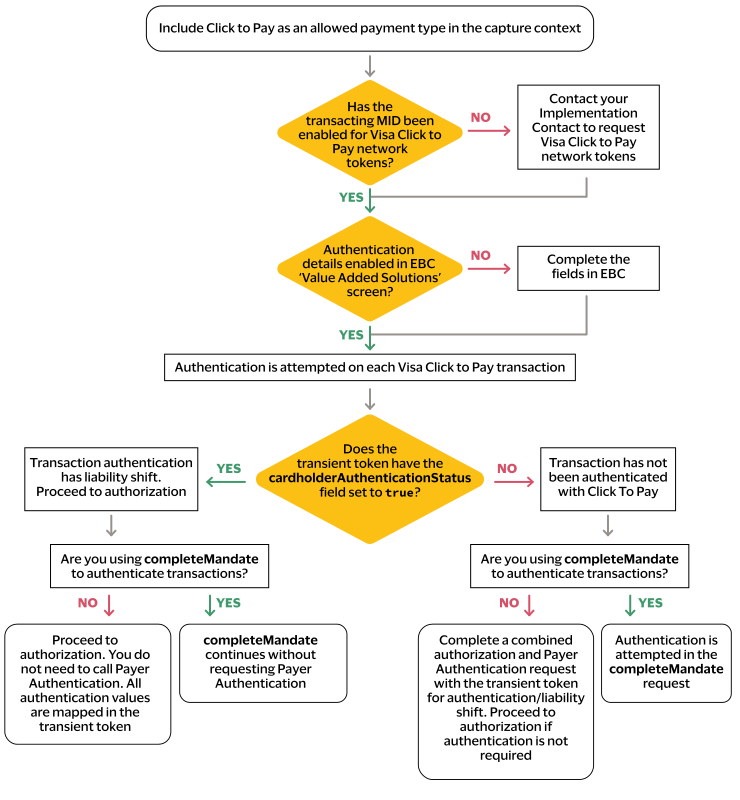
Customer AuthenticationWhen you enable customer authentication through
Click to Pay
, you give
Barclays
permission to send Visa the required authentication
information for each transaction. When the customer completes a transaction using a Visa
card that is already stored in Click to Pay
, authentication is managed
with Click to Pay
. When the customer checks out using manual card entry
and does not save their card to Click to Pay
, the transaction is not
processed through Click to Pay
and you must complete authentication based
on your existing authentication method.Click to Pay
authentication is only available for Visa branded cards that
are tokenized with Click to Pay
. If Click to Pay
does not
authenticate the transaction, but you are using the complete mandate with the
consumerAuthentication
field set to true
,
authentication is attempted as part of this request. When you do not use the complete
mandate, you must check the result of the
cardholderAuthenticationStatus
field in the transient token and
reqeust Payer Authentication
directly when it is required. IMPORTANT
American Express and Mastercard card brands cannot be
authenticated through
Click to Pay
customer authentication.Visa Prerequisites
Before you can begin customer authentication using
Click to Pay
, you
must meet these requirements:- TheallowPaymentTypesfield must includeCLICKTOPAYin the capture context.For more information, see Capture Context.
- The transacting merchant ID that sends the transaction requests must be configured for tokenization withClick to Pay. You must contact your implementation consultant or technical account manager to configure tokenization withClick to Pay.
- Set up Visa customer authentication in theSmartpay Fuse Portal. For information, see Set Up Customer Authentication for Visa Click to Pay.
Authentication Flow